


The Ultimate Personal & Home Network Hardening Checklist: 10 Actionable Steps to Secure Your Digital Footprint
Securing your digital environment requires a defense-in-depth approach. Whether you are a cybersecurity student setting up a home lab or a professional safeguarding personal data, run your infrastructure through this battle-tested checklist:
Phase 1: Network & Router Security
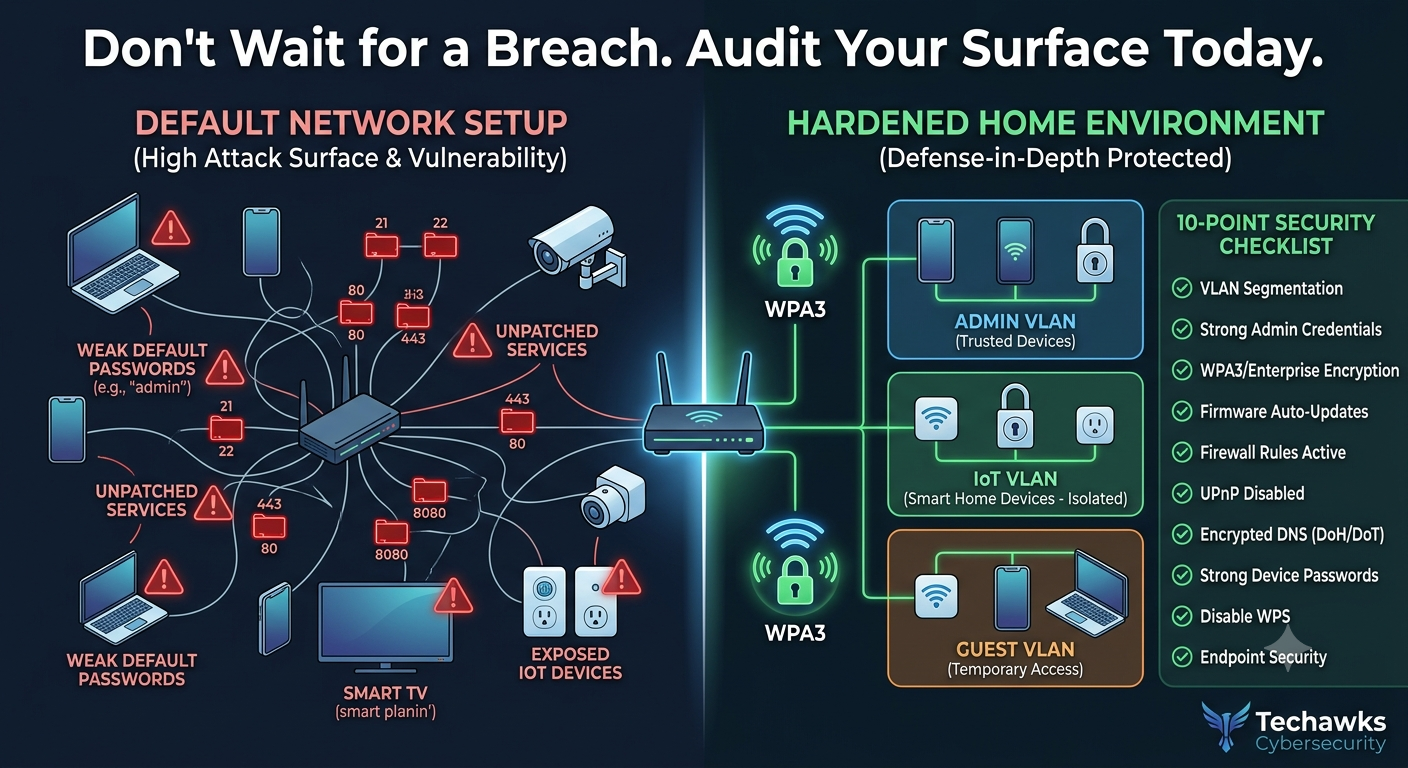
1. Change Default Router Admin Credentials: Replace factory default usernames (admin) and passwords on your home router to block automated brute-force attacks across local gateway IPs.
2. Upgrade Wi-Fi Encryption to WPA3 / WPA2-Enterprise: Ensure your wireless access point uses at least WPA2-AES (CCMP) or WPA3. Disable obsolete WEP and original WPA standards, as well as WPS (Wi-Fi Protected Setup).
3. Isolate IoT Devices on a Separate VLAN/Guest Network: Segment smart TVs, security cameras, and IoT devices onto a dedicated guest network or VLAN to prevent compromised devices from reaching personal laptops and storage servers.
4. Disable Remote Router Management & UPnP: Turn off Universal Plug and Play (UPnP) and disable WAN-side router management interfaces to block unsolicited inbound connections from the public internet.
Phase 2: Endpoint & Account Hardening
5. Implement Phishing-Resistant MFA: Enforce Multi-Factor Authentication across all critical accounts (email, cloud storage, banking), prioritizing security keys (FIDO2/YubiKey) or app-based authenticator codes over SMS/text messages.
6. Enforce Full Disk Encryption (FDE): Enable BitLocker (Windows) or FileVault (macOS) on all laptops and removable drives to protect data at rest in the event of device theft or loss.
7. Enable Automated Operating System & Application Patching: Set OS updates, web browsers, and core software tools to auto-update to eliminate known software vulnerabilities (CVEs).
Phase 3: Privacy & Data Integrity
8. Deploy Encrypted DNS (DoH/DoT) & Ad-Blocking: Configure DNS-over-HTTPS (DoH) or DNS-over-TLS (DoT) via privacy-focused DNS providers (e.g., Cloudflare 1.1.1.1 or Quad9) to encrypt lookup queries and filter malicious domains.
9. Adopt a Dedicated Password Manager: Transition off stored browser credentials to a dedicated password manager to generate unique, 16+ character passwords for every service.
10. Automate Off-Site 3-2-1 Backups: Follow the 3-2-1 backup rule (3 copies of critical data, across 2 different media types, with 1 stored securely off-site/cloud) to maintain resilience against ransomware.
Key Takeaways
Network Segmentation Contains Threats: Isolating IoT devices onto separate VLANs stops lateral movement if a smart device is breached.
Credentials Are the Perimeter: Moving from SMS-based MFA to hardware keys or TOTP authenticators removes the biggest vector for credential theft.
Resilience Requires Off-Site Backups: A strong backup strategy ensures quick recovery without relying on decryptors if ransomware strikes.
CTA
How many checks did your home lab or personal network pass today? Join Cybersecurity & Ethical Hacking to share your hardening progress, discuss router configurations, and test network security practices in hands-on labs.
Securing your digital environment requires a defense-in-depth approach. Whether you are a cybersecurity student setting up a home lab or a professional safeguarding personal data, run your infrastructure through this battle-tested checklist:
Phase 1: Network & Router Security
1. Change Default Router Admin Credentials: Replace factory default usernames (admin) and passwords on your home router to block automated brute-force attacks across local gateway IPs.
2. Upgrade Wi-Fi Encryption to WPA3 / WPA2-Enterprise: Ensure your wireless access point uses at least WPA2-AES (CCMP) or WPA3. Disable obsolete WEP and original WPA standards, as well as WPS (Wi-Fi Protected Setup).
3. Isolate IoT Devices on a Separate VLAN/Guest Network: Segment smart TVs, security cameras, and IoT devices onto a dedicated guest network or VLAN to prevent compromised devices from reaching personal laptops and storage servers.
4. Disable Remote Router Management & UPnP: Turn off Universal Plug and Play (UPnP) and disable WAN-side router management interfaces to block unsolicited inbound connections from the public internet.
Phase 2: Endpoint & Account Hardening
5. Implement Phishing-Resistant MFA: Enforce Multi-Factor Authentication across all critical accounts (email, cloud storage, banking), prioritizing security keys (FIDO2/YubiKey) or app-based authenticator codes over SMS/text messages.
6. Enforce Full Disk Encryption (FDE): Enable BitLocker (Windows) or FileVault (macOS) on all laptops and removable drives to protect data at rest in the event of device theft or loss.
7. Enable Automated Operating System & Application Patching: Set OS updates, web browsers, and core software tools to auto-update to eliminate known software vulnerabilities (CVEs).
Phase 3: Privacy & Data Integrity
8. Deploy Encrypted DNS (DoH/DoT) & Ad-Blocking: Configure DNS-over-HTTPS (DoH) or DNS-over-TLS (DoT) via privacy-focused DNS providers (e.g., Cloudflare 1.1.1.1 or Quad9) to encrypt lookup queries and filter malicious domains.
9. Adopt a Dedicated Password Manager: Transition off stored browser credentials to a dedicated password manager to generate unique, 16+ character passwords for every service.
10. Automate Off-Site 3-2-1 Backups: Follow the 3-2-1 backup rule (3 copies of critical data, across 2 different media types, with 1 stored securely off-site/cloud) to maintain resilience against ransomware.
Key Takeaways
Network Segmentation Contains Threats: Isolating IoT devices onto separate VLANs stops lateral movement if a smart device is breached.
Credentials Are the Perimeter: Moving from SMS-based MFA to hardware keys or TOTP authenticators removes the biggest vector for credential theft.
Resilience Requires Off-Site Backups: A strong backup strategy ensures quick recovery without relying on decryptors if ransomware strikes.
CTA
How many checks did your home lab or personal network pass today? Join Cybersecurity & Ethical Hacking to share your hardening progress, discuss router configurations, and test network security practices in hands-on labs.
The Ultimate Personal & Home Network Hardening Checklist: 10 Actionable Steps to Secure Your Digital Footprint
Securing your digital environment requires a defense-in-depth approach. Whether you are a cybersecurity student setting up a home lab or a professional safeguarding personal data, run your infrastructure through this battle-tested checklist:
Phase 1: Network & Router Security
1. Change Default Router Admin Credentials: Replace factory default usernames (admin) and passwords on your home router to block automated brute-force attacks across local gateway IPs.
2. Upgrade Wi-Fi Encryption to WPA3 / WPA2-Enterprise: Ensure your wireless access point uses at least WPA2-AES (CCMP) or WPA3. Disable obsolete WEP and original WPA standards, as well as WPS (Wi-Fi Protected Setup).
3. Isolate IoT Devices on a Separate VLAN/Guest Network: Segment smart TVs, security cameras, and IoT devices onto a dedicated guest network or VLAN to prevent compromised devices from reaching personal laptops and storage servers.
4. Disable Remote Router Management & UPnP: Turn off Universal Plug and Play (UPnP) and disable WAN-side router management interfaces to block unsolicited inbound connections from the public internet.
Phase 2: Endpoint & Account Hardening
5. Implement Phishing-Resistant MFA: Enforce Multi-Factor Authentication across all critical accounts (email, cloud storage, banking), prioritizing security keys (FIDO2/YubiKey) or app-based authenticator codes over SMS/text messages.
6. Enforce Full Disk Encryption (FDE): Enable BitLocker (Windows) or FileVault (macOS) on all laptops and removable drives to protect data at rest in the event of device theft or loss.
7. Enable Automated Operating System & Application Patching: Set OS updates, web browsers, and core software tools to auto-update to eliminate known software vulnerabilities (CVEs).
Phase 3: Privacy & Data Integrity
8. Deploy Encrypted DNS (DoH/DoT) & Ad-Blocking: Configure DNS-over-HTTPS (DoH) or DNS-over-TLS (DoT) via privacy-focused DNS providers (e.g., Cloudflare 1.1.1.1 or Quad9) to encrypt lookup queries and filter malicious domains.
9. Adopt a Dedicated Password Manager: Transition off stored browser credentials to a dedicated password manager to generate unique, 16+ character passwords for every service.
10. Automate Off-Site 3-2-1 Backups: Follow the 3-2-1 backup rule (3 copies of critical data, across 2 different media types, with 1 stored securely off-site/cloud) to maintain resilience against ransomware.
Key Takeaways
Network Segmentation Contains Threats: Isolating IoT devices onto separate VLANs stops lateral movement if a smart device is breached.
Credentials Are the Perimeter: Moving from SMS-based MFA to hardware keys or TOTP authenticators removes the biggest vector for credential theft.
Resilience Requires Off-Site Backups: A strong backup strategy ensures quick recovery without relying on decryptors if ransomware strikes.
CTA
How many checks did your home lab or personal network pass today? Join Cybersecurity & Ethical Hacking to share your hardening progress, discuss router configurations, and test network security practices in hands-on labs.

 English
 Arabic
 French
 Spanish
 Portuguese
 Deutsch
 Turkish
 Dutch
Dutch
 Italiano
 Russian
 Portuguese (Brazil)
 Greek
Greek