


How to Zero-Downtime Deploy on Kubernetes: A Step-by-Step Rolling Update Tutorial
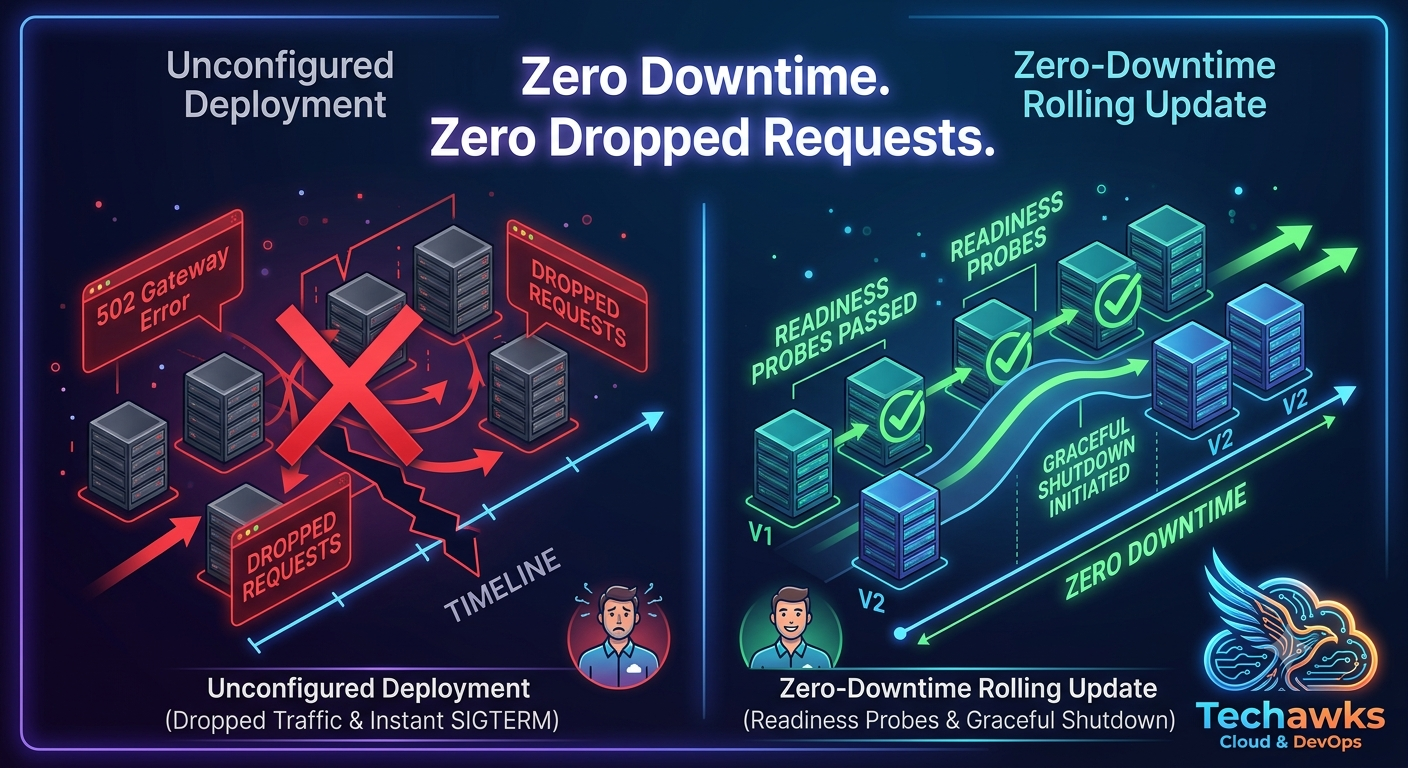
A successful zero-downtime deployment relies on three core mechanics: progressive instance replacement, health probing, and graceful connection termination. Without explicit configurations, Kubernetes might kill old pods before new ones are ready, leading to dropped HTTP requests (502 Bad Gateway).
Follow this 4-step workflow to implement fault-tolerant deployments:
Step 1: Configure Rolling Update Strategy Parameters
Define how many pods Kubernetes can terminate or create simultaneously during an update. In your Deployment manifest, set maxSurge and maxUnavailable:
YAML
spec:
replicas: 4
strategy:
type: RollingUpdate
rollingUpdate:
maxSurge: 25% # Creates 1 new pod before terminating any old ones
maxUnavailable: 0% # Guarantees 100% capacity remains active throughout the rollout
Step 2: Implement Readiness and Liveness Probes
Kubernetes needs to know when a newly spawned pod is actually prepared to accept traffic, not just when its container process starts.
Readiness Probe: Ensures traffic is routed only after application dependencies (database connections, internal caches) are fully initialized.
Liveness Probe: Detects deadlocks and restarts frozen containers.
YAML
spec:
containers:
- name: web-app
image: app:v2.1.0
readinessProbe:
httpGet:
path: /healthz/ready
port: 8080
initialDelaySeconds: 10
periodSeconds: 5
livenessProbe:
httpGet:
path: /healthz/live
port: 8080
initialDelaySeconds: 15
periodSeconds: 10
Step 3: Handle Graceful Shutdown with preStop Hooks
When Kubernetes terminates an old pod, service endpoint updates propagate asynchronously across the cluster network. To prevent dropped connections during this propagation window, delay process termination using a preStop hook:
YAML
lifecycle:
preStop:
exec:
command: ["/bin/sh", "-c", "sleep 15"]
Why this works: The sleep command holds the container process alive while Kubernetes removes the pod IP from load balancer endpoints, ensuring in-flight HTTP requests complete cleanly.
Step 4: Validate the Rollout and Set Auto-Rollback Rules
Execute the update and monitor the rollout status in real time:
Bash
# Apply the updated manifest
kubectl apply -f deployment.yaml
# Monitor rollout progression step-by-step
kubectl rollout status deployment/web-app-deployment
# Undo the deployment immediately if probes fail or errors spike
kubectl rollout undo deployment/web-app-deployment
Key Takeaways
Zero Downtime Requires Probes: Without explicit readinessProbe definitions, Kubernetes assumes a pod is ready immediately upon process start, routing live user traffic to uninitialized apps.
Eliminate Drop-Offs with preStop Hooks: Adding a small sleep delay allows network routing tables to update before the application process receives SIGTERM.
Zero Availability Loss: Setting maxUnavailable: 0% guarantees total operational capacity is preserved throughout the entire deployment cycle.
CTA
Struggling with deployment errors or service mesh traffic routing in production? Join Cloud, DevOps & Open Source to share Kubernetes manifests, troubleshoot cluster setups, and learn container orchestration best practices from field-tested DevOps engineers.
A successful zero-downtime deployment relies on three core mechanics: progressive instance replacement, health probing, and graceful connection termination. Without explicit configurations, Kubernetes might kill old pods before new ones are ready, leading to dropped HTTP requests (502 Bad Gateway).
Follow this 4-step workflow to implement fault-tolerant deployments:
Step 1: Configure Rolling Update Strategy Parameters
Define how many pods Kubernetes can terminate or create simultaneously during an update. In your Deployment manifest, set maxSurge and maxUnavailable:
YAML
spec:
replicas: 4
strategy:
type: RollingUpdate
rollingUpdate:
maxSurge: 25% # Creates 1 new pod before terminating any old ones
maxUnavailable: 0% # Guarantees 100% capacity remains active throughout the rollout
Step 2: Implement Readiness and Liveness Probes
Kubernetes needs to know when a newly spawned pod is actually prepared to accept traffic, not just when its container process starts.
Readiness Probe: Ensures traffic is routed only after application dependencies (database connections, internal caches) are fully initialized.
Liveness Probe: Detects deadlocks and restarts frozen containers.
YAML
spec:
containers:
- name: web-app
image: app:v2.1.0
readinessProbe:
httpGet:
path: /healthz/ready
port: 8080
initialDelaySeconds: 10
periodSeconds: 5
livenessProbe:
httpGet:
path: /healthz/live
port: 8080
initialDelaySeconds: 15
periodSeconds: 10
Step 3: Handle Graceful Shutdown with preStop Hooks
When Kubernetes terminates an old pod, service endpoint updates propagate asynchronously across the cluster network. To prevent dropped connections during this propagation window, delay process termination using a preStop hook:
YAML
lifecycle:
preStop:
exec:
command: ["/bin/sh", "-c", "sleep 15"]
Why this works: The sleep command holds the container process alive while Kubernetes removes the pod IP from load balancer endpoints, ensuring in-flight HTTP requests complete cleanly.
Step 4: Validate the Rollout and Set Auto-Rollback Rules
Execute the update and monitor the rollout status in real time:
Bash
# Apply the updated manifest
kubectl apply -f deployment.yaml
# Monitor rollout progression step-by-step
kubectl rollout status deployment/web-app-deployment
# Undo the deployment immediately if probes fail or errors spike
kubectl rollout undo deployment/web-app-deployment
Key Takeaways
Zero Downtime Requires Probes: Without explicit readinessProbe definitions, Kubernetes assumes a pod is ready immediately upon process start, routing live user traffic to uninitialized apps.
Eliminate Drop-Offs with preStop Hooks: Adding a small sleep delay allows network routing tables to update before the application process receives SIGTERM.
Zero Availability Loss: Setting maxUnavailable: 0% guarantees total operational capacity is preserved throughout the entire deployment cycle.
CTA
Struggling with deployment errors or service mesh traffic routing in production? Join Cloud, DevOps & Open Source to share Kubernetes manifests, troubleshoot cluster setups, and learn container orchestration best practices from field-tested DevOps engineers.
How to Zero-Downtime Deploy on Kubernetes: A Step-by-Step Rolling Update Tutorial
A successful zero-downtime deployment relies on three core mechanics: progressive instance replacement, health probing, and graceful connection termination. Without explicit configurations, Kubernetes might kill old pods before new ones are ready, leading to dropped HTTP requests (502 Bad Gateway).
Follow this 4-step workflow to implement fault-tolerant deployments:
Step 1: Configure Rolling Update Strategy Parameters
Define how many pods Kubernetes can terminate or create simultaneously during an update. In your Deployment manifest, set maxSurge and maxUnavailable:
YAML
spec:
replicas: 4
strategy:
type: RollingUpdate
rollingUpdate:
maxSurge: 25% # Creates 1 new pod before terminating any old ones
maxUnavailable: 0% # Guarantees 100% capacity remains active throughout the rollout
Step 2: Implement Readiness and Liveness Probes
Kubernetes needs to know when a newly spawned pod is actually prepared to accept traffic, not just when its container process starts.
Readiness Probe: Ensures traffic is routed only after application dependencies (database connections, internal caches) are fully initialized.
Liveness Probe: Detects deadlocks and restarts frozen containers.
YAML
spec:
containers:
- name: web-app
image: app:v2.1.0
readinessProbe:
httpGet:
path: /healthz/ready
port: 8080
initialDelaySeconds: 10
periodSeconds: 5
livenessProbe:
httpGet:
path: /healthz/live
port: 8080
initialDelaySeconds: 15
periodSeconds: 10
Step 3: Handle Graceful Shutdown with preStop Hooks
When Kubernetes terminates an old pod, service endpoint updates propagate asynchronously across the cluster network. To prevent dropped connections during this propagation window, delay process termination using a preStop hook:
YAML
lifecycle:
preStop:
exec:
command: ["/bin/sh", "-c", "sleep 15"]
Why this works: The sleep command holds the container process alive while Kubernetes removes the pod IP from load balancer endpoints, ensuring in-flight HTTP requests complete cleanly.
Step 4: Validate the Rollout and Set Auto-Rollback Rules
Execute the update and monitor the rollout status in real time:
Bash
# Apply the updated manifest
kubectl apply -f deployment.yaml
# Monitor rollout progression step-by-step
kubectl rollout status deployment/web-app-deployment
# Undo the deployment immediately if probes fail or errors spike
kubectl rollout undo deployment/web-app-deployment
Key Takeaways
Zero Downtime Requires Probes: Without explicit readinessProbe definitions, Kubernetes assumes a pod is ready immediately upon process start, routing live user traffic to uninitialized apps.
Eliminate Drop-Offs with preStop Hooks: Adding a small sleep delay allows network routing tables to update before the application process receives SIGTERM.
Zero Availability Loss: Setting maxUnavailable: 0% guarantees total operational capacity is preserved throughout the entire deployment cycle.
CTA
Struggling with deployment errors or service mesh traffic routing in production? Join Cloud, DevOps & Open Source to share Kubernetes manifests, troubleshoot cluster setups, and learn container orchestration best practices from field-tested DevOps engineers.

 English
 Arabic
 French
 Spanish
 Portuguese
 Deutsch
 Turkish
 Dutch
Dutch
 Italiano
 Russian
 Romaian
 Greek
Greek