


The Hidden Danger of "Permissive" Ephemeral Infrastructure: Hardening Your CI/CD & Cluster Control Plane
As teams scale GitOps and platform engineering, infrastructure provisioning has become fully dynamic. Dynamic runners spin up, assume cloud IAM roles, apply Kubernetes manifests or IaC modules, and terminate.
The trap? Ephemeral execution with static trust.
Engineers often grant wide IAM permissions (e.g., * on S3 buckets, wide VPC modification, or cluster-admin service accounts) under the false assumption that because the runner lives for only 6 minutes, the blast radius is negligible. In practice, compromised third-party dependencies, malicious PR actions, or leaked pipeline context tokens convert short-lived environments into full control plane takeover vectors.
Resilient cloud architecture demands that credential lifespans match the micro-task, not the entire build pipeline.
Before your next release cycle, run this audit across your deployment pipelines:
The Zero-Trust Ephemeral Infrastructure Checklist
[ ] 1. Enforce Workload Identity Federation (No Static API Keys)
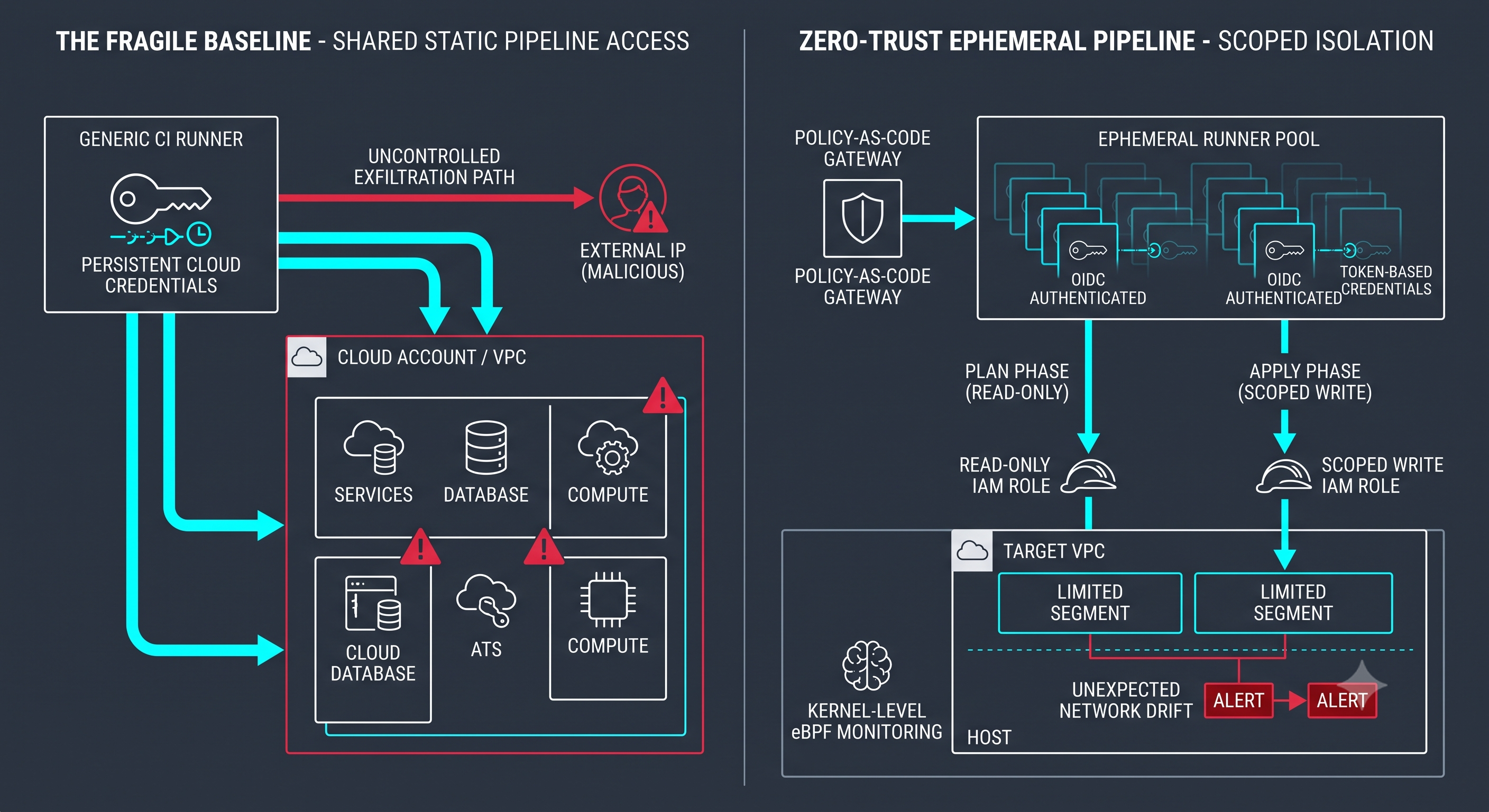
Eliminate static access keys stored in CI variables. Mandate OIDC (OpenID Connect) federation (e.g., GitHub Actions/GitLab OIDC to AWS IAM, GCP Workload Identity, or Azure Federated Credentials) with strictly bounded audience and subject claims.
[ ] 2. Scope IAM to Single Plan/Apply Phases (Task-Level Scoping)
Decouple your pipeline roles: the "plan/spec" phase receives strictly read-only metadata permissions, while the "apply" phase receives narrow write access restricted to the targeted state file and VPC resources.
[ ] 3. Adopt Kernel-Level Runtime Observability (eBPF)
Traditional container logs miss unauthorized outbound connections or privilege escalations initiated inside dynamic runners. Deploy eBPF-based runtime monitoring (such as Cilium or Falco) to flag unexpected process execution at the host level.
[ ] 4. Enforce Policy-as-Code Gates Before State Locking
Integrate deterministic validation (Open Policy Agent/Rego, Kyverno, or Trivy) inside the pipeline. Block deployments automatically if a pull request introduces open security groups (0.0.0.0/0), elevated container privileges, or missing encryption tags.
[ ] 5. Cap Token TTL to Sub-Hour Limits
Set the maximum session duration for assumed STS/IAM roles to match the mean pipeline runtime (e.g., 15–30 minutes), preventing cached credential reuse in the event of an artifact leak.
[ ] 6. Isolate Dynamic Runners in Dedicated VPCs
Ensure dynamic runners and build agents do not run in the same internal network plane as staging or production databases. Enforce strict egress filtering—runners only connect to designated registries and cloud control-plane endpoints.
Discussion Question
How does your team enforce the boundary between read-only evaluation and write-level deployment privileges inside automated GitOps workflows?
CTA
Join Cloud, DevOps & Open Source — follow Techawks Cloud & DevOps for hands-on architectural blueprints, infrastructure teardowns, and actionable reliability checklists.
As teams scale GitOps and platform engineering, infrastructure provisioning has become fully dynamic. Dynamic runners spin up, assume cloud IAM roles, apply Kubernetes manifests or IaC modules, and terminate.
The trap? Ephemeral execution with static trust.
Engineers often grant wide IAM permissions (e.g., * on S3 buckets, wide VPC modification, or cluster-admin service accounts) under the false assumption that because the runner lives for only 6 minutes, the blast radius is negligible. In practice, compromised third-party dependencies, malicious PR actions, or leaked pipeline context tokens convert short-lived environments into full control plane takeover vectors.
Resilient cloud architecture demands that credential lifespans match the micro-task, not the entire build pipeline.
Before your next release cycle, run this audit across your deployment pipelines:
The Zero-Trust Ephemeral Infrastructure Checklist
[ ] 1. Enforce Workload Identity Federation (No Static API Keys)
Eliminate static access keys stored in CI variables. Mandate OIDC (OpenID Connect) federation (e.g., GitHub Actions/GitLab OIDC to AWS IAM, GCP Workload Identity, or Azure Federated Credentials) with strictly bounded audience and subject claims.
[ ] 2. Scope IAM to Single Plan/Apply Phases (Task-Level Scoping)
Decouple your pipeline roles: the "plan/spec" phase receives strictly read-only metadata permissions, while the "apply" phase receives narrow write access restricted to the targeted state file and VPC resources.
[ ] 3. Adopt Kernel-Level Runtime Observability (eBPF)
Traditional container logs miss unauthorized outbound connections or privilege escalations initiated inside dynamic runners. Deploy eBPF-based runtime monitoring (such as Cilium or Falco) to flag unexpected process execution at the host level.
[ ] 4. Enforce Policy-as-Code Gates Before State Locking
Integrate deterministic validation (Open Policy Agent/Rego, Kyverno, or Trivy) inside the pipeline. Block deployments automatically if a pull request introduces open security groups (0.0.0.0/0), elevated container privileges, or missing encryption tags.
[ ] 5. Cap Token TTL to Sub-Hour Limits
Set the maximum session duration for assumed STS/IAM roles to match the mean pipeline runtime (e.g., 15–30 minutes), preventing cached credential reuse in the event of an artifact leak.
[ ] 6. Isolate Dynamic Runners in Dedicated VPCs
Ensure dynamic runners and build agents do not run in the same internal network plane as staging or production databases. Enforce strict egress filtering—runners only connect to designated registries and cloud control-plane endpoints.
Discussion Question
How does your team enforce the boundary between read-only evaluation and write-level deployment privileges inside automated GitOps workflows?
CTA
Join Cloud, DevOps & Open Source — follow Techawks Cloud & DevOps for hands-on architectural blueprints, infrastructure teardowns, and actionable reliability checklists.
The Hidden Danger of "Permissive" Ephemeral Infrastructure: Hardening Your CI/CD & Cluster Control Plane
As teams scale GitOps and platform engineering, infrastructure provisioning has become fully dynamic. Dynamic runners spin up, assume cloud IAM roles, apply Kubernetes manifests or IaC modules, and terminate.
The trap? Ephemeral execution with static trust.
Engineers often grant wide IAM permissions (e.g., * on S3 buckets, wide VPC modification, or cluster-admin service accounts) under the false assumption that because the runner lives for only 6 minutes, the blast radius is negligible. In practice, compromised third-party dependencies, malicious PR actions, or leaked pipeline context tokens convert short-lived environments into full control plane takeover vectors.
Resilient cloud architecture demands that credential lifespans match the micro-task, not the entire build pipeline.
Before your next release cycle, run this audit across your deployment pipelines:
The Zero-Trust Ephemeral Infrastructure Checklist
[ ] 1. Enforce Workload Identity Federation (No Static API Keys)
Eliminate static access keys stored in CI variables. Mandate OIDC (OpenID Connect) federation (e.g., GitHub Actions/GitLab OIDC to AWS IAM, GCP Workload Identity, or Azure Federated Credentials) with strictly bounded audience and subject claims.
[ ] 2. Scope IAM to Single Plan/Apply Phases (Task-Level Scoping)
Decouple your pipeline roles: the "plan/spec" phase receives strictly read-only metadata permissions, while the "apply" phase receives narrow write access restricted to the targeted state file and VPC resources.
[ ] 3. Adopt Kernel-Level Runtime Observability (eBPF)
Traditional container logs miss unauthorized outbound connections or privilege escalations initiated inside dynamic runners. Deploy eBPF-based runtime monitoring (such as Cilium or Falco) to flag unexpected process execution at the host level.
[ ] 4. Enforce Policy-as-Code Gates Before State Locking
Integrate deterministic validation (Open Policy Agent/Rego, Kyverno, or Trivy) inside the pipeline. Block deployments automatically if a pull request introduces open security groups (0.0.0.0/0), elevated container privileges, or missing encryption tags.
[ ] 5. Cap Token TTL to Sub-Hour Limits
Set the maximum session duration for assumed STS/IAM roles to match the mean pipeline runtime (e.g., 15–30 minutes), preventing cached credential reuse in the event of an artifact leak.
[ ] 6. Isolate Dynamic Runners in Dedicated VPCs
Ensure dynamic runners and build agents do not run in the same internal network plane as staging or production databases. Enforce strict egress filtering—runners only connect to designated registries and cloud control-plane endpoints.
Discussion Question
How does your team enforce the boundary between read-only evaluation and write-level deployment privileges inside automated GitOps workflows?
CTA
Join Cloud, DevOps & Open Source — follow Techawks Cloud & DevOps for hands-on architectural blueprints, infrastructure teardowns, and actionable reliability checklists.

 Arabic
 French
 Spanish
 Portuguese
 Deutsch
 Turkish
 Dutch
Dutch
 Italiano
 Russian
 Romaian
 Portuguese (Brazil)
 Greek
Greek