


Mastering AI Pair Programmers: Why Understanding Context Windows Will Make You a Better Developer
AI-powered development tools like GitHub Copilot and intelligent AI IDEs are now standard across the industry. Yet, many student developers struggle because they don't understand how these models process information.
Why it matters:
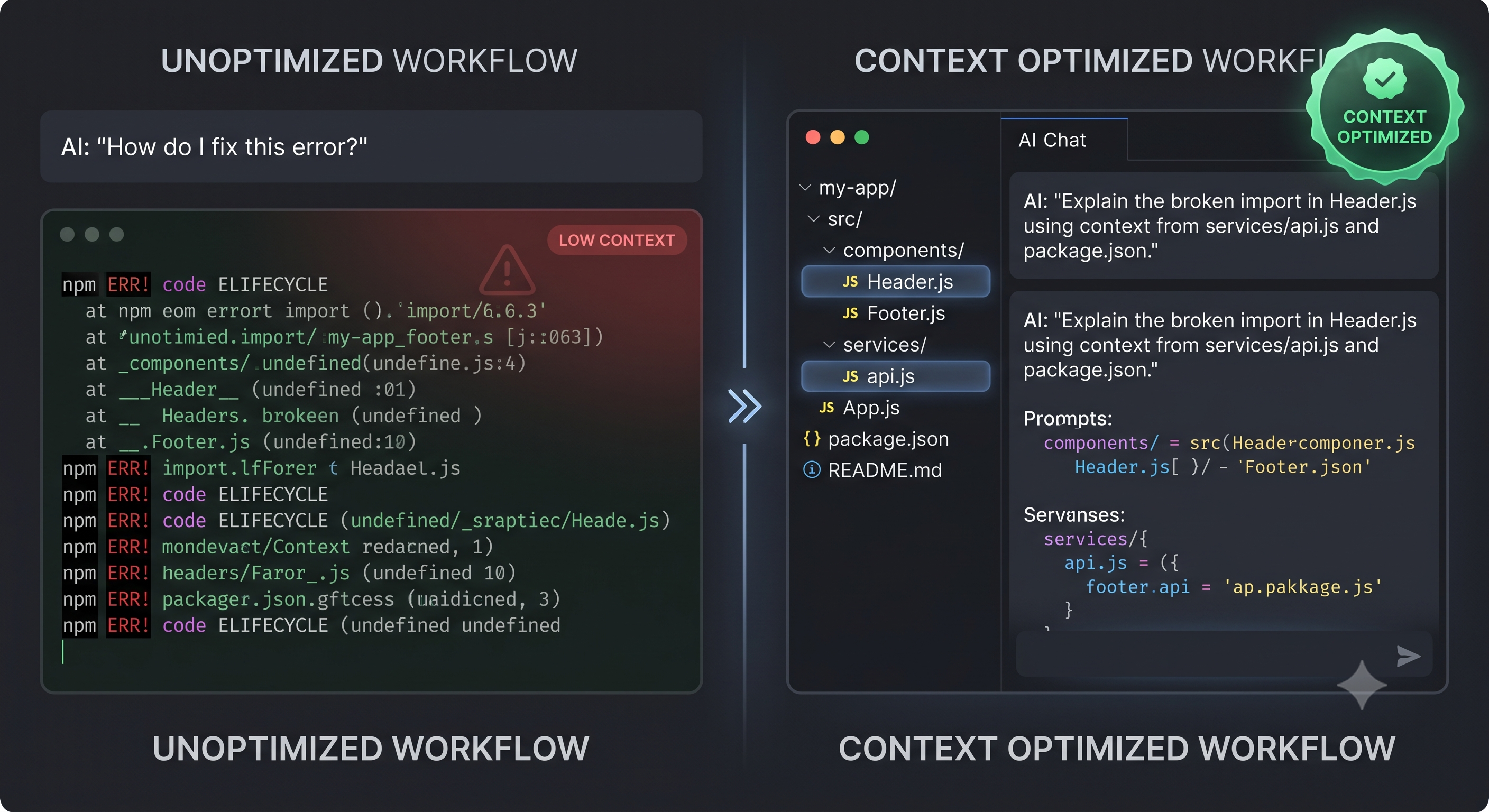
An AI assistant doesn't "know" your project; it only knows the context window you feed it. When you paste isolated error messages without structural context, the model guesses blindly, leading to hallucinations, broken imports, and spaghetti code. Learning how to manage context and prompt AI with architectural awareness is a core engineering skill for modern software careers.
What you can learn (The Student Playbook):
When using AI coding assistants in your academic projects or personal builds, master these three workflow habits:
Curate the Context: Instead of asking general questions, explicitly reference relevant files or modules so the model indexes your actual app architecture rather than hallucinating generic solutions.
Understand Token Limits: Recognize that LLMs have a maximum working memory (context window). Avoid dumping an entire 5,000-line repository into a prompt; isolate the specific component or function you are debugging.
Verify Before You Merge: Treat AI output like code written by a junior teammate. Always run unit tests, check edge cases, and manually trace the logic so you truly understand what the code does.
Discussion Question
How are you integrating AI coding assistants into your learning routine? Are they helping you learn faster, or do you find yourself relying too heavily on auto-generated code?
CTA (Join Students in Tech)
Ready to bridge the gap between classroom theory and real-world software engineering? Join the Techawks Students in Tech community today to collaborate, share resources, and level up your tech journey:
AI-powered development tools like GitHub Copilot and intelligent AI IDEs are now standard across the industry. Yet, many student developers struggle because they don't understand how these models process information.
Why it matters:
An AI assistant doesn't "know" your project; it only knows the context window you feed it. When you paste isolated error messages without structural context, the model guesses blindly, leading to hallucinations, broken imports, and spaghetti code. Learning how to manage context and prompt AI with architectural awareness is a core engineering skill for modern software careers.
What you can learn (The Student Playbook):
When using AI coding assistants in your academic projects or personal builds, master these three workflow habits:
Curate the Context: Instead of asking general questions, explicitly reference relevant files or modules so the model indexes your actual app architecture rather than hallucinating generic solutions.
Understand Token Limits: Recognize that LLMs have a maximum working memory (context window). Avoid dumping an entire 5,000-line repository into a prompt; isolate the specific component or function you are debugging.
Verify Before You Merge: Treat AI output like code written by a junior teammate. Always run unit tests, check edge cases, and manually trace the logic so you truly understand what the code does.
Discussion Question
How are you integrating AI coding assistants into your learning routine? Are they helping you learn faster, or do you find yourself relying too heavily on auto-generated code?
CTA (Join Students in Tech)
Ready to bridge the gap between classroom theory and real-world software engineering? Join the Techawks Students in Tech community today to collaborate, share resources, and level up your tech journey:
Mastering AI Pair Programmers: Why Understanding Context Windows Will Make You a Better Developer
AI-powered development tools like GitHub Copilot and intelligent AI IDEs are now standard across the industry. Yet, many student developers struggle because they don't understand how these models process information.
Why it matters:
An AI assistant doesn't "know" your project; it only knows the context window you feed it. When you paste isolated error messages without structural context, the model guesses blindly, leading to hallucinations, broken imports, and spaghetti code. Learning how to manage context and prompt AI with architectural awareness is a core engineering skill for modern software careers.
What you can learn (The Student Playbook):
When using AI coding assistants in your academic projects or personal builds, master these three workflow habits:
Curate the Context: Instead of asking general questions, explicitly reference relevant files or modules so the model indexes your actual app architecture rather than hallucinating generic solutions.
Understand Token Limits: Recognize that LLMs have a maximum working memory (context window). Avoid dumping an entire 5,000-line repository into a prompt; isolate the specific component or function you are debugging.
Verify Before You Merge: Treat AI output like code written by a junior teammate. Always run unit tests, check edge cases, and manually trace the logic so you truly understand what the code does.
Discussion Question
How are you integrating AI coding assistants into your learning routine? Are they helping you learn faster, or do you find yourself relying too heavily on auto-generated code?
CTA (Join Students in Tech)
Ready to bridge the gap between classroom theory and real-world software engineering? Join the Techawks Students in Tech community today to collaborate, share resources, and level up your tech journey:

 English
 Arabic
 French
 Spanish
 Portuguese
 Deutsch
 Turkish
 Italiano
 Russian
 Romaian
 Portuguese (Brazil)
 Greek
Greek