


Nmap Demystified: The Essential Recon Tool Every Beginner Security Analyst Needs
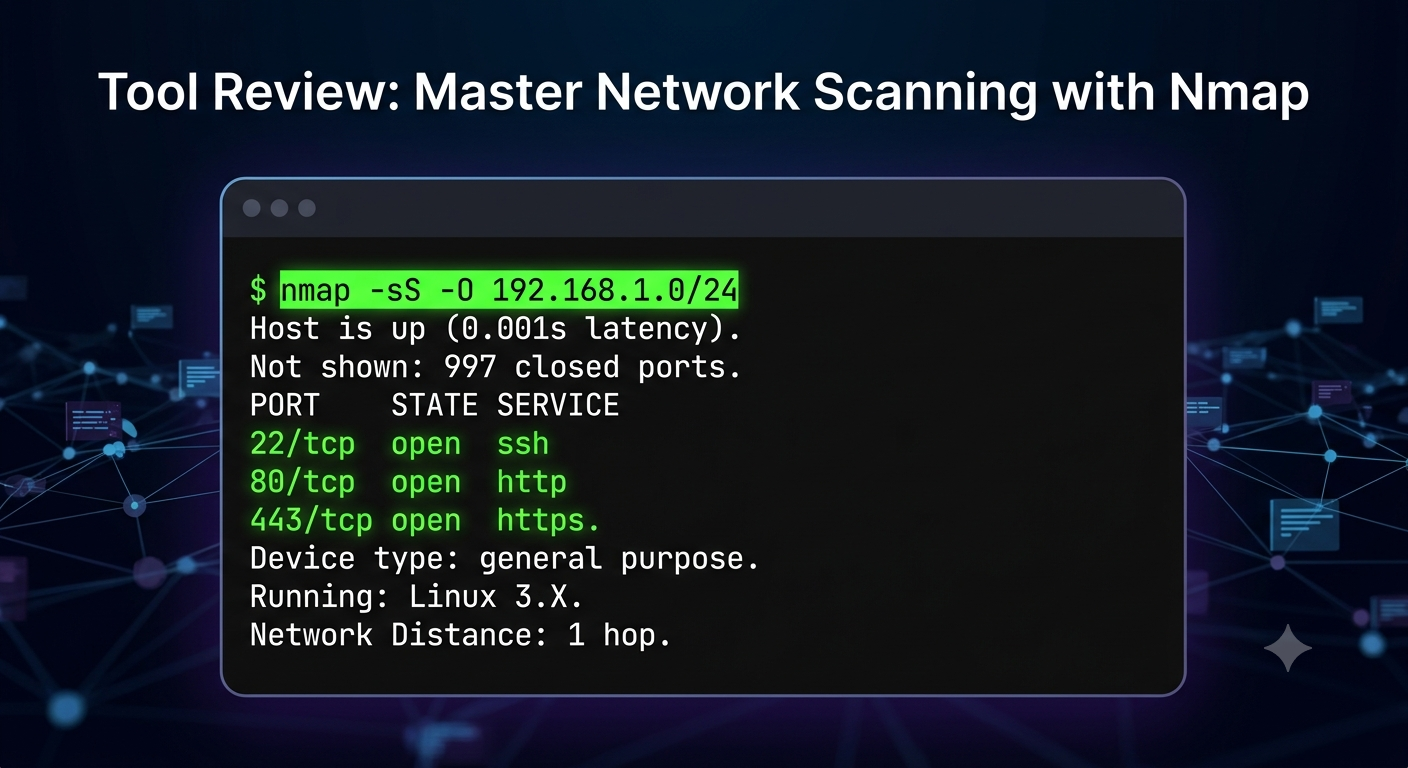
When starting out in cybersecurity, the sheer number of tools can feel overwhelming. However, network reconnaissance remains the cornerstone of both offensive and defensive operations. Nmap (Network Mapper) stands out because it provides deep visibility into open ports, running services, and potential vulnerabilities—all from a simple command line.
Here is a practical, step-by-step breakdown of how to use Nmap effectively for network discovery:
1. Basic Host Discovery
Avoid noise by verifying which devices are alive on the network before performing heavy scans.
Command: nmap -sn 192.168.1.0/24
What it does: Performs a ping sweep across the subnet without scanning individual ports, saving you time.
2. Service and Version Detection
Knowing a port is open isn't enough; you need to know what is listening on it to identify outdated software.
Command: nmap -sV 192.168.1.50
What it does: Probes open ports to determine the exact service name and version number running on the target host.
3. OS Fingerprinting
Understanding the operating system helps security teams tailor patch management and threat modeling.
Command: nmap -O 192.168.1.50
What it does: Analyzes TCP/IP stack responses to identify the underlying OS (Linux, Windows, embedded systems, etc.).
Pro Tip for Learners
Combine key flags into a single, comprehensive scan during lab environments:
nmap -sV -sC -O -p- 192.168.1.50
(Scans all 65,535 ports, runs default security scripts, detects service versions, and identifies the OS).
Key Takeaways
Recon comes first: Accurate network scanning forms the foundation of all defensive and penetration testing workflows.
Precision matters: Use host discovery (-sn) to map subnets quickly before running detailed service scans.
Version tracking: Identifying specific software versions via -sV is critical for spotting unpatched vulnerabilities.
Practice safely: Always practice your Nmap skills on authorized labs like TryHackMe, Hack The Box, or custom virtual machines.
CTA
Ready to move from basic scans to hands-on threat hunting and penetration testing?
👉 Join our Cybersecurity & Ethical Hacking community today to access structured learning paths, practical labs, and mentorship!
When starting out in cybersecurity, the sheer number of tools can feel overwhelming. However, network reconnaissance remains the cornerstone of both offensive and defensive operations. Nmap (Network Mapper) stands out because it provides deep visibility into open ports, running services, and potential vulnerabilities—all from a simple command line.
Here is a practical, step-by-step breakdown of how to use Nmap effectively for network discovery:
1. Basic Host Discovery
Avoid noise by verifying which devices are alive on the network before performing heavy scans.
Command: nmap -sn 192.168.1.0/24
What it does: Performs a ping sweep across the subnet without scanning individual ports, saving you time.
2. Service and Version Detection
Knowing a port is open isn't enough; you need to know what is listening on it to identify outdated software.
Command: nmap -sV 192.168.1.50
What it does: Probes open ports to determine the exact service name and version number running on the target host.
3. OS Fingerprinting
Understanding the operating system helps security teams tailor patch management and threat modeling.
Command: nmap -O 192.168.1.50
What it does: Analyzes TCP/IP stack responses to identify the underlying OS (Linux, Windows, embedded systems, etc.).
Pro Tip for Learners
Combine key flags into a single, comprehensive scan during lab environments:
nmap -sV -sC -O -p- 192.168.1.50
(Scans all 65,535 ports, runs default security scripts, detects service versions, and identifies the OS).
Key Takeaways
Recon comes first: Accurate network scanning forms the foundation of all defensive and penetration testing workflows.
Precision matters: Use host discovery (-sn) to map subnets quickly before running detailed service scans.
Version tracking: Identifying specific software versions via -sV is critical for spotting unpatched vulnerabilities.
Practice safely: Always practice your Nmap skills on authorized labs like TryHackMe, Hack The Box, or custom virtual machines.
CTA
Ready to move from basic scans to hands-on threat hunting and penetration testing?
👉 Join our Cybersecurity & Ethical Hacking community today to access structured learning paths, practical labs, and mentorship!
Nmap Demystified: The Essential Recon Tool Every Beginner Security Analyst Needs
When starting out in cybersecurity, the sheer number of tools can feel overwhelming. However, network reconnaissance remains the cornerstone of both offensive and defensive operations. Nmap (Network Mapper) stands out because it provides deep visibility into open ports, running services, and potential vulnerabilities—all from a simple command line.
Here is a practical, step-by-step breakdown of how to use Nmap effectively for network discovery:
1. Basic Host Discovery
Avoid noise by verifying which devices are alive on the network before performing heavy scans.
Command: nmap -sn 192.168.1.0/24
What it does: Performs a ping sweep across the subnet without scanning individual ports, saving you time.
2. Service and Version Detection
Knowing a port is open isn't enough; you need to know what is listening on it to identify outdated software.
Command: nmap -sV 192.168.1.50
What it does: Probes open ports to determine the exact service name and version number running on the target host.
3. OS Fingerprinting
Understanding the operating system helps security teams tailor patch management and threat modeling.
Command: nmap -O 192.168.1.50
What it does: Analyzes TCP/IP stack responses to identify the underlying OS (Linux, Windows, embedded systems, etc.).
Pro Tip for Learners
Combine key flags into a single, comprehensive scan during lab environments:
nmap -sV -sC -O -p- 192.168.1.50
(Scans all 65,535 ports, runs default security scripts, detects service versions, and identifies the OS).
Key Takeaways
Recon comes first: Accurate network scanning forms the foundation of all defensive and penetration testing workflows.
Precision matters: Use host discovery (-sn) to map subnets quickly before running detailed service scans.
Version tracking: Identifying specific software versions via -sV is critical for spotting unpatched vulnerabilities.
Practice safely: Always practice your Nmap skills on authorized labs like TryHackMe, Hack The Box, or custom virtual machines.
CTA
Ready to move from basic scans to hands-on threat hunting and penetration testing?
👉 Join our Cybersecurity & Ethical Hacking community today to access structured learning paths, practical labs, and mentorship!

 English
 Arabic
 French
 Spanish
 Portuguese
 Deutsch
 Turkish
 Dutch
Dutch
 Italiano
 Romaian
 Portuguese (Brazil)
 Greek
Greek