


Stop Directory-Scanning Your S3 Bucket: Optimize Big Data Queries with Apache Iceberg Metadata
Traditional object storage (like AWS S3 or Google Cloud Storage) is not a database. It does not understand rows, columns, or transactions—it only knows files.
When you write partitioned queries over giant Hive-style data lakes, your query engine (like Presto, Athena, or Spark) has to call costly LIST operations on object storage to find out which files to read. At scale (petabytes of data), this directory-level path-resolution process becomes a massive latency bottleneck.
Apache Iceberg solves this by introducing a highly structured metadata layer that keeps a precise, stateful inventory of every data file, entirely bypassing filesystem-level file-discovery scans.
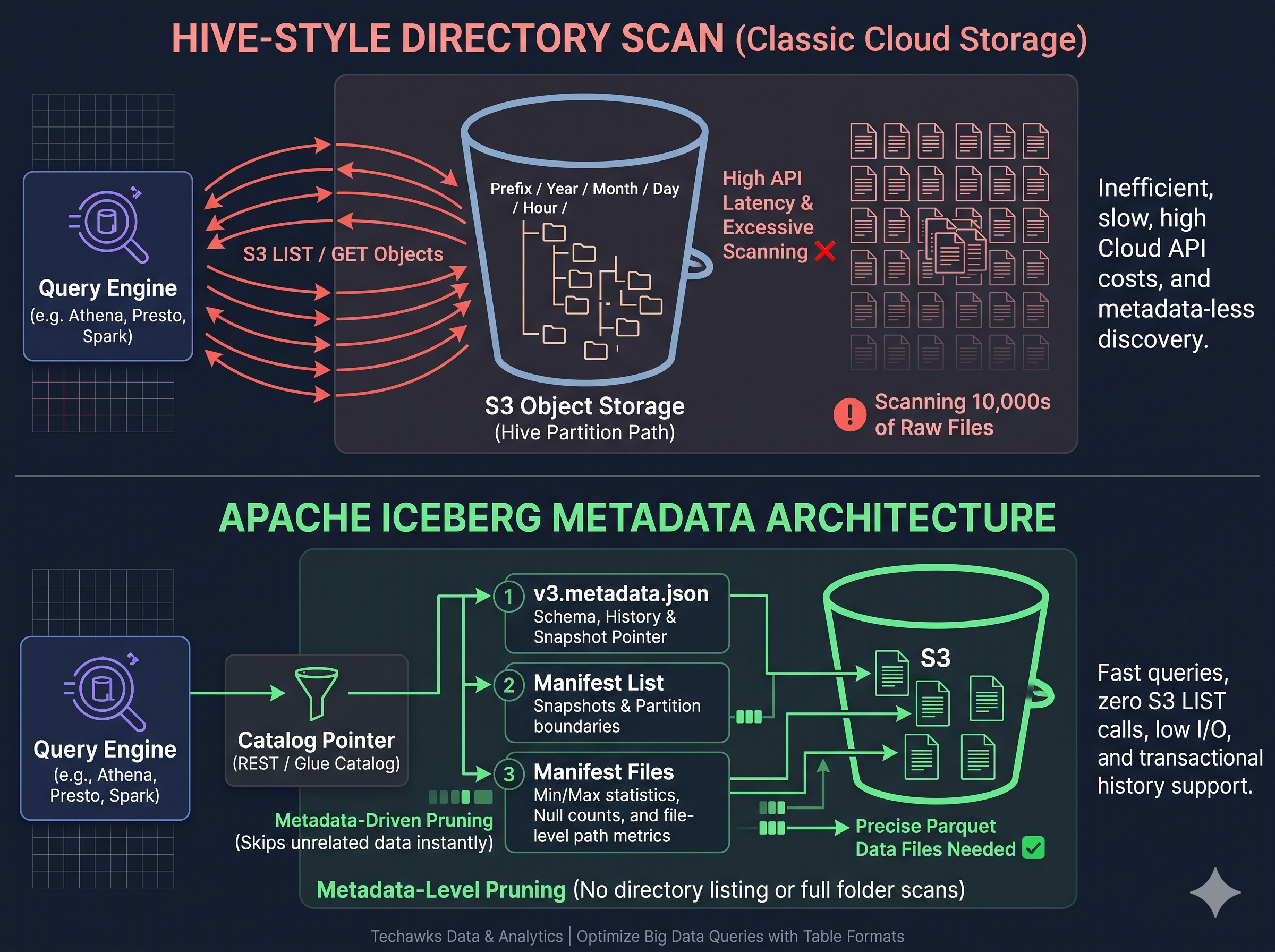
Traditional Hive-Style Approach
[ Query Engine ] ──> [ S3 LIST files/date=2026-10-22/* ] (Slow Directory Scanning)
│
▼
10,000s of Raw Parquet Files ❌ (High I/O Overhead)
The Apache Iceberg Model
[ Query Engine ] ──> [ Catalog (REST / Unity / Glue) ]
│
▼
[ Iceberg Metadata Files ]
• Metadata Pointer (v3.metadata.json)
• Manifest List (Snapshots)
• Manifest File (Exact physical file paths & statistics)
│
▼
[ Selective File Reads ] (Zero Directory Scans)
The 3 Metadata Tiers Making Your Lakehouse Fast
To verify and query data efficiently, Iceberg avoids "guessing" where data is located by creating three tiers of read-optimized metadata:
1. The Manifest File (The File Level):
An Iceberg manifest is an Avro-format file that tracks the exact path of every Parquet data file, along with critical column-level statistics (min/max values, null counts). Before even opening a single data file, the engine uses this manifest to discard entire files that do not match the query’s filter, a process called file-level pruning.
2. The Manifest List (The Snapshot Level):
A manifest list collects groups of manifests to represent a single snapshot of the table at a specific point in time. It stores partition boundaries for each manifest, allowing the engine to skip whole groups of files before scanning file-level metrics.
3. The Metadata File (The Schema & History Level):
This top-level file stores the table’s current schema, its historical partition specs, and a chronological log of previous snapshots. This allows your queries to perform safe, ACID-compliant time-travel queries by letting you query exact points in time simply by referencing an older snapshot ID.
By replacing dynamic folder searches with direct, statistics-driven metadata lookups, you can drop data catalog scanning bottlenecks entirely and turn your generic object store into a high-performance database.
Discussion Question
Is your organization currently migrating Hive-partitioned S3/Blob storage lakes over to Apache Iceberg or Delta Lake? What was your experience with latency improvements when switching from directory-level scans to metadata-driven querying?
CTA
Want to master modern data pipelines, data lakehouse architectures, and cloud-scale query performance alongside thousands of senior data engineers?
👉 Join the Data Science & Analytics Community today: [techawks.io/join-data]
Traditional object storage (like AWS S3 or Google Cloud Storage) is not a database. It does not understand rows, columns, or transactions—it only knows files.
When you write partitioned queries over giant Hive-style data lakes, your query engine (like Presto, Athena, or Spark) has to call costly LIST operations on object storage to find out which files to read. At scale (petabytes of data), this directory-level path-resolution process becomes a massive latency bottleneck.
Apache Iceberg solves this by introducing a highly structured metadata layer that keeps a precise, stateful inventory of every data file, entirely bypassing filesystem-level file-discovery scans.
Traditional Hive-Style Approach
[ Query Engine ] ──> [ S3 LIST files/date=2026-10-22/* ] (Slow Directory Scanning)
│
▼
10,000s of Raw Parquet Files ❌ (High I/O Overhead)
The Apache Iceberg Model
[ Query Engine ] ──> [ Catalog (REST / Unity / Glue) ]
│
▼
[ Iceberg Metadata Files ]
• Metadata Pointer (v3.metadata.json)
• Manifest List (Snapshots)
• Manifest File (Exact physical file paths & statistics)
│
▼
[ Selective File Reads ] (Zero Directory Scans)
The 3 Metadata Tiers Making Your Lakehouse Fast
To verify and query data efficiently, Iceberg avoids "guessing" where data is located by creating three tiers of read-optimized metadata:
1. The Manifest File (The File Level):
An Iceberg manifest is an Avro-format file that tracks the exact path of every Parquet data file, along with critical column-level statistics (min/max values, null counts). Before even opening a single data file, the engine uses this manifest to discard entire files that do not match the query’s filter, a process called file-level pruning.
2. The Manifest List (The Snapshot Level):
A manifest list collects groups of manifests to represent a single snapshot of the table at a specific point in time. It stores partition boundaries for each manifest, allowing the engine to skip whole groups of files before scanning file-level metrics.
3. The Metadata File (The Schema & History Level):
This top-level file stores the table’s current schema, its historical partition specs, and a chronological log of previous snapshots. This allows your queries to perform safe, ACID-compliant time-travel queries by letting you query exact points in time simply by referencing an older snapshot ID.
By replacing dynamic folder searches with direct, statistics-driven metadata lookups, you can drop data catalog scanning bottlenecks entirely and turn your generic object store into a high-performance database.
Discussion Question
Is your organization currently migrating Hive-partitioned S3/Blob storage lakes over to Apache Iceberg or Delta Lake? What was your experience with latency improvements when switching from directory-level scans to metadata-driven querying?
CTA
Want to master modern data pipelines, data lakehouse architectures, and cloud-scale query performance alongside thousands of senior data engineers?
👉 Join the Data Science & Analytics Community today: [techawks.io/join-data]
Stop Directory-Scanning Your S3 Bucket: Optimize Big Data Queries with Apache Iceberg Metadata
Traditional object storage (like AWS S3 or Google Cloud Storage) is not a database. It does not understand rows, columns, or transactions—it only knows files.
When you write partitioned queries over giant Hive-style data lakes, your query engine (like Presto, Athena, or Spark) has to call costly LIST operations on object storage to find out which files to read. At scale (petabytes of data), this directory-level path-resolution process becomes a massive latency bottleneck.
Apache Iceberg solves this by introducing a highly structured metadata layer that keeps a precise, stateful inventory of every data file, entirely bypassing filesystem-level file-discovery scans.
Traditional Hive-Style Approach
[ Query Engine ] ──> [ S3 LIST files/date=2026-10-22/* ] (Slow Directory Scanning)
│
▼
10,000s of Raw Parquet Files ❌ (High I/O Overhead)
The Apache Iceberg Model
[ Query Engine ] ──> [ Catalog (REST / Unity / Glue) ]
│
▼
[ Iceberg Metadata Files ]
• Metadata Pointer (v3.metadata.json)
• Manifest List (Snapshots)
• Manifest File (Exact physical file paths & statistics)
│
▼
[ Selective File Reads ] (Zero Directory Scans)
The 3 Metadata Tiers Making Your Lakehouse Fast
To verify and query data efficiently, Iceberg avoids "guessing" where data is located by creating three tiers of read-optimized metadata:
1. The Manifest File (The File Level):
An Iceberg manifest is an Avro-format file that tracks the exact path of every Parquet data file, along with critical column-level statistics (min/max values, null counts). Before even opening a single data file, the engine uses this manifest to discard entire files that do not match the query’s filter, a process called file-level pruning.
2. The Manifest List (The Snapshot Level):
A manifest list collects groups of manifests to represent a single snapshot of the table at a specific point in time. It stores partition boundaries for each manifest, allowing the engine to skip whole groups of files before scanning file-level metrics.
3. The Metadata File (The Schema & History Level):
This top-level file stores the table’s current schema, its historical partition specs, and a chronological log of previous snapshots. This allows your queries to perform safe, ACID-compliant time-travel queries by letting you query exact points in time simply by referencing an older snapshot ID.
By replacing dynamic folder searches with direct, statistics-driven metadata lookups, you can drop data catalog scanning bottlenecks entirely and turn your generic object store into a high-performance database.
Discussion Question
Is your organization currently migrating Hive-partitioned S3/Blob storage lakes over to Apache Iceberg or Delta Lake? What was your experience with latency improvements when switching from directory-level scans to metadata-driven querying?
CTA
Want to master modern data pipelines, data lakehouse architectures, and cloud-scale query performance alongside thousands of senior data engineers?
👉 Join the Data Science & Analytics Community today: [techawks.io/join-data]

 English
 Arabic
 French
 Spanish
 Portuguese
 Deutsch
 Turkish
 Dutch
 Russian
 Romaian
 Portuguese (Brazil)
 Greek