


Step-by-Step: How to Debug Any Code Error Without Panic (A 5-Step Framework)
Debugging is not about guessing; it is about elimination. When your code breaks, following a structured process saves you hours of frustration and builds real technical problem-solving skills.
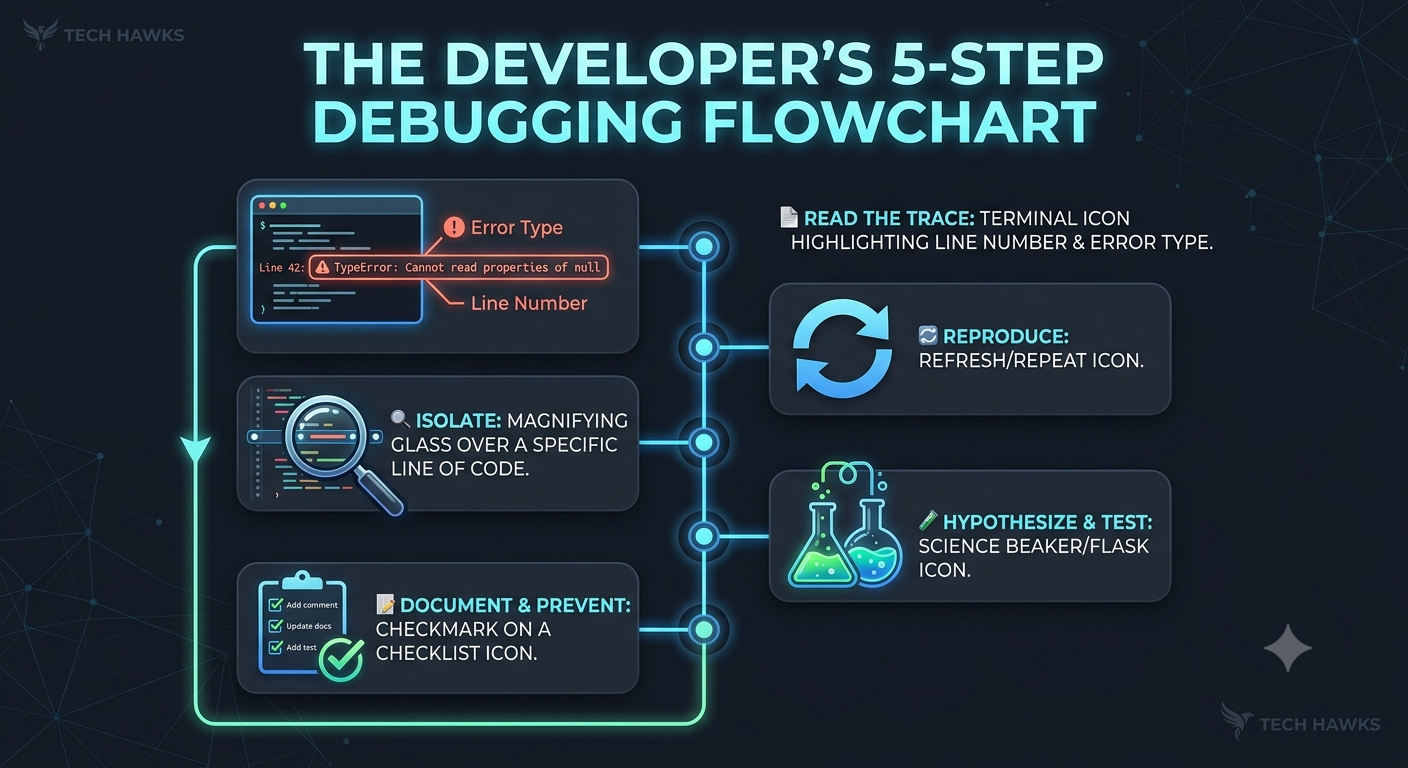
Follow this 5-step tutorial the next time your code fails to run:
Step 1: Read the Stack Trace (Don't Ignore It!)
When an error pops up, do not immediately minimize the terminal. Look for three specific pieces of information:
The File Name: Exactly where the error occurred.
The Line Number: The precise line (or function) that triggered the crash.
The Error Type & Message: Read the last line first—it usually tells you what went wrong (e.g., TypeError: Cannot read properties of undefined).
Step 2: Reproduce the Bug Consistently
Before trying to fix anything, make sure you can break it on command.
Note the exact inputs or user actions that trigger the crash.
If you cannot consistently reproduce the issue, you cannot confirm when it is truly fixed.
Step 3: Isolate the Variable (The "Divide and Conquer" Rule)
Do not modify ten lines at once. Isolate the problem area:
Comment out code: Temporarily remove non-essential blocks to see if the error persists.
Log state values: Use console.log(), print(), or a debugger breakpoint right before the line that crashes to check what your variables actually contain versus what you think they contain.
Step 4: Formulate a Single Hypothesis & Test
Formulate one theory at a time:
Hypothesis: "Variable X is returning null because the API response hasn't loaded yet."
Test: Add a conditional check or await statement.
Result: If it works, problem solved! If not, revert your change so you keep a clean slate.
Step 5: Document the Cause and Fix
Once resolved, ask yourself why it broke. Was it missing error handling? An unhandled edge case? Add a short code comment or unit test so you never fall for the exact same bug twice.
Key Takeaways
Read Before Searching: The error stack trace already gives you the line number and problem—start there.
One Change at a Time: Testing multiple fixes at once makes it impossible to know what actually solved the problem.
Revert Unsuccessful Attempts: Keep your working environment clean by rolling back failed experiments immediately.
CTA (Join Students in Tech)
Stuck on a tricky bug or want to practice your debugging skills with fellow builders?
🚀 Join the Students in Tech community today to get help, share solutions, and master software development together!
Debugging is not about guessing; it is about elimination. When your code breaks, following a structured process saves you hours of frustration and builds real technical problem-solving skills.
Follow this 5-step tutorial the next time your code fails to run:
Step 1: Read the Stack Trace (Don't Ignore It!)
When an error pops up, do not immediately minimize the terminal. Look for three specific pieces of information:
The File Name: Exactly where the error occurred.
The Line Number: The precise line (or function) that triggered the crash.
The Error Type & Message: Read the last line first—it usually tells you what went wrong (e.g., TypeError: Cannot read properties of undefined).
Step 2: Reproduce the Bug Consistently
Before trying to fix anything, make sure you can break it on command.
Note the exact inputs or user actions that trigger the crash.
If you cannot consistently reproduce the issue, you cannot confirm when it is truly fixed.
Step 3: Isolate the Variable (The "Divide and Conquer" Rule)
Do not modify ten lines at once. Isolate the problem area:
Comment out code: Temporarily remove non-essential blocks to see if the error persists.
Log state values: Use console.log(), print(), or a debugger breakpoint right before the line that crashes to check what your variables actually contain versus what you think they contain.
Step 4: Formulate a Single Hypothesis & Test
Formulate one theory at a time:
Hypothesis: "Variable X is returning null because the API response hasn't loaded yet."
Test: Add a conditional check or await statement.
Result: If it works, problem solved! If not, revert your change so you keep a clean slate.
Step 5: Document the Cause and Fix
Once resolved, ask yourself why it broke. Was it missing error handling? An unhandled edge case? Add a short code comment or unit test so you never fall for the exact same bug twice.
Key Takeaways
Read Before Searching: The error stack trace already gives you the line number and problem—start there.
One Change at a Time: Testing multiple fixes at once makes it impossible to know what actually solved the problem.
Revert Unsuccessful Attempts: Keep your working environment clean by rolling back failed experiments immediately.
CTA (Join Students in Tech)
Stuck on a tricky bug or want to practice your debugging skills with fellow builders?
🚀 Join the Students in Tech community today to get help, share solutions, and master software development together!
Step-by-Step: How to Debug Any Code Error Without Panic (A 5-Step Framework)
Debugging is not about guessing; it is about elimination. When your code breaks, following a structured process saves you hours of frustration and builds real technical problem-solving skills.
Follow this 5-step tutorial the next time your code fails to run:
Step 1: Read the Stack Trace (Don't Ignore It!)
When an error pops up, do not immediately minimize the terminal. Look for three specific pieces of information:
The File Name: Exactly where the error occurred.
The Line Number: The precise line (or function) that triggered the crash.
The Error Type & Message: Read the last line first—it usually tells you what went wrong (e.g., TypeError: Cannot read properties of undefined).
Step 2: Reproduce the Bug Consistently
Before trying to fix anything, make sure you can break it on command.
Note the exact inputs or user actions that trigger the crash.
If you cannot consistently reproduce the issue, you cannot confirm when it is truly fixed.
Step 3: Isolate the Variable (The "Divide and Conquer" Rule)
Do not modify ten lines at once. Isolate the problem area:
Comment out code: Temporarily remove non-essential blocks to see if the error persists.
Log state values: Use console.log(), print(), or a debugger breakpoint right before the line that crashes to check what your variables actually contain versus what you think they contain.
Step 4: Formulate a Single Hypothesis & Test
Formulate one theory at a time:
Hypothesis: "Variable X is returning null because the API response hasn't loaded yet."
Test: Add a conditional check or await statement.
Result: If it works, problem solved! If not, revert your change so you keep a clean slate.
Step 5: Document the Cause and Fix
Once resolved, ask yourself why it broke. Was it missing error handling? An unhandled edge case? Add a short code comment or unit test so you never fall for the exact same bug twice.
Key Takeaways
Read Before Searching: The error stack trace already gives you the line number and problem—start there.
One Change at a Time: Testing multiple fixes at once makes it impossible to know what actually solved the problem.
Revert Unsuccessful Attempts: Keep your working environment clean by rolling back failed experiments immediately.
CTA (Join Students in Tech)
Stuck on a tricky bug or want to practice your debugging skills with fellow builders?
🚀 Join the Students in Tech community today to get help, share solutions, and master software development together!

 English
 Arabic
 French
 Spanish
 Portuguese
 Turkish
 Dutch
Dutch
 Italiano
 Russian
 Romaian
 Portuguese (Brazil)
 Greek
Greek