


The Essential Home Lab Blueprint: How to Practice Cybersecurity Responsibly
Trying out offensive or defensive security tools on live public networks without explicit authorization is illegal and risky. A local virtual lab gives you a controlled sandboxed environment where you can safely analyze malware, test vulnerabilities, and practice network defense.
Here is the essential breakdown of building a free, safe cybersecurity home lab:
1. Select Your Virtualization Engine
To run isolated environments on your existing computer, start with a hypervisor:
VirtualBox (Free & Open Source): Excellent for cross-platform compatibility.
VMware Workstation Player: A solid alternative for smooth performance and hardware integration.
2. Set Up Your Attack Platform
Download an offensive security distribution designed for penetration testing and auditing:
Kali Linux or Parrot OS: Pre-configured with essential tools like Nmap, Wireshark, and Metasploit.
3. Deploy Vulnerable Targets
Never target real systems. Use purpose-built, intentionally vulnerable virtual machines (VMs):
Metasploitable 2/3: Designed for practicing network scanning and service exploitation.
OWASP Juice Shop: An ideal target for learning modern web application security (SQL injection, XSS, broken access control).
4. Configure Isolated Networking
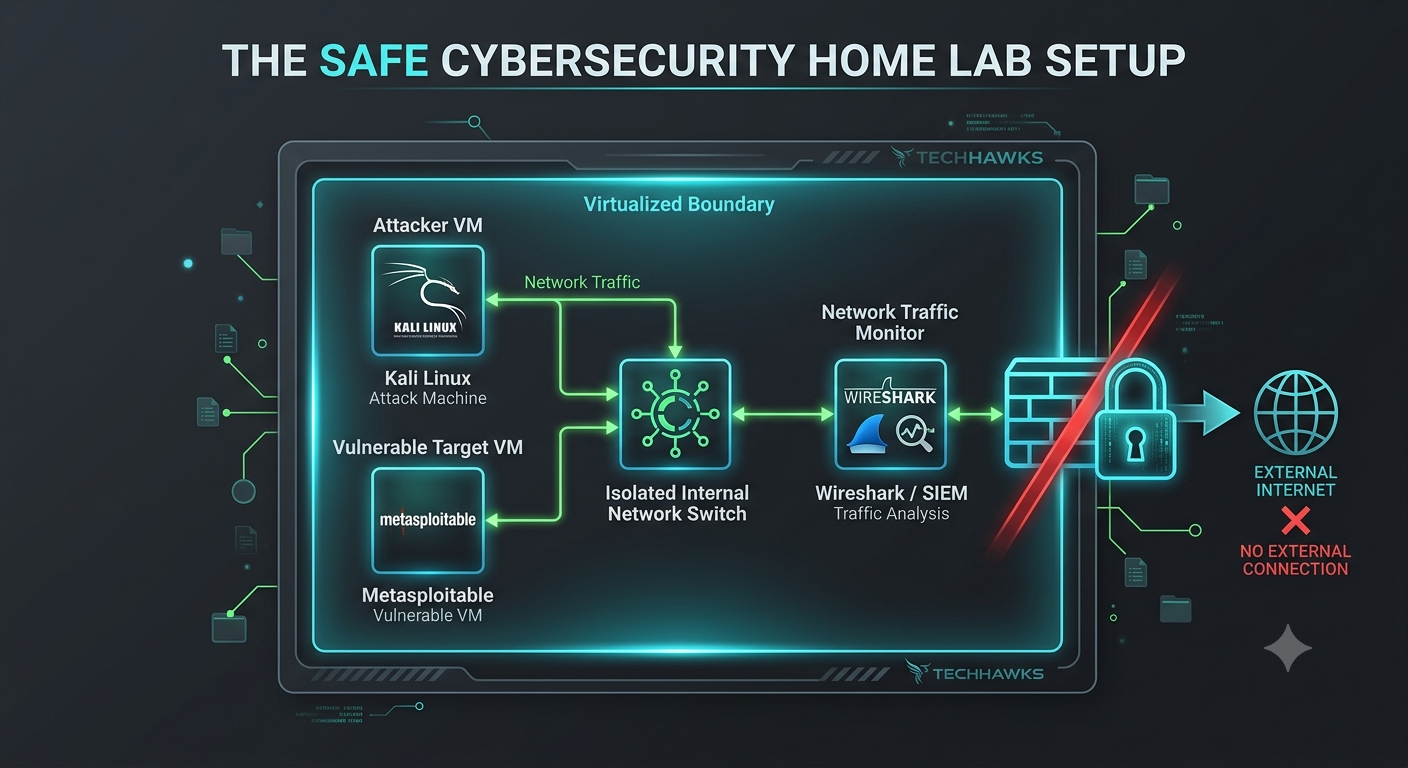
Set your virtual machine network interfaces to Host-Only or create an Internal Network.
Crucial Rule: Keep vulnerable target VMs completely disconnected from the open internet to prevent unauthorized external access or accidental leaks.
5. Monitor & Defend (The Blue Team Side)
Install a network security monitoring tool like Security Onion or set up Wireshark to capture packets between your attack machine and your target. Inspecting the traffic helps you understand what attacks look like from a defensive perspective.
Key Takeaways
Safety First: Always keep vulnerable targets isolated on internal or host-only virtual networks.
Practice Ethically: Use controlled environments like Metasploitable or OWASP Juice Shop to develop skills legally.
Learn Both Sides: Attack execution is only half the equation—always monitor and analyze traffic to learn defensive detection.
CTA (Join Cybersecurity & Ethical Hacking)
Ready to build your first virtual lab and master hands-on ethical hacking alongside a community of active security enthusiasts?
🛡️ Join the Cybersecurity & Ethical Hacking community today to get lab guides, practical challenges, and real-time support!
Trying out offensive or defensive security tools on live public networks without explicit authorization is illegal and risky. A local virtual lab gives you a controlled sandboxed environment where you can safely analyze malware, test vulnerabilities, and practice network defense.
Here is the essential breakdown of building a free, safe cybersecurity home lab:
1. Select Your Virtualization Engine
To run isolated environments on your existing computer, start with a hypervisor:
VirtualBox (Free & Open Source): Excellent for cross-platform compatibility.
VMware Workstation Player: A solid alternative for smooth performance and hardware integration.
2. Set Up Your Attack Platform
Download an offensive security distribution designed for penetration testing and auditing:
Kali Linux or Parrot OS: Pre-configured with essential tools like Nmap, Wireshark, and Metasploit.
3. Deploy Vulnerable Targets
Never target real systems. Use purpose-built, intentionally vulnerable virtual machines (VMs):
Metasploitable 2/3: Designed for practicing network scanning and service exploitation.
OWASP Juice Shop: An ideal target for learning modern web application security (SQL injection, XSS, broken access control).
4. Configure Isolated Networking
Set your virtual machine network interfaces to Host-Only or create an Internal Network.
Crucial Rule: Keep vulnerable target VMs completely disconnected from the open internet to prevent unauthorized external access or accidental leaks.
5. Monitor & Defend (The Blue Team Side)
Install a network security monitoring tool like Security Onion or set up Wireshark to capture packets between your attack machine and your target. Inspecting the traffic helps you understand what attacks look like from a defensive perspective.
Key Takeaways
Safety First: Always keep vulnerable targets isolated on internal or host-only virtual networks.
Practice Ethically: Use controlled environments like Metasploitable or OWASP Juice Shop to develop skills legally.
Learn Both Sides: Attack execution is only half the equation—always monitor and analyze traffic to learn defensive detection.
CTA (Join Cybersecurity & Ethical Hacking)
Ready to build your first virtual lab and master hands-on ethical hacking alongside a community of active security enthusiasts?
🛡️ Join the Cybersecurity & Ethical Hacking community today to get lab guides, practical challenges, and real-time support!
The Essential Home Lab Blueprint: How to Practice Cybersecurity Responsibly
Trying out offensive or defensive security tools on live public networks without explicit authorization is illegal and risky. A local virtual lab gives you a controlled sandboxed environment where you can safely analyze malware, test vulnerabilities, and practice network defense.
Here is the essential breakdown of building a free, safe cybersecurity home lab:
1. Select Your Virtualization Engine
To run isolated environments on your existing computer, start with a hypervisor:
VirtualBox (Free & Open Source): Excellent for cross-platform compatibility.
VMware Workstation Player: A solid alternative for smooth performance and hardware integration.
2. Set Up Your Attack Platform
Download an offensive security distribution designed for penetration testing and auditing:
Kali Linux or Parrot OS: Pre-configured with essential tools like Nmap, Wireshark, and Metasploit.
3. Deploy Vulnerable Targets
Never target real systems. Use purpose-built, intentionally vulnerable virtual machines (VMs):
Metasploitable 2/3: Designed for practicing network scanning and service exploitation.
OWASP Juice Shop: An ideal target for learning modern web application security (SQL injection, XSS, broken access control).
4. Configure Isolated Networking
Set your virtual machine network interfaces to Host-Only or create an Internal Network.
Crucial Rule: Keep vulnerable target VMs completely disconnected from the open internet to prevent unauthorized external access or accidental leaks.
5. Monitor & Defend (The Blue Team Side)
Install a network security monitoring tool like Security Onion or set up Wireshark to capture packets between your attack machine and your target. Inspecting the traffic helps you understand what attacks look like from a defensive perspective.
Key Takeaways
Safety First: Always keep vulnerable targets isolated on internal or host-only virtual networks.
Practice Ethically: Use controlled environments like Metasploitable or OWASP Juice Shop to develop skills legally.
Learn Both Sides: Attack execution is only half the equation—always monitor and analyze traffic to learn defensive detection.
CTA (Join Cybersecurity & Ethical Hacking)
Ready to build your first virtual lab and master hands-on ethical hacking alongside a community of active security enthusiasts?
🛡️ Join the Cybersecurity & Ethical Hacking community today to get lab guides, practical challenges, and real-time support!

 English
 Arabic
 French
 Spanish
 Portuguese
 Deutsch
 Turkish
 Dutch
Dutch
 Italiano
 Romaian
 Portuguese (Brazil)
 Greek
Greek