


How to Make Your First Open-Source Contribution on GitHub: A Step-by-Step Tutorial
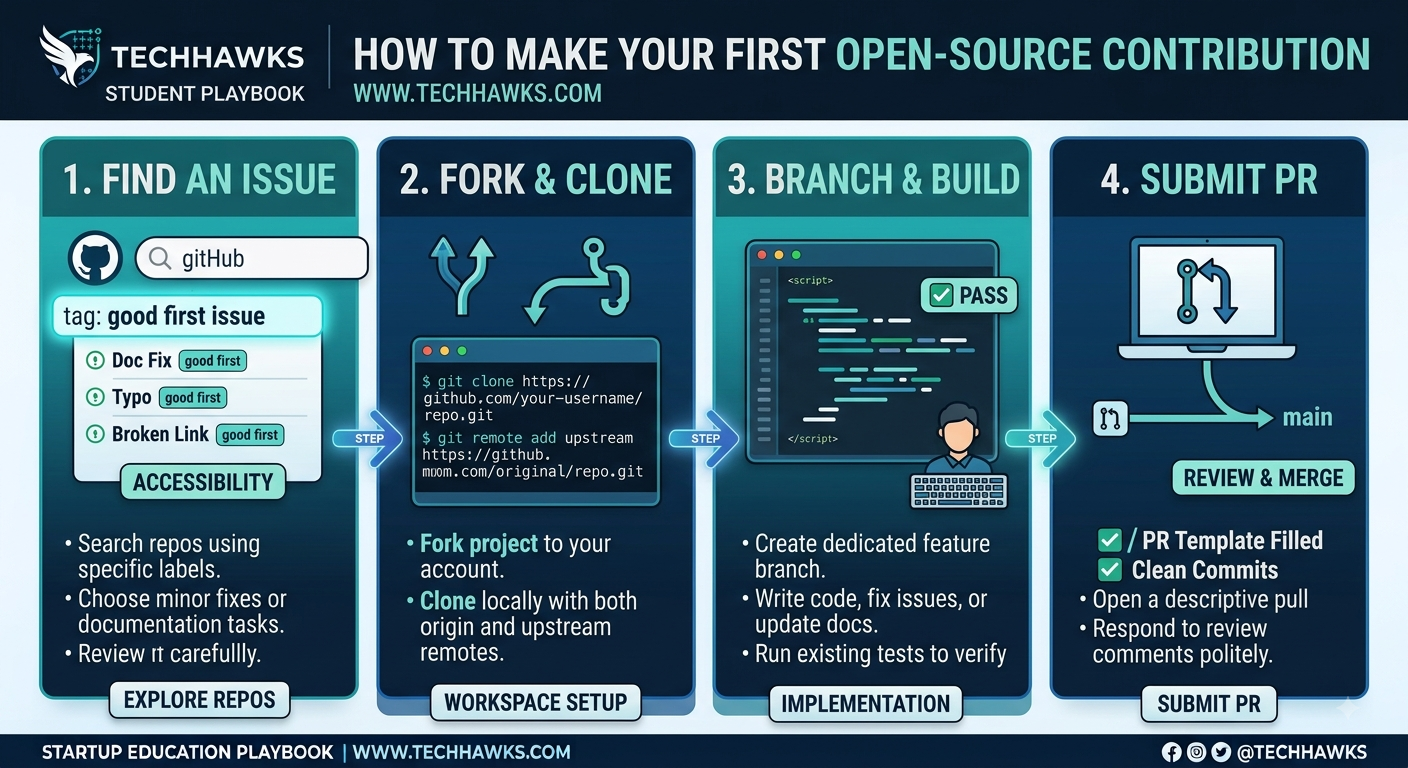
Follow this actionable 4-step workflow to find, clone, and submit your first successful pull request (PR):
Step 1: Locate "Good First Issue" Repositories
Search GitHub using filters like label:"good first issue" or label:"help wanted" within languages you are actively studying.
Start with documentation fixes, broken link repairs, or small unit test additions to familiarize yourself with the project's contribution guidelines (CONTRIBUTING.md).
Step 2: Fork and Clone the Repository
Click Fork on the target repository to create a copy under your GitHub account.
Clone your fork locally using the command:
git clone [https://github.com/your-username/repository-name.git](https://github.com/your-username/repository-name.git)
Add the original project as an upstream remote to keep your code in sync:
git remote add upstream [https://github.com/original-owner/repository-name.git](https://github.com/original-owner/repository-name.git)
Step 3: Create a Dedicated Feature Branch and Implement the Fix
Always create a new branch before modifying code:
git checkout -b fix/issue-description
Make your changes, run existing test suites locally to ensure nothing breaks, and write clear, concise commit messages following standard formatting (e.g., fix: resolve broken link in README).
Step 4: Push Changes and Open a Clean Pull Request
Push your local branch to your fork:
git push origin fix/issue-description
Navigate to the original repository on GitHub, click Compare & pull request, fill out the PR template thoroughly, link the corresponding issue number, and submit it for maintainer review.
Key Takeaways
Always read the project's CONTRIBUTING.md before making any code changes.
Never commit directly to the main branch; isolate every change in a dedicated feature branch.
Small, well-tested documentation or bug fixes are the fastest way to get your first PR merged.
CTA
Want to practice your open-source workflow, build portfolio projects, and collaborate with other student developers? Join the Students in Tech community today to access curated coding challenges, mentorship, and peer code reviews
Follow this actionable 4-step workflow to find, clone, and submit your first successful pull request (PR):
Step 1: Locate "Good First Issue" Repositories
Search GitHub using filters like label:"good first issue" or label:"help wanted" within languages you are actively studying.
Start with documentation fixes, broken link repairs, or small unit test additions to familiarize yourself with the project's contribution guidelines (CONTRIBUTING.md).
Step 2: Fork and Clone the Repository
Click Fork on the target repository to create a copy under your GitHub account.
Clone your fork locally using the command:
git clone [https://github.com/your-username/repository-name.git](https://github.com/your-username/repository-name.git)
Add the original project as an upstream remote to keep your code in sync:
git remote add upstream [https://github.com/original-owner/repository-name.git](https://github.com/original-owner/repository-name.git)
Step 3: Create a Dedicated Feature Branch and Implement the Fix
Always create a new branch before modifying code:
git checkout -b fix/issue-description
Make your changes, run existing test suites locally to ensure nothing breaks, and write clear, concise commit messages following standard formatting (e.g., fix: resolve broken link in README).
Step 4: Push Changes and Open a Clean Pull Request
Push your local branch to your fork:
git push origin fix/issue-description
Navigate to the original repository on GitHub, click Compare & pull request, fill out the PR template thoroughly, link the corresponding issue number, and submit it for maintainer review.
Key Takeaways
Always read the project's CONTRIBUTING.md before making any code changes.
Never commit directly to the main branch; isolate every change in a dedicated feature branch.
Small, well-tested documentation or bug fixes are the fastest way to get your first PR merged.
CTA
Want to practice your open-source workflow, build portfolio projects, and collaborate with other student developers? Join the Students in Tech community today to access curated coding challenges, mentorship, and peer code reviews
How to Make Your First Open-Source Contribution on GitHub: A Step-by-Step Tutorial
Follow this actionable 4-step workflow to find, clone, and submit your first successful pull request (PR):
Step 1: Locate "Good First Issue" Repositories
Search GitHub using filters like label:"good first issue" or label:"help wanted" within languages you are actively studying.
Start with documentation fixes, broken link repairs, or small unit test additions to familiarize yourself with the project's contribution guidelines (CONTRIBUTING.md).
Step 2: Fork and Clone the Repository
Click Fork on the target repository to create a copy under your GitHub account.
Clone your fork locally using the command:
git clone [https://github.com/your-username/repository-name.git](https://github.com/your-username/repository-name.git)
Add the original project as an upstream remote to keep your code in sync:
git remote add upstream [https://github.com/original-owner/repository-name.git](https://github.com/original-owner/repository-name.git)
Step 3: Create a Dedicated Feature Branch and Implement the Fix
Always create a new branch before modifying code:
git checkout -b fix/issue-description
Make your changes, run existing test suites locally to ensure nothing breaks, and write clear, concise commit messages following standard formatting (e.g., fix: resolve broken link in README).
Step 4: Push Changes and Open a Clean Pull Request
Push your local branch to your fork:
git push origin fix/issue-description
Navigate to the original repository on GitHub, click Compare & pull request, fill out the PR template thoroughly, link the corresponding issue number, and submit it for maintainer review.
Key Takeaways
Always read the project's CONTRIBUTING.md before making any code changes.
Never commit directly to the main branch; isolate every change in a dedicated feature branch.
Small, well-tested documentation or bug fixes are the fastest way to get your first PR merged.
CTA
Want to practice your open-source workflow, build portfolio projects, and collaborate with other student developers? Join the Students in Tech community today to access curated coding challenges, mentorship, and peer code reviews

 English
 Arabic
 French
 Spanish
 Portuguese
 Deutsch
 Turkish
 Dutch
Dutch
 Italiano
 Russian
 Romaian
 Greek
Greek