


The Essential 7-Point Hardening Checklist for Securing Any New Linux Server
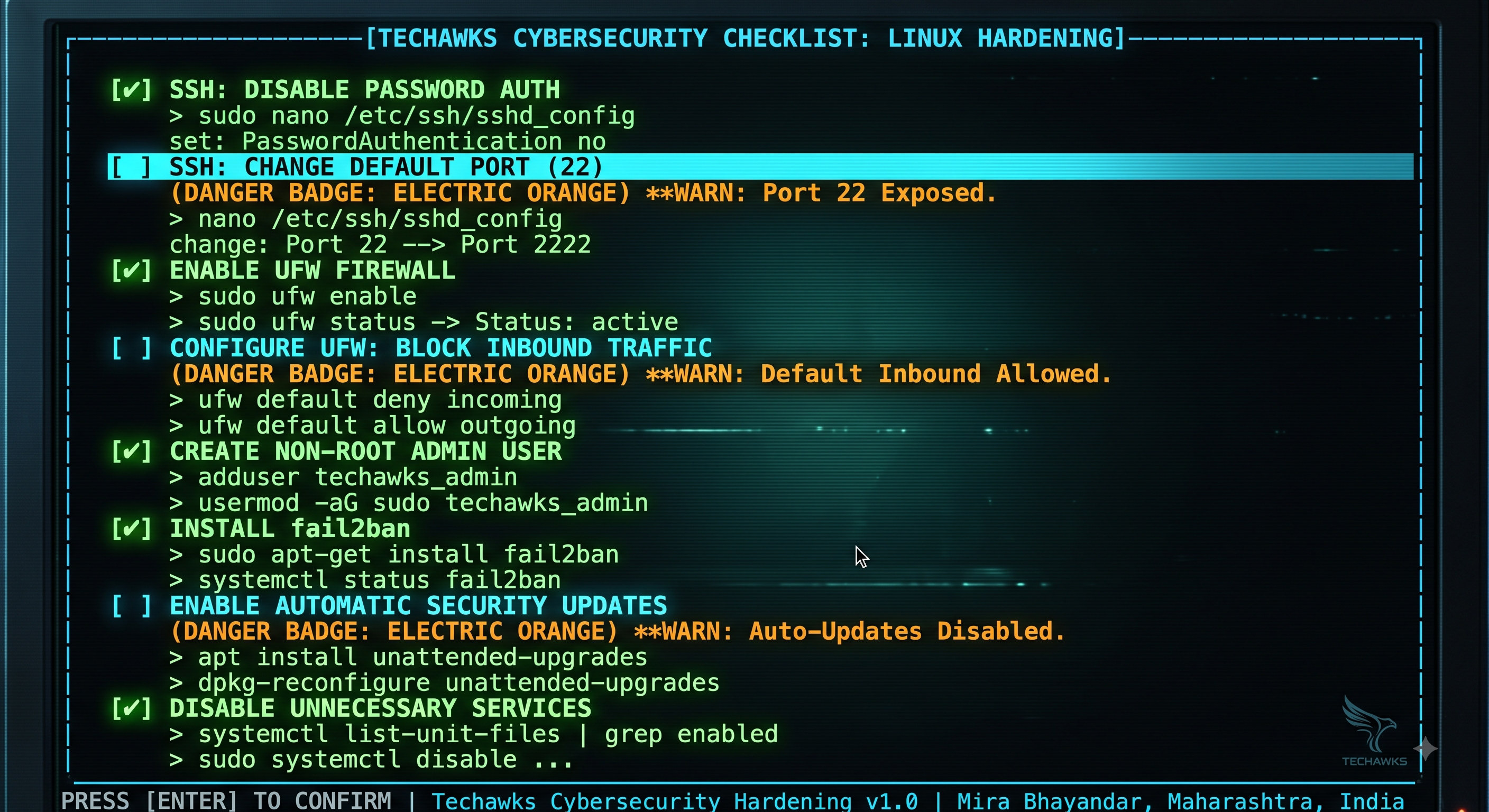
Default server installations prioritize accessibility over defense. Before hosting applications, running containers, or storing data, complete this 7-point server hardening checklist:
[ ] 1. Create a Non-Root Sudo User
Disable direct administrative logins immediately. Create a dedicated user account with sudo privileges to establish audit trails for system commands.
[ ] 2. Enforce Public-Key Authentication & Disable Password Logins
Deploy Ed25519 or RSA-4096 SSH keys. In /etc/ssh/sshd_config, set PasswordAuthentication no and PermitRootLogin no, then restart the SSH daemon.
[ ] 3. Change the Default SSH Port
Move SSH from port 22 to a non-standard high port (e.g., 2222 or 49152–65535). While not a replacement for strong cryptography, this eliminates over 95% of automated internet-wide port scans.
[ ] 4. Configure a Host-Based Firewall (UFW / nftables)
Apply a default-deny inbound posture:
ufw default deny incoming
ufw default allow outgoing
Explicitly allow only required ports (e.g., your custom SSH port, 80, 443) before enabling the firewall.
[ ] 5. Implement Automated Brute-Force Protection (Fail2ban)
Deploy fail2ban to monitor auth logs and automatically update firewall rules to ban IPs that exhibit repeated authentication failures.
[ ] 6. Enable Automatic Security Updates
Configure unattended upgrades (unattended-upgrades on Debian/Ubuntu or dnf-automatic on RHEL) to patch critical kernel and package vulnerabilities automatically.
[ ] 7. Audit Open Ports and Listening Daemons
Run ss -tulpn or netstat -tulpen to verify that no unnecessary services or debug interfaces are bound to public network interfaces (0.0.0.0).
Key Takeaways
Disabling SSH root and password authentication neutralizes the vast majority of initial-access attempts.
A default-deny firewall posture ensures only intentional services face the public internet.
Automated patching and brute-force mitigation provide passive, continuous defense against automated scanners.
CTA
Ready to master offensive security testing, infrastructure hardening, and defensive operations? Join Cybersecurity & Ethical Hacking at Techawks today to build real-world security expertise.
Default server installations prioritize accessibility over defense. Before hosting applications, running containers, or storing data, complete this 7-point server hardening checklist:
[ ] 1. Create a Non-Root Sudo User
Disable direct administrative logins immediately. Create a dedicated user account with sudo privileges to establish audit trails for system commands.
[ ] 2. Enforce Public-Key Authentication & Disable Password Logins
Deploy Ed25519 or RSA-4096 SSH keys. In /etc/ssh/sshd_config, set PasswordAuthentication no and PermitRootLogin no, then restart the SSH daemon.
[ ] 3. Change the Default SSH Port
Move SSH from port 22 to a non-standard high port (e.g., 2222 or 49152–65535). While not a replacement for strong cryptography, this eliminates over 95% of automated internet-wide port scans.
[ ] 4. Configure a Host-Based Firewall (UFW / nftables)
Apply a default-deny inbound posture:
ufw default deny incoming
ufw default allow outgoing
Explicitly allow only required ports (e.g., your custom SSH port, 80, 443) before enabling the firewall.
[ ] 5. Implement Automated Brute-Force Protection (Fail2ban)
Deploy fail2ban to monitor auth logs and automatically update firewall rules to ban IPs that exhibit repeated authentication failures.
[ ] 6. Enable Automatic Security Updates
Configure unattended upgrades (unattended-upgrades on Debian/Ubuntu or dnf-automatic on RHEL) to patch critical kernel and package vulnerabilities automatically.
[ ] 7. Audit Open Ports and Listening Daemons
Run ss -tulpn or netstat -tulpen to verify that no unnecessary services or debug interfaces are bound to public network interfaces (0.0.0.0).
Key Takeaways
Disabling SSH root and password authentication neutralizes the vast majority of initial-access attempts.
A default-deny firewall posture ensures only intentional services face the public internet.
Automated patching and brute-force mitigation provide passive, continuous defense against automated scanners.
CTA
Ready to master offensive security testing, infrastructure hardening, and defensive operations? Join Cybersecurity & Ethical Hacking at Techawks today to build real-world security expertise.
The Essential 7-Point Hardening Checklist for Securing Any New Linux Server
Default server installations prioritize accessibility over defense. Before hosting applications, running containers, or storing data, complete this 7-point server hardening checklist:
[ ] 1. Create a Non-Root Sudo User
Disable direct administrative logins immediately. Create a dedicated user account with sudo privileges to establish audit trails for system commands.
[ ] 2. Enforce Public-Key Authentication & Disable Password Logins
Deploy Ed25519 or RSA-4096 SSH keys. In /etc/ssh/sshd_config, set PasswordAuthentication no and PermitRootLogin no, then restart the SSH daemon.
[ ] 3. Change the Default SSH Port
Move SSH from port 22 to a non-standard high port (e.g., 2222 or 49152–65535). While not a replacement for strong cryptography, this eliminates over 95% of automated internet-wide port scans.
[ ] 4. Configure a Host-Based Firewall (UFW / nftables)
Apply a default-deny inbound posture:
ufw default deny incoming
ufw default allow outgoing
Explicitly allow only required ports (e.g., your custom SSH port, 80, 443) before enabling the firewall.
[ ] 5. Implement Automated Brute-Force Protection (Fail2ban)
Deploy fail2ban to monitor auth logs and automatically update firewall rules to ban IPs that exhibit repeated authentication failures.
[ ] 6. Enable Automatic Security Updates
Configure unattended upgrades (unattended-upgrades on Debian/Ubuntu or dnf-automatic on RHEL) to patch critical kernel and package vulnerabilities automatically.
[ ] 7. Audit Open Ports and Listening Daemons
Run ss -tulpn or netstat -tulpen to verify that no unnecessary services or debug interfaces are bound to public network interfaces (0.0.0.0).
Key Takeaways
Disabling SSH root and password authentication neutralizes the vast majority of initial-access attempts.
A default-deny firewall posture ensures only intentional services face the public internet.
Automated patching and brute-force mitigation provide passive, continuous defense against automated scanners.
CTA
Ready to master offensive security testing, infrastructure hardening, and defensive operations? Join Cybersecurity & Ethical Hacking at Techawks today to build real-world security expertise.

 English
 Arabic
 French
 Spanish
 Portuguese
 Turkish
 Dutch
Dutch
 Italiano
 Russian
 Romaian
 Portuguese (Brazil)
 Greek
Greek