


How to Implement Zero-Trust Service-to-Service Authentication in AWS Using IAM Roles for Service Accounts (IRSA)
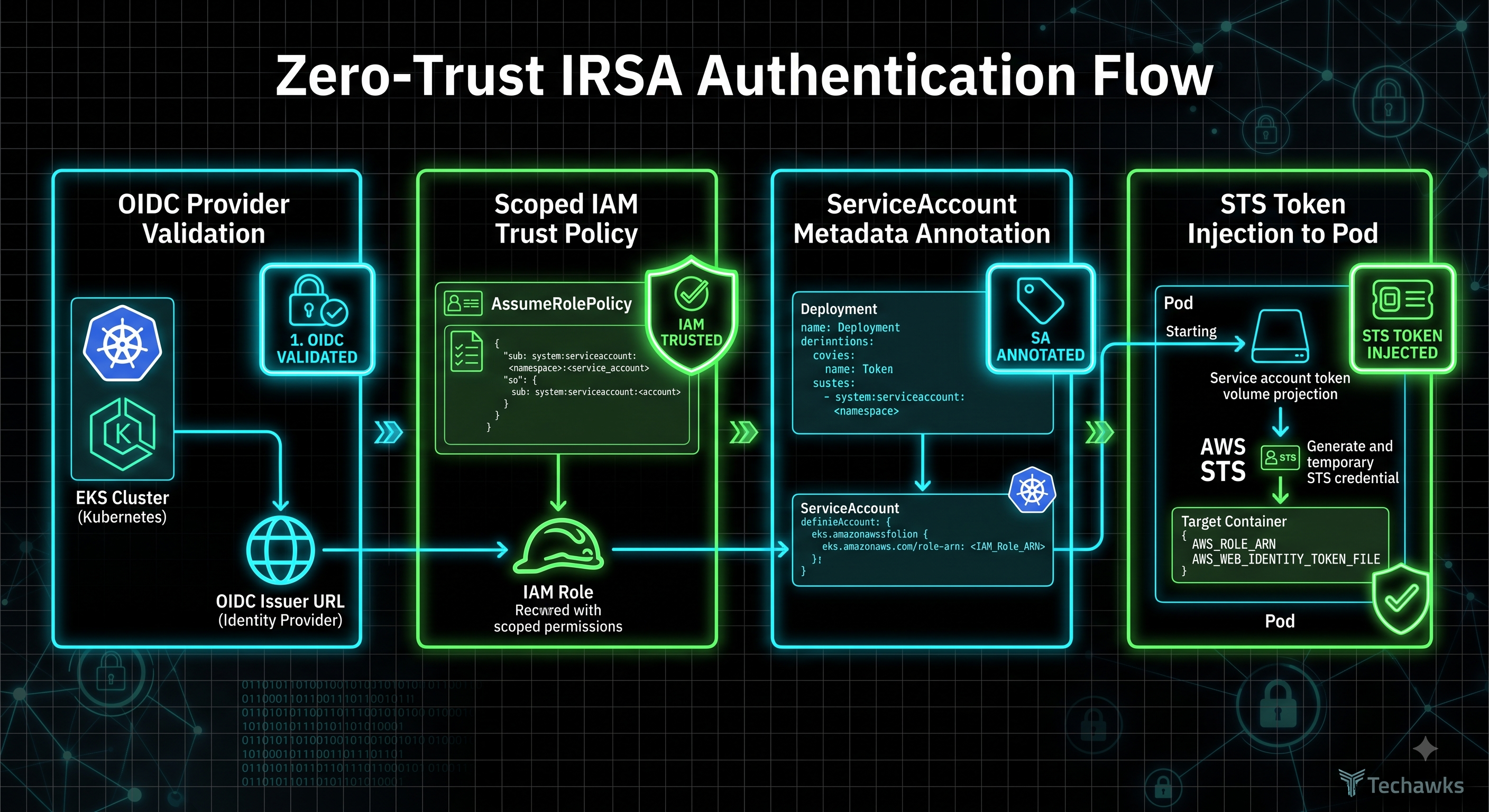
Assigning IAM roles directly to individual Kubernetes service accounts enforces the principle of least privilege at the pod level. Follow this 4-step sequence to configure and deploy IAM Roles for Service Accounts (IRSA) using OpenID Connect (OIDC):
Step 1: Associate an IAM OIDC Provider with Your EKS Cluster
Extract the cluster’s OIDC issuer URL and associate it with AWS IAM to enable federated token verification.
Bash
eksctl utils associate-iam-oidc-provider \
--cluster=production-cluster \
--region=us-east-1 \
--approve
Step 2: Define the Scoped IAM Role & Trust Policy
Create an IAM role whose trust policy restricts role assumption strictly to a specific Kubernetes namespace and service account name:
JSON
{
"Version": "2012-10-17",
"Statement": [{
"Effect": "Allow",
"Principal": {
"Federated": "arn:aws:iam::123456789012:oidc-provider/oidc.eks.us-east-1.amazonaws.com/id/EXAMPLE"
},
"Action": "sts:AssumeRoleWithWebIdentity",
"Condition": {
"StringEquals": {
"oidc.eks.us-east-1.amazonaws.com/id/EXAMPLE:sub": "system:serviceaccount:backend-app:s3-reader-sa"
}
}
}]
}
Step 3: Annotate the Kubernetes Service Account
Create the service account in your target namespace and inject the IAM role ARN into its metadata annotations:
YAML
apiVersion: v1
kind: ServiceAccount
metadata:
name: s3-reader-sa
namespace: backend-app
annotations:
eks.amazonaws.com/role-arn: arn:aws:iam::123456789012:role/ProductionS3ReaderRole
Step 4: Attach the Service Account to Your Deployment
Reference serviceAccountName in your pod spec. The EKS pod identity webhook automatically injects the temporary AWS_ROLE_ARN and AWS_WEB_IDENTITY_TOKEN_FILE environment variables without requiring static secret files:
YAML
apiVersion: apps/v1
kind: Deployment
metadata:
name: payment-processor
namespace: backend-app
spec:
template:
spec:
serviceAccountName: s3-reader-sa
containers:
- name: app
image: 123456789012.dkr.ecr.us-east-1.amazonaws.com/app:v1.2
Key Takeaways
Never assign broad AWS permissions to Kubernetes worker node instance profiles.
Use OIDC federation (sts:AssumeRoleWithWebIdentity) to issue short-lived, rotated STS credentials to pods.
Scope the trust policy strictly using system:serviceaccount:<namespace>:<serviceaccount> condition keys.
Eliminate static AWS access keys from secrets managers and container environment variables.
CTA
Want to master production cloud architecture, Kubernetes workload security, and advanced GitOps pipelines?
Join Techawks Cloud, DevOps & Open Source to collaborate with seasoned platform engineers, access real-world IaC templates, and level up your DevOps career.
Assigning IAM roles directly to individual Kubernetes service accounts enforces the principle of least privilege at the pod level. Follow this 4-step sequence to configure and deploy IAM Roles for Service Accounts (IRSA) using OpenID Connect (OIDC):
Step 1: Associate an IAM OIDC Provider with Your EKS Cluster
Extract the cluster’s OIDC issuer URL and associate it with AWS IAM to enable federated token verification.
Bash
eksctl utils associate-iam-oidc-provider \
--cluster=production-cluster \
--region=us-east-1 \
--approve
Step 2: Define the Scoped IAM Role & Trust Policy
Create an IAM role whose trust policy restricts role assumption strictly to a specific Kubernetes namespace and service account name:
JSON
{
"Version": "2012-10-17",
"Statement": [{
"Effect": "Allow",
"Principal": {
"Federated": "arn:aws:iam::123456789012:oidc-provider/oidc.eks.us-east-1.amazonaws.com/id/EXAMPLE"
},
"Action": "sts:AssumeRoleWithWebIdentity",
"Condition": {
"StringEquals": {
"oidc.eks.us-east-1.amazonaws.com/id/EXAMPLE:sub": "system:serviceaccount:backend-app:s3-reader-sa"
}
}
}]
}
Step 3: Annotate the Kubernetes Service Account
Create the service account in your target namespace and inject the IAM role ARN into its metadata annotations:
YAML
apiVersion: v1
kind: ServiceAccount
metadata:
name: s3-reader-sa
namespace: backend-app
annotations:
eks.amazonaws.com/role-arn: arn:aws:iam::123456789012:role/ProductionS3ReaderRole
Step 4: Attach the Service Account to Your Deployment
Reference serviceAccountName in your pod spec. The EKS pod identity webhook automatically injects the temporary AWS_ROLE_ARN and AWS_WEB_IDENTITY_TOKEN_FILE environment variables without requiring static secret files:
YAML
apiVersion: apps/v1
kind: Deployment
metadata:
name: payment-processor
namespace: backend-app
spec:
template:
spec:
serviceAccountName: s3-reader-sa
containers:
- name: app
image: 123456789012.dkr.ecr.us-east-1.amazonaws.com/app:v1.2
Key Takeaways
Never assign broad AWS permissions to Kubernetes worker node instance profiles.
Use OIDC federation (sts:AssumeRoleWithWebIdentity) to issue short-lived, rotated STS credentials to pods.
Scope the trust policy strictly using system:serviceaccount:<namespace>:<serviceaccount> condition keys.
Eliminate static AWS access keys from secrets managers and container environment variables.
CTA
Want to master production cloud architecture, Kubernetes workload security, and advanced GitOps pipelines?
Join Techawks Cloud, DevOps & Open Source to collaborate with seasoned platform engineers, access real-world IaC templates, and level up your DevOps career.
How to Implement Zero-Trust Service-to-Service Authentication in AWS Using IAM Roles for Service Accounts (IRSA)
Assigning IAM roles directly to individual Kubernetes service accounts enforces the principle of least privilege at the pod level. Follow this 4-step sequence to configure and deploy IAM Roles for Service Accounts (IRSA) using OpenID Connect (OIDC):
Step 1: Associate an IAM OIDC Provider with Your EKS Cluster
Extract the cluster’s OIDC issuer URL and associate it with AWS IAM to enable federated token verification.
Bash
eksctl utils associate-iam-oidc-provider \
--cluster=production-cluster \
--region=us-east-1 \
--approve
Step 2: Define the Scoped IAM Role & Trust Policy
Create an IAM role whose trust policy restricts role assumption strictly to a specific Kubernetes namespace and service account name:
JSON
{
"Version": "2012-10-17",
"Statement": [{
"Effect": "Allow",
"Principal": {
"Federated": "arn:aws:iam::123456789012:oidc-provider/oidc.eks.us-east-1.amazonaws.com/id/EXAMPLE"
},
"Action": "sts:AssumeRoleWithWebIdentity",
"Condition": {
"StringEquals": {
"oidc.eks.us-east-1.amazonaws.com/id/EXAMPLE:sub": "system:serviceaccount:backend-app:s3-reader-sa"
}
}
}]
}
Step 3: Annotate the Kubernetes Service Account
Create the service account in your target namespace and inject the IAM role ARN into its metadata annotations:
YAML
apiVersion: v1
kind: ServiceAccount
metadata:
name: s3-reader-sa
namespace: backend-app
annotations:
eks.amazonaws.com/role-arn: arn:aws:iam::123456789012:role/ProductionS3ReaderRole
Step 4: Attach the Service Account to Your Deployment
Reference serviceAccountName in your pod spec. The EKS pod identity webhook automatically injects the temporary AWS_ROLE_ARN and AWS_WEB_IDENTITY_TOKEN_FILE environment variables without requiring static secret files:
YAML
apiVersion: apps/v1
kind: Deployment
metadata:
name: payment-processor
namespace: backend-app
spec:
template:
spec:
serviceAccountName: s3-reader-sa
containers:
- name: app
image: 123456789012.dkr.ecr.us-east-1.amazonaws.com/app:v1.2
Key Takeaways
Never assign broad AWS permissions to Kubernetes worker node instance profiles.
Use OIDC federation (sts:AssumeRoleWithWebIdentity) to issue short-lived, rotated STS credentials to pods.
Scope the trust policy strictly using system:serviceaccount:<namespace>:<serviceaccount> condition keys.
Eliminate static AWS access keys from secrets managers and container environment variables.
CTA
Want to master production cloud architecture, Kubernetes workload security, and advanced GitOps pipelines?
Join Techawks Cloud, DevOps & Open Source to collaborate with seasoned platform engineers, access real-world IaC templates, and level up your DevOps career.

 English
 Arabic
 French
 Spanish
 Portuguese
 Deutsch
 Dutch
Dutch
 Italiano
 Russian
 Romaian
 Portuguese (Brazil)
 Greek
Greek