


Stop memorizing syntax: How to master Git under the hood (Blobs, Trees, and Commits).
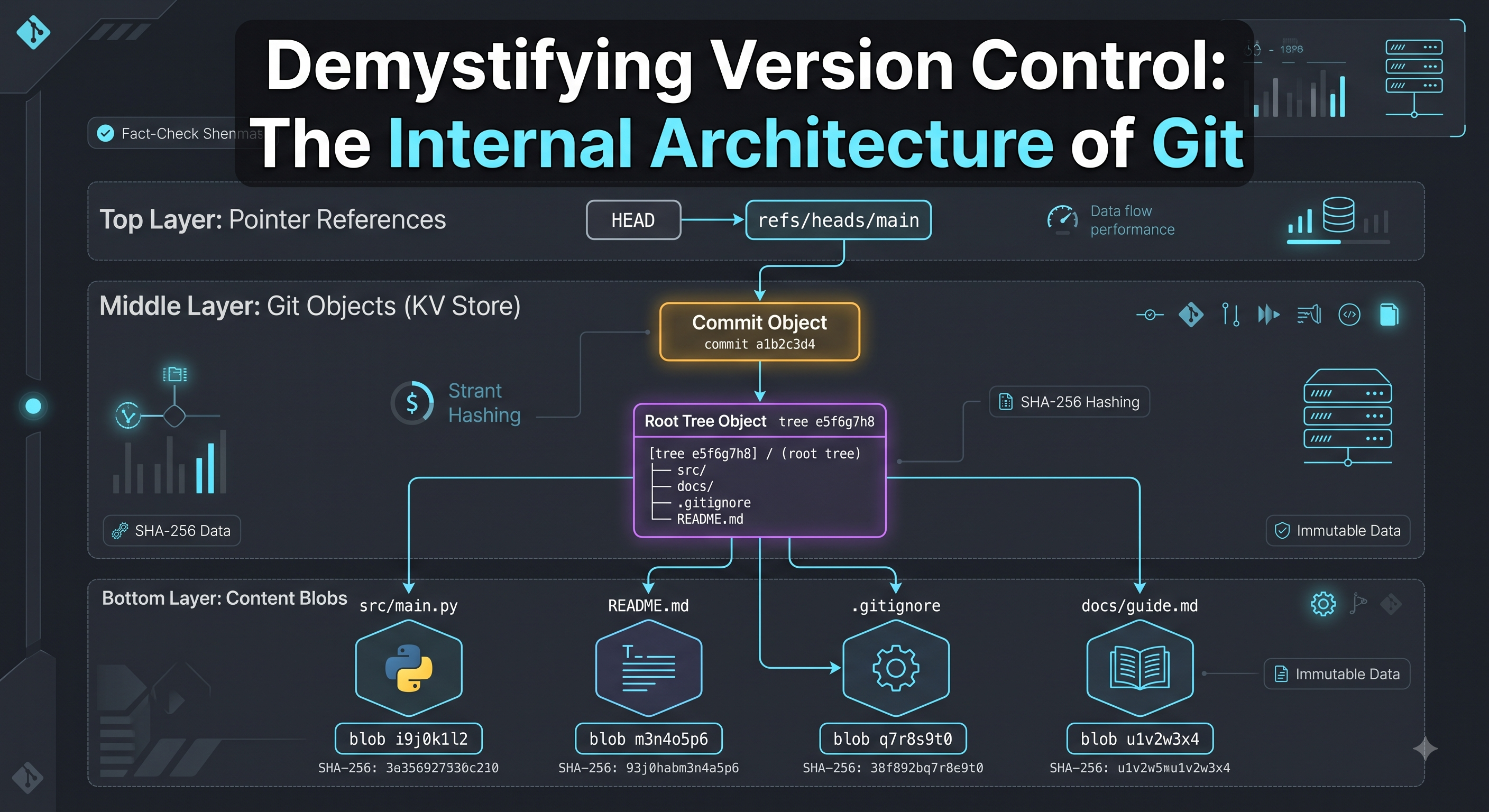
Git is not a system that tracks file differences or "diffs." Git is a content-addressable key-value store with a VCS interface on top.
Whenever you commit, Git snapshots your entire working directory using three primary object types stored in the .git/objects directory:
The Blob (Binary Large Object):
Stores the raw data/contents of a single file (no file name, no metadata, just content).
Keyed by the SHA hash of its content. If two files in different folders have identical code, Git stores only one Blob.
The Tree Object (Directories):
Acts like a directory listing.
Contains pointers (hashes) to Blobs (files) and other Trees (subdirectories), along with file names, execution permissions, and directory structure.
The Commit Object (Snapshots in Time):
Points to a top-level Tree representing the project root at that instant.
Contains metadata: author, timestamp, commit message, and a pointer to Parent Commit(s).
Plaintext
[ Commit Object ]
├── Parent Hash: a1b2c3...
├── Author: You <you@techawks.com>
└── Root Tree Hash: d4e5f6...
├── "main.py" ──► [ Blob: 9a8b7c... ]
└── "src/" ──► [ Sub-Tree: 1f2e3d... ]
└── "utils.py" ──► [ Blob: 4e5d6c... ]
Why This Changes How You Code:
Branches are just 41-byte text files: A Git branch is not an expensive container; it is simply a text file in .git/refs/heads/ containing a 40-character SHA-1/SHA-256 hash pointing to a specific commit object.
HEAD is just a pointer: HEAD simply points to your current branch reference or directly to a commit hash ("detached HEAD state").
Rebase vs. Merge in Plain English:
Merge: Creates a new commit object with two parent hashes, joining two branches of the graph.
Rebase: Replays your series of commit objects sequentially onto a new base commit hash, creating entirely new SHA hashes for each replayed commit to keep history linear.
Discussion Question
For CS students and early engineers: What was the one Git command that completely broke your project before you learned how Git actually worked—git rebase, git reset --hard, or a recursive merge conflict? Let’s break down how to fix it in the comments.
CTA
Master foundational computer science with Techawks Students.
Join our Students in Tech community to dive into systems design, data structures, and practical engineering guides alongside ambitious students and developers worldwide: [Join Techawks Students Community]
Git is not a system that tracks file differences or "diffs." Git is a content-addressable key-value store with a VCS interface on top.
Whenever you commit, Git snapshots your entire working directory using three primary object types stored in the .git/objects directory:
The Blob (Binary Large Object):
Stores the raw data/contents of a single file (no file name, no metadata, just content).
Keyed by the SHA hash of its content. If two files in different folders have identical code, Git stores only one Blob.
The Tree Object (Directories):
Acts like a directory listing.
Contains pointers (hashes) to Blobs (files) and other Trees (subdirectories), along with file names, execution permissions, and directory structure.
The Commit Object (Snapshots in Time):
Points to a top-level Tree representing the project root at that instant.
Contains metadata: author, timestamp, commit message, and a pointer to Parent Commit(s).
Plaintext
[ Commit Object ]
├── Parent Hash: a1b2c3...
├── Author: You <you@techawks.com>
└── Root Tree Hash: d4e5f6...
├── "main.py" ──► [ Blob: 9a8b7c... ]
└── "src/" ──► [ Sub-Tree: 1f2e3d... ]
└── "utils.py" ──► [ Blob: 4e5d6c... ]
Why This Changes How You Code:
Branches are just 41-byte text files: A Git branch is not an expensive container; it is simply a text file in .git/refs/heads/ containing a 40-character SHA-1/SHA-256 hash pointing to a specific commit object.
HEAD is just a pointer: HEAD simply points to your current branch reference or directly to a commit hash ("detached HEAD state").
Rebase vs. Merge in Plain English:
Merge: Creates a new commit object with two parent hashes, joining two branches of the graph.
Rebase: Replays your series of commit objects sequentially onto a new base commit hash, creating entirely new SHA hashes for each replayed commit to keep history linear.
Discussion Question
For CS students and early engineers: What was the one Git command that completely broke your project before you learned how Git actually worked—git rebase, git reset --hard, or a recursive merge conflict? Let’s break down how to fix it in the comments.
CTA
Master foundational computer science with Techawks Students.
Join our Students in Tech community to dive into systems design, data structures, and practical engineering guides alongside ambitious students and developers worldwide: [Join Techawks Students Community]
Stop memorizing syntax: How to master Git under the hood (Blobs, Trees, and Commits).
Git is not a system that tracks file differences or "diffs." Git is a content-addressable key-value store with a VCS interface on top.
Whenever you commit, Git snapshots your entire working directory using three primary object types stored in the .git/objects directory:
The Blob (Binary Large Object):
Stores the raw data/contents of a single file (no file name, no metadata, just content).
Keyed by the SHA hash of its content. If two files in different folders have identical code, Git stores only one Blob.
The Tree Object (Directories):
Acts like a directory listing.
Contains pointers (hashes) to Blobs (files) and other Trees (subdirectories), along with file names, execution permissions, and directory structure.
The Commit Object (Snapshots in Time):
Points to a top-level Tree representing the project root at that instant.
Contains metadata: author, timestamp, commit message, and a pointer to Parent Commit(s).
Plaintext
[ Commit Object ]
├── Parent Hash: a1b2c3...
├── Author: You <you@techawks.com>
└── Root Tree Hash: d4e5f6...
├── "main.py" ──► [ Blob: 9a8b7c... ]
└── "src/" ──► [ Sub-Tree: 1f2e3d... ]
└── "utils.py" ──► [ Blob: 4e5d6c... ]
Why This Changes How You Code:
Branches are just 41-byte text files: A Git branch is not an expensive container; it is simply a text file in .git/refs/heads/ containing a 40-character SHA-1/SHA-256 hash pointing to a specific commit object.
HEAD is just a pointer: HEAD simply points to your current branch reference or directly to a commit hash ("detached HEAD state").
Rebase vs. Merge in Plain English:
Merge: Creates a new commit object with two parent hashes, joining two branches of the graph.
Rebase: Replays your series of commit objects sequentially onto a new base commit hash, creating entirely new SHA hashes for each replayed commit to keep history linear.
Discussion Question
For CS students and early engineers: What was the one Git command that completely broke your project before you learned how Git actually worked—git rebase, git reset --hard, or a recursive merge conflict? Let’s break down how to fix it in the comments.
CTA
Master foundational computer science with Techawks Students.
Join our Students in Tech community to dive into systems design, data structures, and practical engineering guides alongside ambitious students and developers worldwide: [Join Techawks Students Community]

 English
 Arabic
 French
 Spanish
 Portuguese
 Deutsch
 Dutch
Dutch
 Italiano
 Russian
 Romaian
 Portuguese (Brazil)
 Greek
Greek