


How to Optimize Your GitHub Profile for Tech Recruiters: Step-by-Step Guide
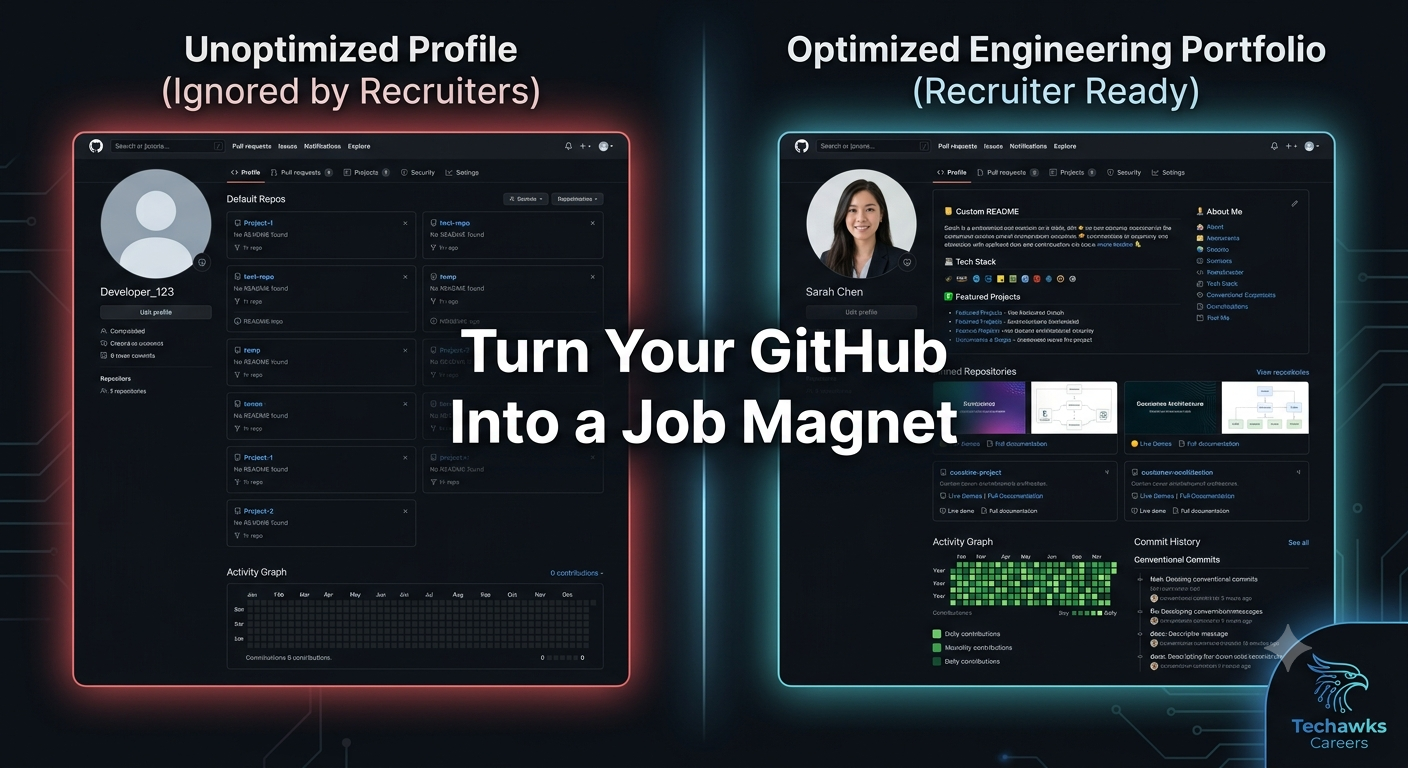
Your GitHub profile is your live engineering portfolio. To stand out to hiring managers and technical recruiters, you need to structure your profile so it immediately communicates code quality, documentation skills, and problem-solving ability.
Follow this step-by-step tutorial to transform your GitHub into a recruiter magnet:
Step 1: Build a Custom Profile README
Create a repository named exactly as your GitHub username to unlock a special profile README that displays at the top of your landing page.
Keep it Concise: Include a brief 2-sentence bio detailing your core stack (e.g., Node.js, TypeScript, PostgreSQL) and current focus.
Highlight Key Metrics: Use dynamic badges to display language proficiencies, total contributions, or open-source pull requests merged.
Add Direct Links: Provide quick access to your LinkedIn, personal portfolio, and contact info.
Step 2: Curate and Pin Your Top 3–4 Repositories
Do not leave your pinned repositories blank or let GitHub default to your most recently updated projects. Carefully select 3 to 4 repositories that demonstrate:
Full-Stack Competency: A complete, deployed application with front-end, API, and database integration.
Technical Depth: A project featuring non-trivial complexity (e.g., custom rate limiter, cache layer, or data processing pipeline).
Open-Source Impact: A contributed PR to an established open-source tool or community project.
Step 3: Write Production-Grade Repository READMEs
A recruiter or engineering lead will rarely clone your repo to run it locally; they read the README. Every pinned project must include:
Project Architecture Diagram: A clear flowchart illustrating how data moves through your system.
Tech Stack & Key Trade-Offs: Explanations of why you chose specific frameworks or databases over alternatives.
Live Demo & Deployment Links: A working URL (e.g., hosted on Vercel, AWS, or Render) alongside a 10-second GIF demonstrating core functionality.
Setup Instructions: Precise, copy-pasteable terminal commands to run the project locally.
Step 4: Practice Clean Commit Hygiene
Recruiters look at repository commit histories to evaluate how you work within a team.
Avoid generic commit messages like fix bug or updated code.
Use Conventional Commits (e.g., feat: add user authentication endpoint or fix: handle null token error in auth middleware).
Keep feature branches clean and write descriptive Pull Request descriptions.
Key Takeaways
First Impressions Matter: A custom profile README immediately establishes professionalism and communicates your core engineering stack.
Document Like a Senior: Comprehensive repository READMEs with diagrams and live demos matter more to hiring teams than thousands of raw lines of code.
Demonstrate Workflow Discipline: Clean commit history and conventional messages show that you understand industry team practices.
CTA
Want expert feedback on your developer portfolio and GitHub profile? Join Tech Jobs & Opportunities to get profile reviews, benchmark your application materials, and connect directly with hiring managers in tech.
Your GitHub profile is your live engineering portfolio. To stand out to hiring managers and technical recruiters, you need to structure your profile so it immediately communicates code quality, documentation skills, and problem-solving ability.
Follow this step-by-step tutorial to transform your GitHub into a recruiter magnet:
Step 1: Build a Custom Profile README
Create a repository named exactly as your GitHub username to unlock a special profile README that displays at the top of your landing page.
Keep it Concise: Include a brief 2-sentence bio detailing your core stack (e.g., Node.js, TypeScript, PostgreSQL) and current focus.
Highlight Key Metrics: Use dynamic badges to display language proficiencies, total contributions, or open-source pull requests merged.
Add Direct Links: Provide quick access to your LinkedIn, personal portfolio, and contact info.
Step 2: Curate and Pin Your Top 3–4 Repositories
Do not leave your pinned repositories blank or let GitHub default to your most recently updated projects. Carefully select 3 to 4 repositories that demonstrate:
Full-Stack Competency: A complete, deployed application with front-end, API, and database integration.
Technical Depth: A project featuring non-trivial complexity (e.g., custom rate limiter, cache layer, or data processing pipeline).
Open-Source Impact: A contributed PR to an established open-source tool or community project.
Step 3: Write Production-Grade Repository READMEs
A recruiter or engineering lead will rarely clone your repo to run it locally; they read the README. Every pinned project must include:
Project Architecture Diagram: A clear flowchart illustrating how data moves through your system.
Tech Stack & Key Trade-Offs: Explanations of why you chose specific frameworks or databases over alternatives.
Live Demo & Deployment Links: A working URL (e.g., hosted on Vercel, AWS, or Render) alongside a 10-second GIF demonstrating core functionality.
Setup Instructions: Precise, copy-pasteable terminal commands to run the project locally.
Step 4: Practice Clean Commit Hygiene
Recruiters look at repository commit histories to evaluate how you work within a team.
Avoid generic commit messages like fix bug or updated code.
Use Conventional Commits (e.g., feat: add user authentication endpoint or fix: handle null token error in auth middleware).
Keep feature branches clean and write descriptive Pull Request descriptions.
Key Takeaways
First Impressions Matter: A custom profile README immediately establishes professionalism and communicates your core engineering stack.
Document Like a Senior: Comprehensive repository READMEs with diagrams and live demos matter more to hiring teams than thousands of raw lines of code.
Demonstrate Workflow Discipline: Clean commit history and conventional messages show that you understand industry team practices.
CTA
Want expert feedback on your developer portfolio and GitHub profile? Join Tech Jobs & Opportunities to get profile reviews, benchmark your application materials, and connect directly with hiring managers in tech.
How to Optimize Your GitHub Profile for Tech Recruiters: Step-by-Step Guide
Your GitHub profile is your live engineering portfolio. To stand out to hiring managers and technical recruiters, you need to structure your profile so it immediately communicates code quality, documentation skills, and problem-solving ability.
Follow this step-by-step tutorial to transform your GitHub into a recruiter magnet:
Step 1: Build a Custom Profile README
Create a repository named exactly as your GitHub username to unlock a special profile README that displays at the top of your landing page.
Keep it Concise: Include a brief 2-sentence bio detailing your core stack (e.g., Node.js, TypeScript, PostgreSQL) and current focus.
Highlight Key Metrics: Use dynamic badges to display language proficiencies, total contributions, or open-source pull requests merged.
Add Direct Links: Provide quick access to your LinkedIn, personal portfolio, and contact info.
Step 2: Curate and Pin Your Top 3–4 Repositories
Do not leave your pinned repositories blank or let GitHub default to your most recently updated projects. Carefully select 3 to 4 repositories that demonstrate:
Full-Stack Competency: A complete, deployed application with front-end, API, and database integration.
Technical Depth: A project featuring non-trivial complexity (e.g., custom rate limiter, cache layer, or data processing pipeline).
Open-Source Impact: A contributed PR to an established open-source tool or community project.
Step 3: Write Production-Grade Repository READMEs
A recruiter or engineering lead will rarely clone your repo to run it locally; they read the README. Every pinned project must include:
Project Architecture Diagram: A clear flowchart illustrating how data moves through your system.
Tech Stack & Key Trade-Offs: Explanations of why you chose specific frameworks or databases over alternatives.
Live Demo & Deployment Links: A working URL (e.g., hosted on Vercel, AWS, or Render) alongside a 10-second GIF demonstrating core functionality.
Setup Instructions: Precise, copy-pasteable terminal commands to run the project locally.
Step 4: Practice Clean Commit Hygiene
Recruiters look at repository commit histories to evaluate how you work within a team.
Avoid generic commit messages like fix bug or updated code.
Use Conventional Commits (e.g., feat: add user authentication endpoint or fix: handle null token error in auth middleware).
Keep feature branches clean and write descriptive Pull Request descriptions.
Key Takeaways
First Impressions Matter: A custom profile README immediately establishes professionalism and communicates your core engineering stack.
Document Like a Senior: Comprehensive repository READMEs with diagrams and live demos matter more to hiring teams than thousands of raw lines of code.
Demonstrate Workflow Discipline: Clean commit history and conventional messages show that you understand industry team practices.
CTA
Want expert feedback on your developer portfolio and GitHub profile? Join Tech Jobs & Opportunities to get profile reviews, benchmark your application materials, and connect directly with hiring managers in tech.

 English
 French
 Spanish
 Portuguese
 Deutsch
 Turkish
 Dutch
Dutch
 Italiano
 Russian
 Romaian
 Portuguese (Brazil)
 Greek
Greek