


Beyond the Chatbox: The Product & UX Blueprint for Declarative Generative UI
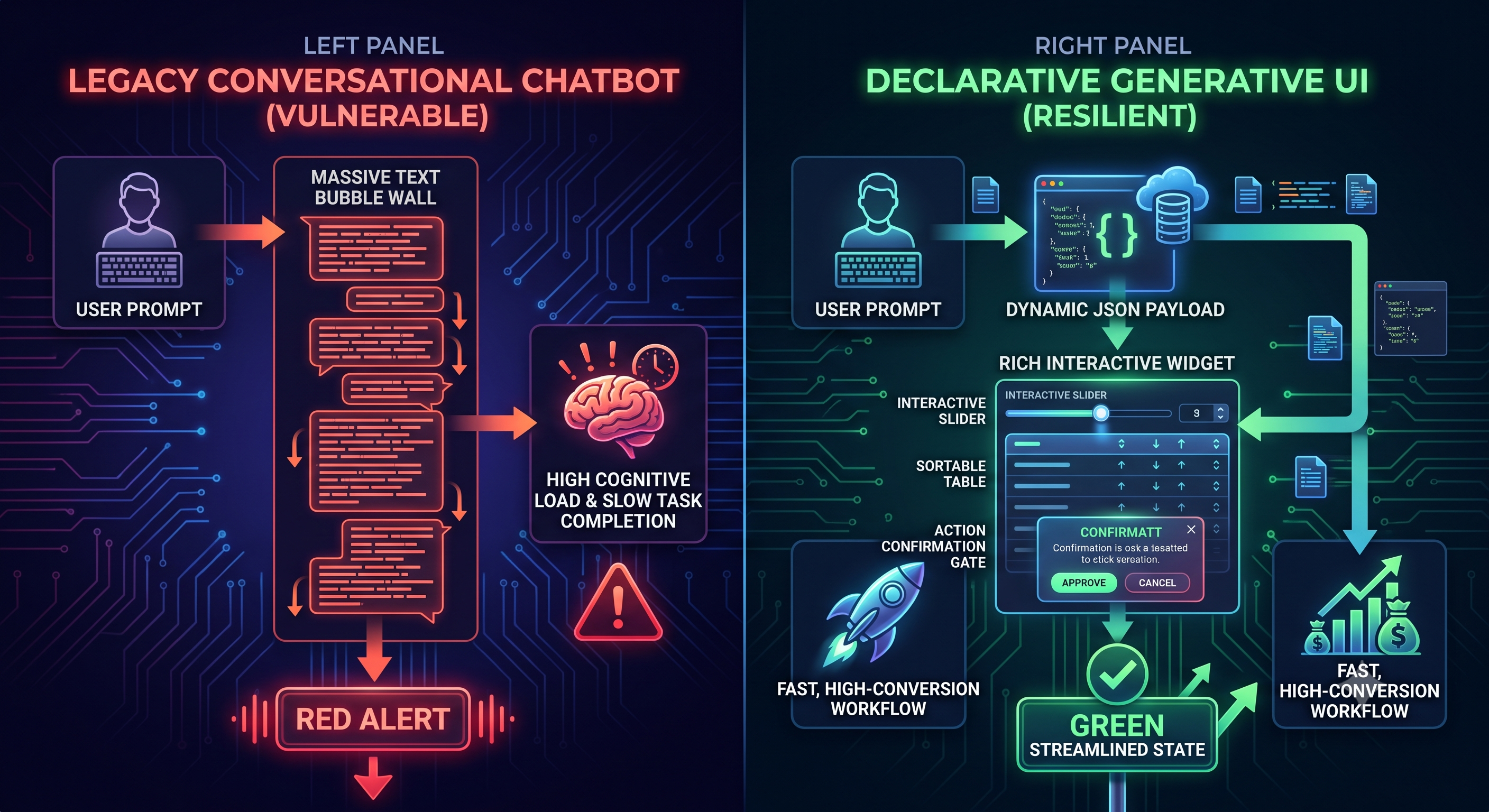
Treating text chat as the universal interface for AI products creates massive friction:
Text is inefficient for multi-variable data manipulation.
Forms, interactive sliders, filterable tables, and canvas widgets will always beat conversational back-and-forth for structured tasks.
Generative UI (GenUI) solves this by using AI not just to produce text, but to stream structured schema payloads (JSON) that render modular, design-system-compliant components on the fly.
If you are designing AI-driven products, follow these 3 Core Product & UX Principles:
1. Shift from Canvas Layouts to Constraint-Based Design
Instead of wireframing rigid, static screens for every edge-case persona, product teams must define the component registry and assembly rules:
Component Primitives: Build audited, accessible UI blocks (e.g., <ComparisonCard/>, <InteractiveSlider/>, <DataGrid/>, <ActionGate/>).
Declarative Schemas: The AI agent determines which component to render and binds the dynamic data payload, but it never renders arbitrary, unsandboxed HTML/CSS.
Design System Bounds: Brand styling, typography, spacing, and WCAG accessibility standards remain locked into the design system.
2. Calibrated Trust: Action Gates vs. Frictionless Execution
As interfaces become autonomous, usability depends on Action Legibility:
Low Impact / Reversible (Read/Filter/Draft): Render inline instantly without modal interruption.
High Impact / Irreversible (Execute payment, delete records, broadcast message): Require an explicit Action Gate—a visual component with an explicit diff preview, impact summary, and two-step confirmation before execution.
3. Spatial Co-Creation: The Side-by-Side Canvas Pattern
Moving beyond single-thread chat means adopting a split-pane mental model:
Left Pane (Intent Stream): Minimalist natural-language input or voice prompt.
Right Pane (Dynamic Workspace Canvas): A living, interactive canvas where the agent renders editable forms, interactive graphs, and layout reorganizations that the user can directly manipulate with a mouse or touch.
Discussion Question
Are you moving your AI product experiences away from pure conversational chat toward hybrid GenUI/canvas surfaces, or is chat still your primary entry point? Where are you seeing the most drop-off?
CTA
Design intuitive, high-conversion interfaces for the next generation of software.
👉 Join Product, UX & Design to access interactive component design systems, UX teardowns, product strategy frameworks, and design reviews: [Insert Link / bio link]
Treating text chat as the universal interface for AI products creates massive friction:
Text is inefficient for multi-variable data manipulation.
Forms, interactive sliders, filterable tables, and canvas widgets will always beat conversational back-and-forth for structured tasks.
Generative UI (GenUI) solves this by using AI not just to produce text, but to stream structured schema payloads (JSON) that render modular, design-system-compliant components on the fly.
If you are designing AI-driven products, follow these 3 Core Product & UX Principles:
1. Shift from Canvas Layouts to Constraint-Based Design
Instead of wireframing rigid, static screens for every edge-case persona, product teams must define the component registry and assembly rules:
Component Primitives: Build audited, accessible UI blocks (e.g., <ComparisonCard/>, <InteractiveSlider/>, <DataGrid/>, <ActionGate/>).
Declarative Schemas: The AI agent determines which component to render and binds the dynamic data payload, but it never renders arbitrary, unsandboxed HTML/CSS.
Design System Bounds: Brand styling, typography, spacing, and WCAG accessibility standards remain locked into the design system.
2. Calibrated Trust: Action Gates vs. Frictionless Execution
As interfaces become autonomous, usability depends on Action Legibility:
Low Impact / Reversible (Read/Filter/Draft): Render inline instantly without modal interruption.
High Impact / Irreversible (Execute payment, delete records, broadcast message): Require an explicit Action Gate—a visual component with an explicit diff preview, impact summary, and two-step confirmation before execution.
3. Spatial Co-Creation: The Side-by-Side Canvas Pattern
Moving beyond single-thread chat means adopting a split-pane mental model:
Left Pane (Intent Stream): Minimalist natural-language input or voice prompt.
Right Pane (Dynamic Workspace Canvas): A living, interactive canvas where the agent renders editable forms, interactive graphs, and layout reorganizations that the user can directly manipulate with a mouse or touch.
Discussion Question
Are you moving your AI product experiences away from pure conversational chat toward hybrid GenUI/canvas surfaces, or is chat still your primary entry point? Where are you seeing the most drop-off?
CTA
Design intuitive, high-conversion interfaces for the next generation of software.
👉 Join Product, UX & Design to access interactive component design systems, UX teardowns, product strategy frameworks, and design reviews: [Insert Link / bio link]
Beyond the Chatbox: The Product & UX Blueprint for Declarative Generative UI
Treating text chat as the universal interface for AI products creates massive friction:
Text is inefficient for multi-variable data manipulation.
Forms, interactive sliders, filterable tables, and canvas widgets will always beat conversational back-and-forth for structured tasks.
Generative UI (GenUI) solves this by using AI not just to produce text, but to stream structured schema payloads (JSON) that render modular, design-system-compliant components on the fly.
If you are designing AI-driven products, follow these 3 Core Product & UX Principles:
1. Shift from Canvas Layouts to Constraint-Based Design
Instead of wireframing rigid, static screens for every edge-case persona, product teams must define the component registry and assembly rules:
Component Primitives: Build audited, accessible UI blocks (e.g., <ComparisonCard/>, <InteractiveSlider/>, <DataGrid/>, <ActionGate/>).
Declarative Schemas: The AI agent determines which component to render and binds the dynamic data payload, but it never renders arbitrary, unsandboxed HTML/CSS.
Design System Bounds: Brand styling, typography, spacing, and WCAG accessibility standards remain locked into the design system.
2. Calibrated Trust: Action Gates vs. Frictionless Execution
As interfaces become autonomous, usability depends on Action Legibility:
Low Impact / Reversible (Read/Filter/Draft): Render inline instantly without modal interruption.
High Impact / Irreversible (Execute payment, delete records, broadcast message): Require an explicit Action Gate—a visual component with an explicit diff preview, impact summary, and two-step confirmation before execution.
3. Spatial Co-Creation: The Side-by-Side Canvas Pattern
Moving beyond single-thread chat means adopting a split-pane mental model:
Left Pane (Intent Stream): Minimalist natural-language input or voice prompt.
Right Pane (Dynamic Workspace Canvas): A living, interactive canvas where the agent renders editable forms, interactive graphs, and layout reorganizations that the user can directly manipulate with a mouse or touch.
Discussion Question
Are you moving your AI product experiences away from pure conversational chat toward hybrid GenUI/canvas surfaces, or is chat still your primary entry point? Where are you seeing the most drop-off?
CTA
Design intuitive, high-conversion interfaces for the next generation of software.
👉 Join Product, UX & Design to access interactive component design systems, UX teardowns, product strategy frameworks, and design reviews: [Insert Link / bio link]

 English
 Arabic
 French
 Spanish
 Portuguese
 Deutsch
 Turkish
 Italiano
 Russian
 Romaian
 Portuguese (Brazil)
 Greek
Greek