


Step-by-Step: Implementing Cloud-Agnostic Secret Management with HashiCorp Vault
As tech companies in the UAE scale across regional cloud infrastructure (AWS, Azure, Google Cloud), managing application secrets, database credentials, and API keys across multiple cloud accounts creates operational friction and security risks.
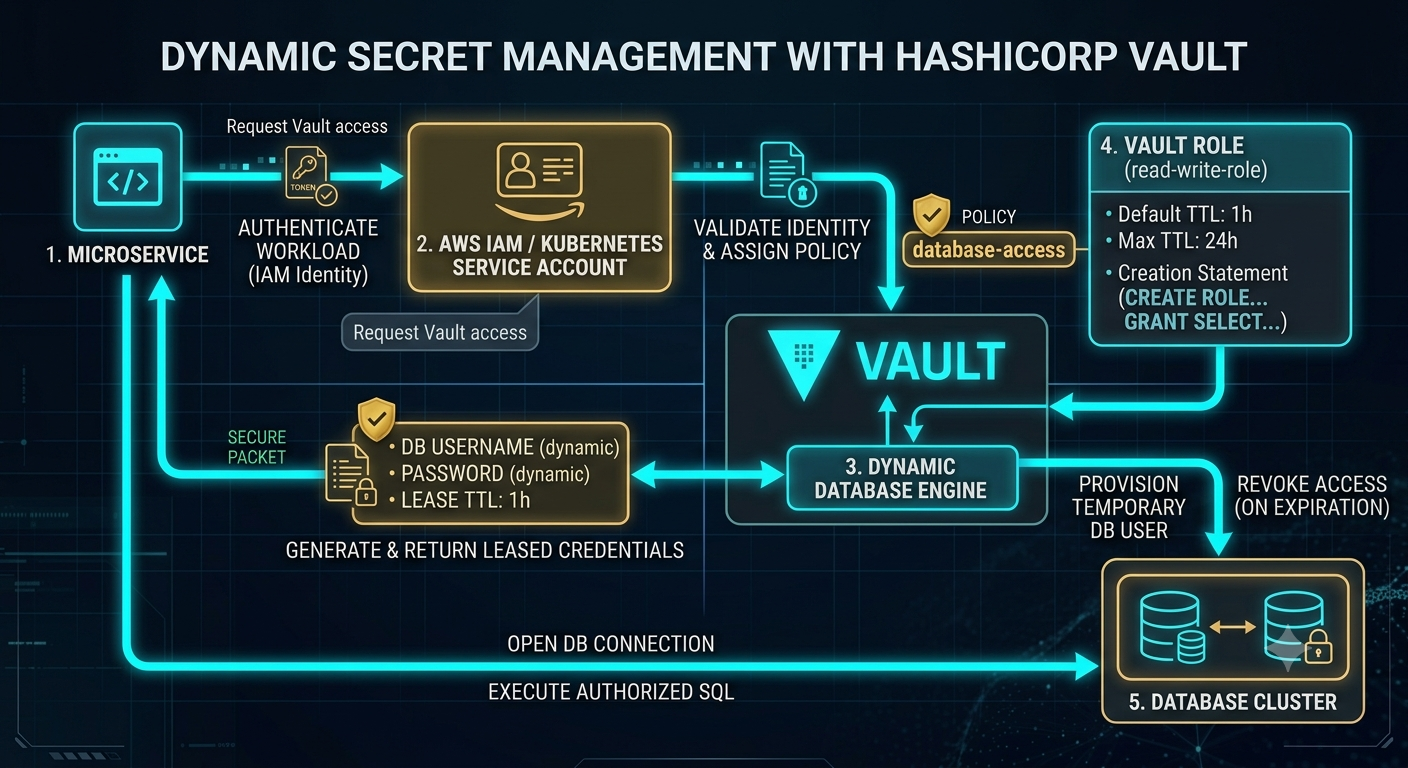
Static credentials left in environment variables or configuration files are vulnerable to leakages. Implementing HashiCorp Vault with dynamic secret engines allows applications to request auto-expiring database credentials on demand.
Here is a 4-step tutorial to implement dynamic secret management in production:
Step 1: Authenticate Workloads using Cloud IAM Identities
Instead of static API tokens, configure Vault to authenticate workloads using their native cloud identities (e.g., AWS IAM roles, Azure Managed Identities, or Kubernetes Service Accounts).
Bash
# Enable AWS authentication engine in Vault
vault auth enable aws
# Map an IAM role to a specific Vault access policy
vault write auth/aws/role/backend-service \
auth_type=iam \
bound_iam_principal_arn=arn:aws:iam::123456789012:role/BackendRole \
policies=database-access \
ttl=1h
Step 2: Enable Dynamic Database Secrets Engine
Configure Vault to generate ephemeral database credentials rather than retrieving a static password.
Bash
# Mount the database secrets engine
vault secrets enable database
# Configure connection to primary database
vault write database/config/production-db \
plugin_name=postgresql-database-plugin \
allowed_roles="read-write-role" \
connection_url="postgresql://{{username}}:{{password}}@db.internal:5432/app" \
username="vault_admin" \
password="admin_password"
Step 3: Define Dynamic Role and Provision Short-Lived Users
Create a Vault role that automatically provisions temporary SQL users with auto-expiring Lease Time-To-Live (TTL).
SQL
-- Vault creates a temporary database user on demand and drops it on expiration
vault write database/roles/read-write-role \
db_name=production-db \
creation_statements="CREATE ROLE \"{{name}}\" WITH LOGIN PASSWORD '{{password}}' VALID UNTIL '{{expiration}}'; \
GRANT SELECT, INSERT, UPDATE ON ALL TABLES IN SCHEMA public TO \"{{name}}\";" \
default_ttl="1h" \
max_ttl="24h"
Step 4: Fetch and Rotate Secrets Programmatically at Runtime
Update application workloads to request database credentials via Vault's REST API or SDKs at runtime before opening database connections. Once the TTL expires, Vault automatically revokes access at the database level, eliminating risk from leaked environment variables.
Key Takeaways
Ephemeral credentials eliminate static passwords from application configuration files.
Leveraging native cloud IAM for Vault authentication creates a seamless multi-cloud security identity model.
Auto-revoking database leases drastically minimizes the blast radius of potential secret exposure.
CTA (Join Techawks UAE)
Building resilient, zero-trust infrastructure is key to scaling secure enterprise systems in the Gulf region. Join Techawks UAE today to access technical blueprints, expert-led tutorials, and deep dives with leading software engineers across the region.
As tech companies in the UAE scale across regional cloud infrastructure (AWS, Azure, Google Cloud), managing application secrets, database credentials, and API keys across multiple cloud accounts creates operational friction and security risks.
Static credentials left in environment variables or configuration files are vulnerable to leakages. Implementing HashiCorp Vault with dynamic secret engines allows applications to request auto-expiring database credentials on demand.
Here is a 4-step tutorial to implement dynamic secret management in production:
Step 1: Authenticate Workloads using Cloud IAM Identities
Instead of static API tokens, configure Vault to authenticate workloads using their native cloud identities (e.g., AWS IAM roles, Azure Managed Identities, or Kubernetes Service Accounts).
Bash
# Enable AWS authentication engine in Vault
vault auth enable aws
# Map an IAM role to a specific Vault access policy
vault write auth/aws/role/backend-service \
auth_type=iam \
bound_iam_principal_arn=arn:aws:iam::123456789012:role/BackendRole \
policies=database-access \
ttl=1h
Step 2: Enable Dynamic Database Secrets Engine
Configure Vault to generate ephemeral database credentials rather than retrieving a static password.
Bash
# Mount the database secrets engine
vault secrets enable database
# Configure connection to primary database
vault write database/config/production-db \
plugin_name=postgresql-database-plugin \
allowed_roles="read-write-role" \
connection_url="postgresql://{{username}}:{{password}}@db.internal:5432/app" \
username="vault_admin" \
password="admin_password"
Step 3: Define Dynamic Role and Provision Short-Lived Users
Create a Vault role that automatically provisions temporary SQL users with auto-expiring Lease Time-To-Live (TTL).
SQL
-- Vault creates a temporary database user on demand and drops it on expiration
vault write database/roles/read-write-role \
db_name=production-db \
creation_statements="CREATE ROLE \"{{name}}\" WITH LOGIN PASSWORD '{{password}}' VALID UNTIL '{{expiration}}'; \
GRANT SELECT, INSERT, UPDATE ON ALL TABLES IN SCHEMA public TO \"{{name}}\";" \
default_ttl="1h" \
max_ttl="24h"
Step 4: Fetch and Rotate Secrets Programmatically at Runtime
Update application workloads to request database credentials via Vault's REST API or SDKs at runtime before opening database connections. Once the TTL expires, Vault automatically revokes access at the database level, eliminating risk from leaked environment variables.
Key Takeaways
Ephemeral credentials eliminate static passwords from application configuration files.
Leveraging native cloud IAM for Vault authentication creates a seamless multi-cloud security identity model.
Auto-revoking database leases drastically minimizes the blast radius of potential secret exposure.
CTA (Join Techawks UAE)
Building resilient, zero-trust infrastructure is key to scaling secure enterprise systems in the Gulf region. Join Techawks UAE today to access technical blueprints, expert-led tutorials, and deep dives with leading software engineers across the region.
Step-by-Step: Implementing Cloud-Agnostic Secret Management with HashiCorp Vault
As tech companies in the UAE scale across regional cloud infrastructure (AWS, Azure, Google Cloud), managing application secrets, database credentials, and API keys across multiple cloud accounts creates operational friction and security risks.
Static credentials left in environment variables or configuration files are vulnerable to leakages. Implementing HashiCorp Vault with dynamic secret engines allows applications to request auto-expiring database credentials on demand.
Here is a 4-step tutorial to implement dynamic secret management in production:
Step 1: Authenticate Workloads using Cloud IAM Identities
Instead of static API tokens, configure Vault to authenticate workloads using their native cloud identities (e.g., AWS IAM roles, Azure Managed Identities, or Kubernetes Service Accounts).
Bash
# Enable AWS authentication engine in Vault
vault auth enable aws
# Map an IAM role to a specific Vault access policy
vault write auth/aws/role/backend-service \
auth_type=iam \
bound_iam_principal_arn=arn:aws:iam::123456789012:role/BackendRole \
policies=database-access \
ttl=1h
Step 2: Enable Dynamic Database Secrets Engine
Configure Vault to generate ephemeral database credentials rather than retrieving a static password.
Bash
# Mount the database secrets engine
vault secrets enable database
# Configure connection to primary database
vault write database/config/production-db \
plugin_name=postgresql-database-plugin \
allowed_roles="read-write-role" \
connection_url="postgresql://{{username}}:{{password}}@db.internal:5432/app" \
username="vault_admin" \
password="admin_password"
Step 3: Define Dynamic Role and Provision Short-Lived Users
Create a Vault role that automatically provisions temporary SQL users with auto-expiring Lease Time-To-Live (TTL).
SQL
-- Vault creates a temporary database user on demand and drops it on expiration
vault write database/roles/read-write-role \
db_name=production-db \
creation_statements="CREATE ROLE \"{{name}}\" WITH LOGIN PASSWORD '{{password}}' VALID UNTIL '{{expiration}}'; \
GRANT SELECT, INSERT, UPDATE ON ALL TABLES IN SCHEMA public TO \"{{name}}\";" \
default_ttl="1h" \
max_ttl="24h"
Step 4: Fetch and Rotate Secrets Programmatically at Runtime
Update application workloads to request database credentials via Vault's REST API or SDKs at runtime before opening database connections. Once the TTL expires, Vault automatically revokes access at the database level, eliminating risk from leaked environment variables.
Key Takeaways
Ephemeral credentials eliminate static passwords from application configuration files.
Leveraging native cloud IAM for Vault authentication creates a seamless multi-cloud security identity model.
Auto-revoking database leases drastically minimizes the blast radius of potential secret exposure.
CTA (Join Techawks UAE)
Building resilient, zero-trust infrastructure is key to scaling secure enterprise systems in the Gulf region. Join Techawks UAE today to access technical blueprints, expert-led tutorials, and deep dives with leading software engineers across the region.

 English
 Arabic
 French
 Spanish
 Portuguese
 Deutsch
 Turkish
 Dutch
Dutch
 Italiano
 Russian
 Portuguese (Brazil)
 Greek
Greek