


Tool Review: Resume AI Scanners vs. ATS Simulators — How to Optimize Your Job Search Tech Stack
Modern recruitment relies heavily on Applicant Tracking Systems (ATS) like Lever, Greenhouse, and Workday to parse, filter, and score candidate resumes. To increase your interview callbacks, candidate tools have emerged to help you test and format your resume before hit "Submit."
Understanding how to leverage these two primary categories of career tools will transform your application response rate:
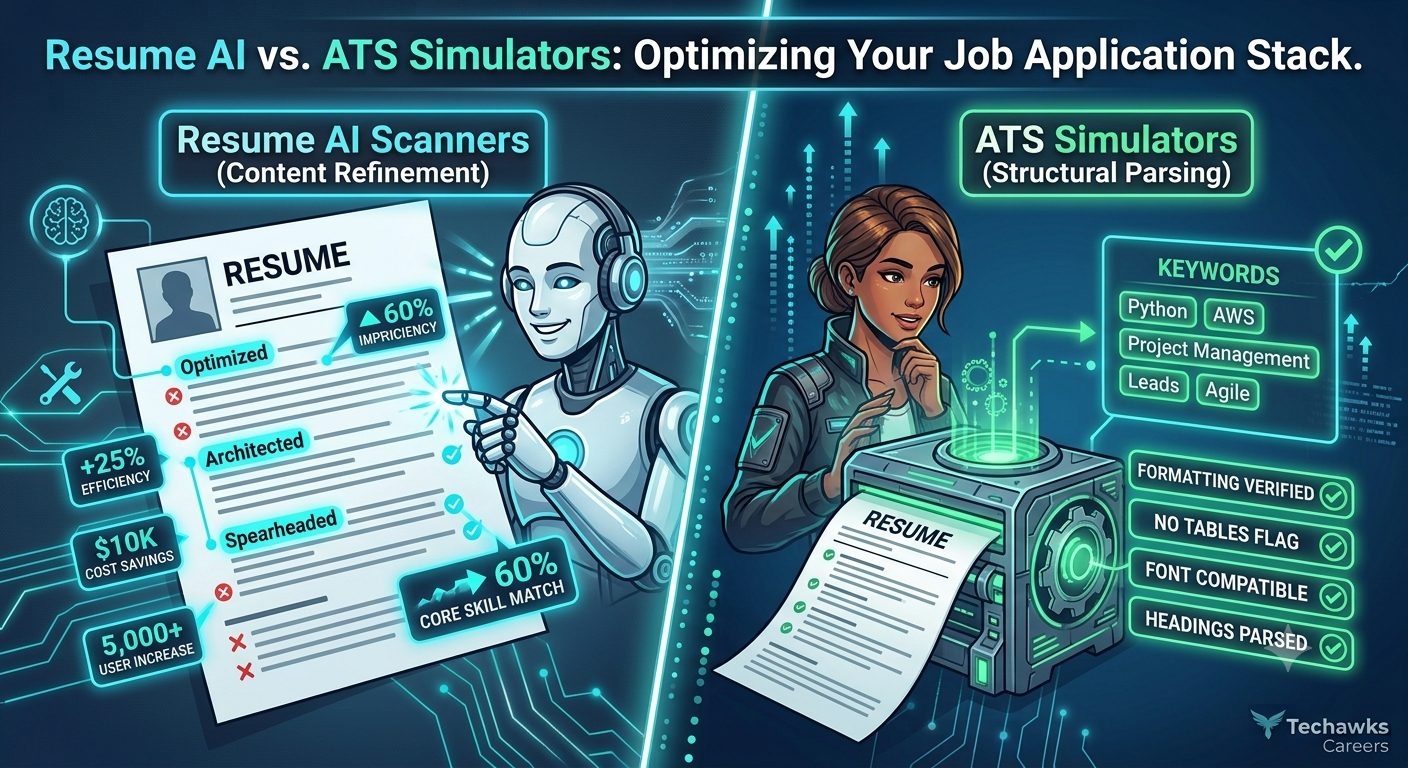
1. Resume AI Scanners (e.g., ChatGPT, Claude, Rezi)
Best For: Content optimization, bullet point impact quantification, and tone alignment.
How They Work: You prompt large language models with your resume bullet points and a target job description to analyze semantic alignment and rewrite descriptions.
Strengths:
Excellent at suggesting action verbs and identifying missing domain keywords.
Helps rephrase duties into high-impact metric statements (e.g., using the Action + Metric + Outcome structure).
Where They Fall Short: Generative AI can introduce subtle hallucinated technical claims or overly flowery phrasing that feels disingenuous to experienced hiring managers.
Actionable Advice: Never copy-paste generated text directly. Use AI tools to generate draft bullet options, then manually verify that every stat and claim accurately reflects your real experience.
2. ATS Simulators & Keyword Matchers (e.g., Jobscan, Resume Worded)
Best For: Structural parsing verification, formatting bug detection, and hard-keyword coverage.
How They Work: These tools convert your PDF/Word document into plain text using standard optical parsing engines, comparing exact keyword frequency against the target job post.
Strengths:
Flags unparsable elements like complex graphic columns, non-standard fonts, or icons in headers.
Gives hard match percentages for key technical frameworks, tools, and certifications.
Where They Fall Short: Over-optimizing purely for exact keyword matches can result in dry, robotic resumes that fail to impress human hiring managers once you pass the initial screen.
Actionable Advice: Aim for a 70–80% keyword match score in these tools rather than chasing 100%. Over-stuffed keyword blocks look artificial to human recruiters.
Key Takeaways
Combine both tool types: Use AI models to refine your accomplishments into measurable results, then run your file through an ATS simulator to ensure clean technical parsing.
Format for parsability: Stick to single-column or clean two-column layouts; avoid tables, charts, and embedded graphics inside PDF headers/footers.
Balance bots and humans: Optimize for automated keywords to pass the screen, but write for human recruiters who want clear proof of problem-solving ability.
CTA (Join Tech Jobs & Opportunities)
Looking to sharpen your resume, receive portfolio reviews, and access unlisted opportunities across the tech industry? [Join Tech Jobs & Opportunities] to connect with hiring managers, recruiters, and fellow tech professionals!
Modern recruitment relies heavily on Applicant Tracking Systems (ATS) like Lever, Greenhouse, and Workday to parse, filter, and score candidate resumes. To increase your interview callbacks, candidate tools have emerged to help you test and format your resume before hit "Submit."
Understanding how to leverage these two primary categories of career tools will transform your application response rate:
1. Resume AI Scanners (e.g., ChatGPT, Claude, Rezi)
Best For: Content optimization, bullet point impact quantification, and tone alignment.
How They Work: You prompt large language models with your resume bullet points and a target job description to analyze semantic alignment and rewrite descriptions.
Strengths:
Excellent at suggesting action verbs and identifying missing domain keywords.
Helps rephrase duties into high-impact metric statements (e.g., using the Action + Metric + Outcome structure).
Where They Fall Short: Generative AI can introduce subtle hallucinated technical claims or overly flowery phrasing that feels disingenuous to experienced hiring managers.
Actionable Advice: Never copy-paste generated text directly. Use AI tools to generate draft bullet options, then manually verify that every stat and claim accurately reflects your real experience.
2. ATS Simulators & Keyword Matchers (e.g., Jobscan, Resume Worded)
Best For: Structural parsing verification, formatting bug detection, and hard-keyword coverage.
How They Work: These tools convert your PDF/Word document into plain text using standard optical parsing engines, comparing exact keyword frequency against the target job post.
Strengths:
Flags unparsable elements like complex graphic columns, non-standard fonts, or icons in headers.
Gives hard match percentages for key technical frameworks, tools, and certifications.
Where They Fall Short: Over-optimizing purely for exact keyword matches can result in dry, robotic resumes that fail to impress human hiring managers once you pass the initial screen.
Actionable Advice: Aim for a 70–80% keyword match score in these tools rather than chasing 100%. Over-stuffed keyword blocks look artificial to human recruiters.
Key Takeaways
Combine both tool types: Use AI models to refine your accomplishments into measurable results, then run your file through an ATS simulator to ensure clean technical parsing.
Format for parsability: Stick to single-column or clean two-column layouts; avoid tables, charts, and embedded graphics inside PDF headers/footers.
Balance bots and humans: Optimize for automated keywords to pass the screen, but write for human recruiters who want clear proof of problem-solving ability.
CTA (Join Tech Jobs & Opportunities)
Looking to sharpen your resume, receive portfolio reviews, and access unlisted opportunities across the tech industry? [Join Tech Jobs & Opportunities] to connect with hiring managers, recruiters, and fellow tech professionals!
Tool Review: Resume AI Scanners vs. ATS Simulators — How to Optimize Your Job Search Tech Stack
Modern recruitment relies heavily on Applicant Tracking Systems (ATS) like Lever, Greenhouse, and Workday to parse, filter, and score candidate resumes. To increase your interview callbacks, candidate tools have emerged to help you test and format your resume before hit "Submit."
Understanding how to leverage these two primary categories of career tools will transform your application response rate:
1. Resume AI Scanners (e.g., ChatGPT, Claude, Rezi)
Best For: Content optimization, bullet point impact quantification, and tone alignment.
How They Work: You prompt large language models with your resume bullet points and a target job description to analyze semantic alignment and rewrite descriptions.
Strengths:
Excellent at suggesting action verbs and identifying missing domain keywords.
Helps rephrase duties into high-impact metric statements (e.g., using the Action + Metric + Outcome structure).
Where They Fall Short: Generative AI can introduce subtle hallucinated technical claims or overly flowery phrasing that feels disingenuous to experienced hiring managers.
Actionable Advice: Never copy-paste generated text directly. Use AI tools to generate draft bullet options, then manually verify that every stat and claim accurately reflects your real experience.
2. ATS Simulators & Keyword Matchers (e.g., Jobscan, Resume Worded)
Best For: Structural parsing verification, formatting bug detection, and hard-keyword coverage.
How They Work: These tools convert your PDF/Word document into plain text using standard optical parsing engines, comparing exact keyword frequency against the target job post.
Strengths:
Flags unparsable elements like complex graphic columns, non-standard fonts, or icons in headers.
Gives hard match percentages for key technical frameworks, tools, and certifications.
Where They Fall Short: Over-optimizing purely for exact keyword matches can result in dry, robotic resumes that fail to impress human hiring managers once you pass the initial screen.
Actionable Advice: Aim for a 70–80% keyword match score in these tools rather than chasing 100%. Over-stuffed keyword blocks look artificial to human recruiters.
Key Takeaways
Combine both tool types: Use AI models to refine your accomplishments into measurable results, then run your file through an ATS simulator to ensure clean technical parsing.
Format for parsability: Stick to single-column or clean two-column layouts; avoid tables, charts, and embedded graphics inside PDF headers/footers.
Balance bots and humans: Optimize for automated keywords to pass the screen, but write for human recruiters who want clear proof of problem-solving ability.
CTA (Join Tech Jobs & Opportunities)
Looking to sharpen your resume, receive portfolio reviews, and access unlisted opportunities across the tech industry? [Join Tech Jobs & Opportunities] to connect with hiring managers, recruiters, and fellow tech professionals!

 English
 Arabic
 Spanish
 Portuguese
 Deutsch
 Turkish
 Dutch
Dutch
 Italiano
 Russian
 Romaian
 Portuguese (Brazil)
 Greek
Greek