


The Chat Box Is Lazy UX: Why Conversational Interfaces Are Failing Complex Products
Over the last two years, product teams responded to the AI wave by putting a text input and a streaming message thread onto every dashboard. The assumption was simple: natural language is universal, so conversational UI must be the ultimate interface.
In practice, chat-first interfaces are breaking down across complex enterprise workflows.
A blank text box violates core usability heuristics:
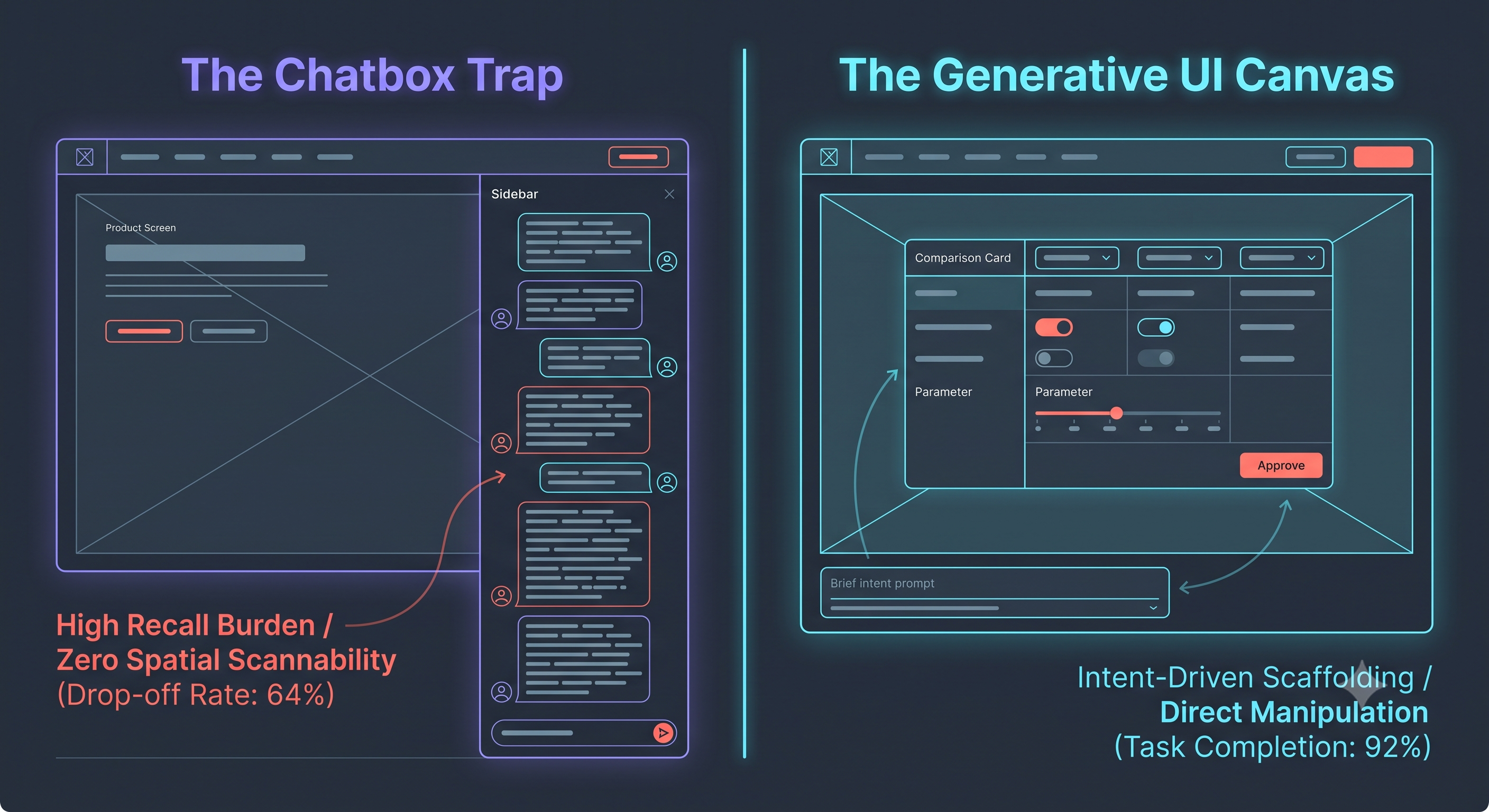
Zero Discoverability: A blank input forces the user to recall system capabilities from memory rather than recognizing them visually. If users don't know what to ask, the feature doesn't exist.
Massive Cognitive Load: Writing a multi-clause prompt to filter a dataset requires significantly more mental effort than clicking two checkboxes and a date picker.
Lack of Direct Manipulation: When an AI tool returns a 400-word wall of conversational text, users cannot slice the data, reorder columns, or inspect outliers without initiating another slow round-trip prompt.
The future of AI product design isn't conversational text—it is Generative UI (GenUI) and outcome-oriented scaffolding.
Instead of confining AI to a sidebar thread, build adaptive interfaces where natural language acts as an accelerator, not the container:
Intent to Structured Component: When an agent acts on user intent, do not stream paragraphs. Stream interactive components—stateful comparison tables, editable parameter cards, interactive sliders, or visual diffs.
Keep Direct Manipulation First-Class: Give users instant visual controls to tweak the agent's output. Changing a parameter should take a single toggle, not a 30-word re-prompt.
Design the Decision Checkpoints: Autonomous agents should not work in an invisible black box until completion. Surface state snapshots, intermediate tool runs, and explicit approval gates for destructive actions.
Stop asking your users to write essays to operate your software. Design systems that turn fuzzy intent into clear, manipulable interfaces.
Discussion Question
Are your AI features trapped in an isolated sidebar chat, or has your team started integrating dynamic, generative UI components directly into user canvases?
CTA (Join Product, UX & Design)
Tired of superficial chat wrappers and ready to design high-impact, human-in-the-loop AI software?
👉 Join the Techawks Product, UX & Design Community to explore real GenUI design systems, challenge interaction dogma, and build intuitive products alongside top design leaders:
Over the last two years, product teams responded to the AI wave by putting a text input and a streaming message thread onto every dashboard. The assumption was simple: natural language is universal, so conversational UI must be the ultimate interface.
In practice, chat-first interfaces are breaking down across complex enterprise workflows.
A blank text box violates core usability heuristics:
Zero Discoverability: A blank input forces the user to recall system capabilities from memory rather than recognizing them visually. If users don't know what to ask, the feature doesn't exist.
Massive Cognitive Load: Writing a multi-clause prompt to filter a dataset requires significantly more mental effort than clicking two checkboxes and a date picker.
Lack of Direct Manipulation: When an AI tool returns a 400-word wall of conversational text, users cannot slice the data, reorder columns, or inspect outliers without initiating another slow round-trip prompt.
The future of AI product design isn't conversational text—it is Generative UI (GenUI) and outcome-oriented scaffolding.
Instead of confining AI to a sidebar thread, build adaptive interfaces where natural language acts as an accelerator, not the container:
Intent to Structured Component: When an agent acts on user intent, do not stream paragraphs. Stream interactive components—stateful comparison tables, editable parameter cards, interactive sliders, or visual diffs.
Keep Direct Manipulation First-Class: Give users instant visual controls to tweak the agent's output. Changing a parameter should take a single toggle, not a 30-word re-prompt.
Design the Decision Checkpoints: Autonomous agents should not work in an invisible black box until completion. Surface state snapshots, intermediate tool runs, and explicit approval gates for destructive actions.
Stop asking your users to write essays to operate your software. Design systems that turn fuzzy intent into clear, manipulable interfaces.
Discussion Question
Are your AI features trapped in an isolated sidebar chat, or has your team started integrating dynamic, generative UI components directly into user canvases?
CTA (Join Product, UX & Design)
Tired of superficial chat wrappers and ready to design high-impact, human-in-the-loop AI software?
👉 Join the Techawks Product, UX & Design Community to explore real GenUI design systems, challenge interaction dogma, and build intuitive products alongside top design leaders:
The Chat Box Is Lazy UX: Why Conversational Interfaces Are Failing Complex Products
Over the last two years, product teams responded to the AI wave by putting a text input and a streaming message thread onto every dashboard. The assumption was simple: natural language is universal, so conversational UI must be the ultimate interface.
In practice, chat-first interfaces are breaking down across complex enterprise workflows.
A blank text box violates core usability heuristics:
Zero Discoverability: A blank input forces the user to recall system capabilities from memory rather than recognizing them visually. If users don't know what to ask, the feature doesn't exist.
Massive Cognitive Load: Writing a multi-clause prompt to filter a dataset requires significantly more mental effort than clicking two checkboxes and a date picker.
Lack of Direct Manipulation: When an AI tool returns a 400-word wall of conversational text, users cannot slice the data, reorder columns, or inspect outliers without initiating another slow round-trip prompt.
The future of AI product design isn't conversational text—it is Generative UI (GenUI) and outcome-oriented scaffolding.
Instead of confining AI to a sidebar thread, build adaptive interfaces where natural language acts as an accelerator, not the container:
Intent to Structured Component: When an agent acts on user intent, do not stream paragraphs. Stream interactive components—stateful comparison tables, editable parameter cards, interactive sliders, or visual diffs.
Keep Direct Manipulation First-Class: Give users instant visual controls to tweak the agent's output. Changing a parameter should take a single toggle, not a 30-word re-prompt.
Design the Decision Checkpoints: Autonomous agents should not work in an invisible black box until completion. Surface state snapshots, intermediate tool runs, and explicit approval gates for destructive actions.
Stop asking your users to write essays to operate your software. Design systems that turn fuzzy intent into clear, manipulable interfaces.
Discussion Question
Are your AI features trapped in an isolated sidebar chat, or has your team started integrating dynamic, generative UI components directly into user canvases?
CTA (Join Product, UX & Design)
Tired of superficial chat wrappers and ready to design high-impact, human-in-the-loop AI software?
👉 Join the Techawks Product, UX & Design Community to explore real GenUI design systems, challenge interaction dogma, and build intuitive products alongside top design leaders:

 English
 French
 Spanish
 Portuguese
 Deutsch
 Turkish
 Dutch
Dutch
 Italiano
 Russian
 Romaian
 Portuguese (Brazil)
 Greek
Greek