


The Conversational Crutch: Why Slapping a Chatbox on Your SaaS Is Lazy Product Design
As generative AI toolkits became plug-and-play, product roadmaps fell victim to a massive industry misconception:
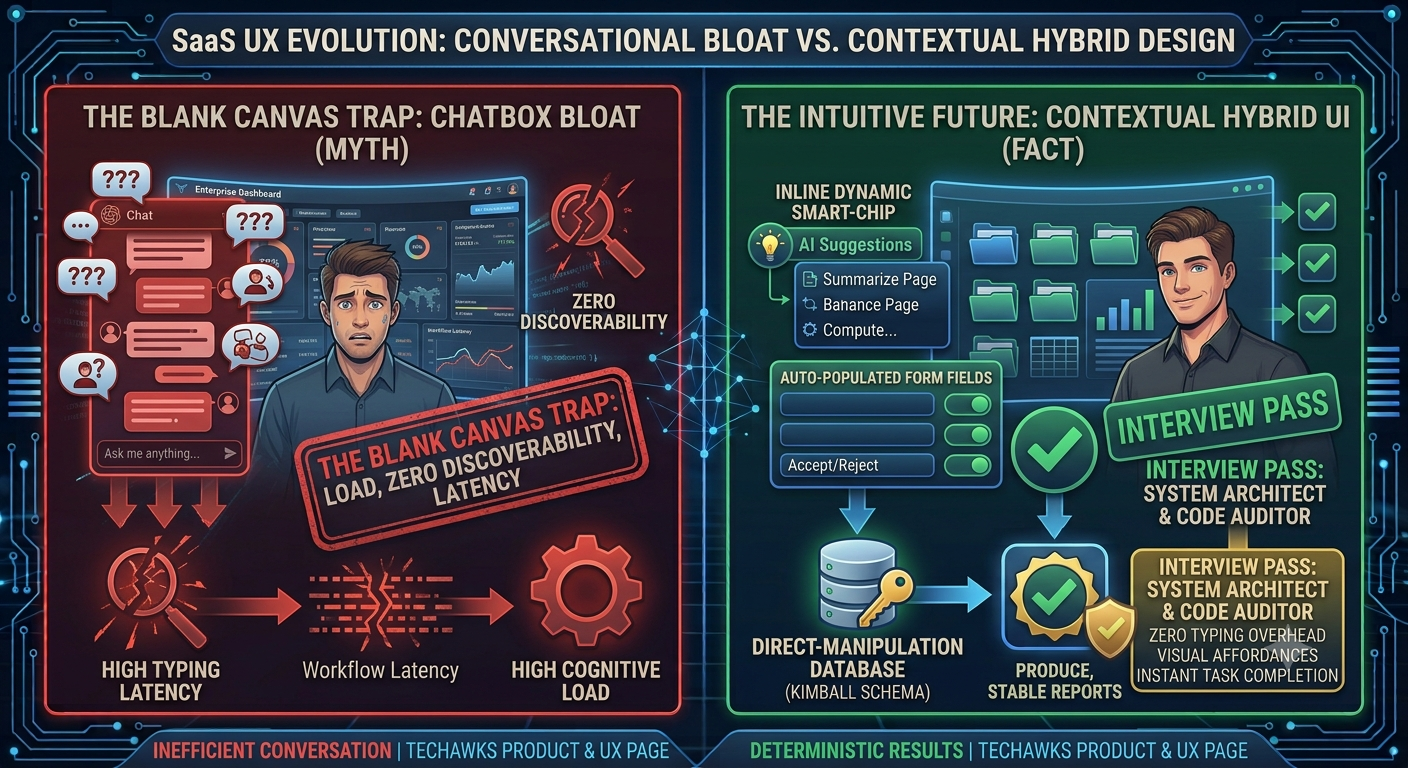
❌ The Myth: "Chat is the universal interface of the future. Replacing menus, forms, and control panels with an open prompt box eliminates UI complexity and gives users ultimate flexibility."
✅ The Reality: An empty prompt box forces maximum cognitive load onto the user. It trades clear affordances for a blank-canvas paralysis, slow typing speeds, and non-deterministic UX.
Why the "Everything-as-a-Chat" Pattern Fails:
The Death of Discoverability: Traditional graphical user interfaces (GUIs) communicate what is possible through visible affordances—buttons, sliders, toggles, and filters. A blinking cursor in a chatbox tells the user nothing about system capabilities, boundary limits, or failure states.
The Prompt Tax (Input Friction): Pointing and clicking takes 200 milliseconds. Typing a structured, context-rich prompt takes 30 seconds. Forcing users to articulate routine operations in natural language slows down workflows rather than accelerating them.
Loss of Spatial State & Correction Loops: In a GUI, tweaking a single parameter (like a date range or toggle) is an instant, localized adjustment. In a conversational interface, adjusting one variable requires re-prompting, reading a full response stream, and hoping the model doesn't drift or alter previous variables.
The Better Pattern: Hybrid Contextual Micro-Interactions
World-class AI UX embeds intelligence directly into existing UI paradigms rather than segregating it into a floating chat drawer:
Generative Affordances & Inline Controls: Instead of asking the user to prompt, anticipate their next step. Offer contextual AI suggestions as inline chips, hover-state shortcuts, or dynamic form pre-fills that can be accepted with a single click.
Bi-Directional Canvas UX: Keep the artifact (document, spreadsheet, canvas, or dashboard) front-and-center. Let the AI manipulate the canvas directly while keeping familiar UI levers (sliders, diff reviews, undo buttons) intact for tactile human control.
Scaffolding Over Blank Inputs: Replace the open prompt box with structured scaffolding—pre-built system templates, parameter slot-filling, and guided prompt builders that constrain the solution space.
The takeaway: Great UX is about reducing cognitive overhead, not showcasing model capabilities. The most powerful AI interface isn't a conversation—it's an interface so frictionless that the user barely realizes an AI is doing the heavy lifting.
Discussion Question
Where in your product has conversational AI actually reduced task-completion time, and where did it just add an unnecessary layer of typing?
CTA (Join Product, UX & Design)
Join the Product, UX & Design community to debate emerging interaction patterns, dissect real-world design systems, and build intuitive, human-centered products.
As generative AI toolkits became plug-and-play, product roadmaps fell victim to a massive industry misconception:
❌ The Myth: "Chat is the universal interface of the future. Replacing menus, forms, and control panels with an open prompt box eliminates UI complexity and gives users ultimate flexibility."
✅ The Reality: An empty prompt box forces maximum cognitive load onto the user. It trades clear affordances for a blank-canvas paralysis, slow typing speeds, and non-deterministic UX.
Why the "Everything-as-a-Chat" Pattern Fails:
The Death of Discoverability: Traditional graphical user interfaces (GUIs) communicate what is possible through visible affordances—buttons, sliders, toggles, and filters. A blinking cursor in a chatbox tells the user nothing about system capabilities, boundary limits, or failure states.
The Prompt Tax (Input Friction): Pointing and clicking takes 200 milliseconds. Typing a structured, context-rich prompt takes 30 seconds. Forcing users to articulate routine operations in natural language slows down workflows rather than accelerating them.
Loss of Spatial State & Correction Loops: In a GUI, tweaking a single parameter (like a date range or toggle) is an instant, localized adjustment. In a conversational interface, adjusting one variable requires re-prompting, reading a full response stream, and hoping the model doesn't drift or alter previous variables.
The Better Pattern: Hybrid Contextual Micro-Interactions
World-class AI UX embeds intelligence directly into existing UI paradigms rather than segregating it into a floating chat drawer:
Generative Affordances & Inline Controls: Instead of asking the user to prompt, anticipate their next step. Offer contextual AI suggestions as inline chips, hover-state shortcuts, or dynamic form pre-fills that can be accepted with a single click.
Bi-Directional Canvas UX: Keep the artifact (document, spreadsheet, canvas, or dashboard) front-and-center. Let the AI manipulate the canvas directly while keeping familiar UI levers (sliders, diff reviews, undo buttons) intact for tactile human control.
Scaffolding Over Blank Inputs: Replace the open prompt box with structured scaffolding—pre-built system templates, parameter slot-filling, and guided prompt builders that constrain the solution space.
The takeaway: Great UX is about reducing cognitive overhead, not showcasing model capabilities. The most powerful AI interface isn't a conversation—it's an interface so frictionless that the user barely realizes an AI is doing the heavy lifting.
Discussion Question
Where in your product has conversational AI actually reduced task-completion time, and where did it just add an unnecessary layer of typing?
CTA (Join Product, UX & Design)
Join the Product, UX & Design community to debate emerging interaction patterns, dissect real-world design systems, and build intuitive, human-centered products.
The Conversational Crutch: Why Slapping a Chatbox on Your SaaS Is Lazy Product Design
As generative AI toolkits became plug-and-play, product roadmaps fell victim to a massive industry misconception:
❌ The Myth: "Chat is the universal interface of the future. Replacing menus, forms, and control panels with an open prompt box eliminates UI complexity and gives users ultimate flexibility."
✅ The Reality: An empty prompt box forces maximum cognitive load onto the user. It trades clear affordances for a blank-canvas paralysis, slow typing speeds, and non-deterministic UX.
Why the "Everything-as-a-Chat" Pattern Fails:
The Death of Discoverability: Traditional graphical user interfaces (GUIs) communicate what is possible through visible affordances—buttons, sliders, toggles, and filters. A blinking cursor in a chatbox tells the user nothing about system capabilities, boundary limits, or failure states.
The Prompt Tax (Input Friction): Pointing and clicking takes 200 milliseconds. Typing a structured, context-rich prompt takes 30 seconds. Forcing users to articulate routine operations in natural language slows down workflows rather than accelerating them.
Loss of Spatial State & Correction Loops: In a GUI, tweaking a single parameter (like a date range or toggle) is an instant, localized adjustment. In a conversational interface, adjusting one variable requires re-prompting, reading a full response stream, and hoping the model doesn't drift or alter previous variables.
The Better Pattern: Hybrid Contextual Micro-Interactions
World-class AI UX embeds intelligence directly into existing UI paradigms rather than segregating it into a floating chat drawer:
Generative Affordances & Inline Controls: Instead of asking the user to prompt, anticipate their next step. Offer contextual AI suggestions as inline chips, hover-state shortcuts, or dynamic form pre-fills that can be accepted with a single click.
Bi-Directional Canvas UX: Keep the artifact (document, spreadsheet, canvas, or dashboard) front-and-center. Let the AI manipulate the canvas directly while keeping familiar UI levers (sliders, diff reviews, undo buttons) intact for tactile human control.
Scaffolding Over Blank Inputs: Replace the open prompt box with structured scaffolding—pre-built system templates, parameter slot-filling, and guided prompt builders that constrain the solution space.
The takeaway: Great UX is about reducing cognitive overhead, not showcasing model capabilities. The most powerful AI interface isn't a conversation—it's an interface so frictionless that the user barely realizes an AI is doing the heavy lifting.
Discussion Question
Where in your product has conversational AI actually reduced task-completion time, and where did it just add an unnecessary layer of typing?
CTA (Join Product, UX & Design)
Join the Product, UX & Design community to debate emerging interaction patterns, dissect real-world design systems, and build intuitive, human-centered products.

 English
 Arabic
 French
 Spanish
 Portuguese
 Deutsch
 Turkish
 Italiano
 Russian
 Romaian
 Portuguese (Brazil)
 Greek
Greek