


From Static Interfaces to Intent-Driven UX: Designing Products for Autonomous AI Agents
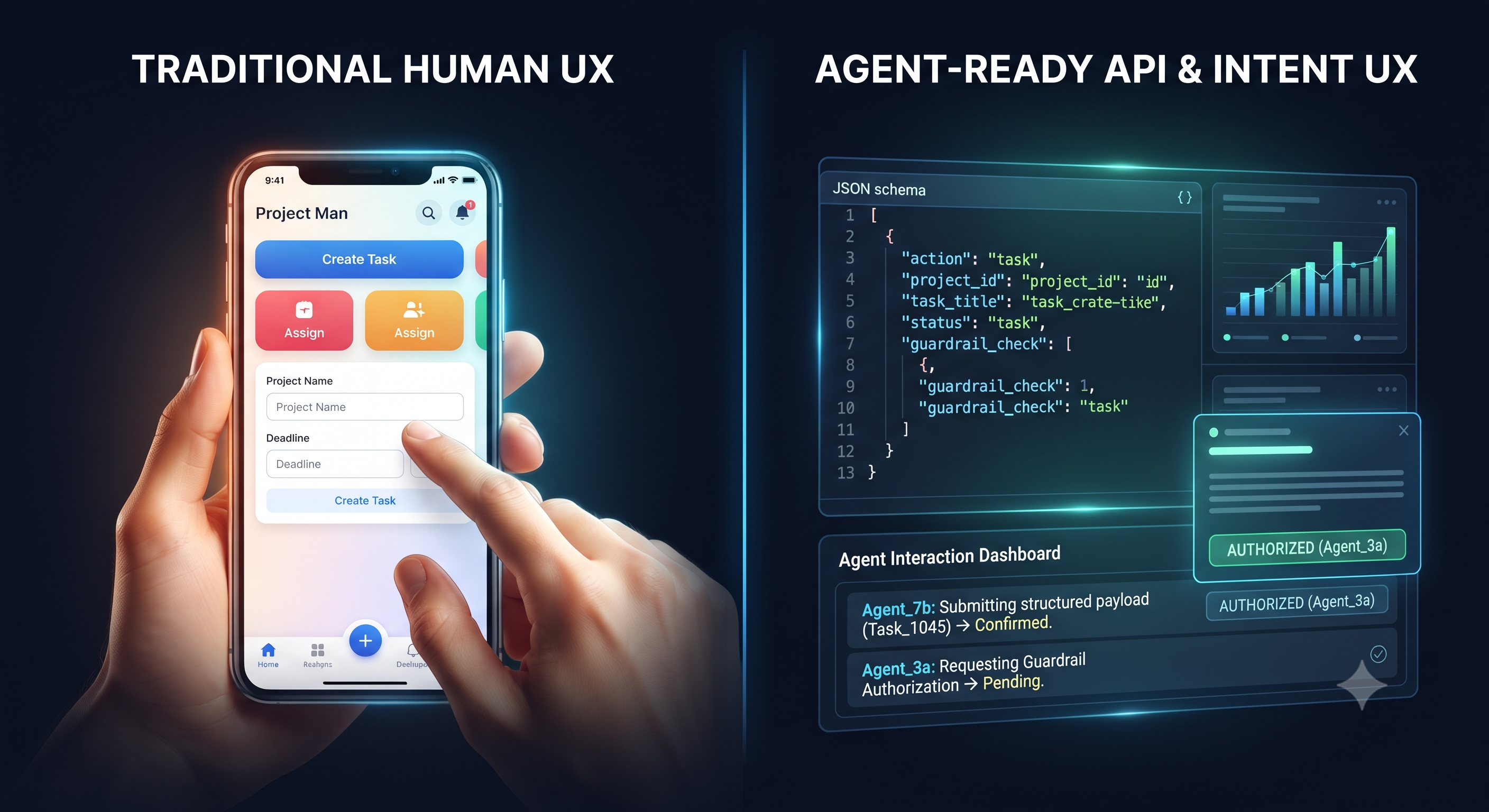
As software evolves from static applications into agentic ecosystems, the definition of a "user" is expanding. Users are no longer just humans clicking through menus; increasingly, they are autonomous AI agents interacting with your APIs, submitting structured payloads, and orchestrating multi-step workflows on behalf of users.
If your product's UX relies entirely on visual friction—such as multi-page wizards, captchas, and rigid form fields—you are actively blocking machine-to-machine efficiency.
Why This Matters
When agents interact with your product, they don't care about your color palette or micro-animations; they care about predictable schemas, semantic clarity, and programmatic determinism. Designing products for the AI era means building dual-facing systems: intuitive visual interfaces for humans, and robust, well-documented API contracts and semantic endpoints for autonomous agents.
Mini-Tutorial: How to Design an Agent-Ready Product Workflow
Future-proof your product roadmap by incorporating these three UX design steps for autonomous agents:
Step 1: Expose Machine-Readable Endpoints Alongside UI. Every user-facing action (like booking a service or updating a record) should have a clean, version-controlled API counterpart with explicit JSON schemas and error handling.
Step 2: Design Explicit Confirmation & Guardrail States. Since agents execute rapidly, provide clear programmatic staging states. Allow agents to preview actions, evaluate confidence scores, and request explicit authorization before committing irreversible changes.
Step 3: Optimize Error Feedback Loops. When an agent makes an invalid request, return descriptive, actionable error payloads (e.g., specifying exact schema violations) rather than generic error pages so the agent can self-correct on its next iteration.
Discussion Question
Are you currently designing product experiences with autonomous AI agents in mind, or are your user journeys still entirely optimized for human clicks? Let’s discuss below! 👇
CTA (Join Product, UX & Design)
Ready to pioneer the future of digital products, agentic UX, and user-centric design? Join Product, UX & Design today to share frameworks, swap design systems, and elevate your product craft!
As software evolves from static applications into agentic ecosystems, the definition of a "user" is expanding. Users are no longer just humans clicking through menus; increasingly, they are autonomous AI agents interacting with your APIs, submitting structured payloads, and orchestrating multi-step workflows on behalf of users.
If your product's UX relies entirely on visual friction—such as multi-page wizards, captchas, and rigid form fields—you are actively blocking machine-to-machine efficiency.
Why This Matters
When agents interact with your product, they don't care about your color palette or micro-animations; they care about predictable schemas, semantic clarity, and programmatic determinism. Designing products for the AI era means building dual-facing systems: intuitive visual interfaces for humans, and robust, well-documented API contracts and semantic endpoints for autonomous agents.
Mini-Tutorial: How to Design an Agent-Ready Product Workflow
Future-proof your product roadmap by incorporating these three UX design steps for autonomous agents:
Step 1: Expose Machine-Readable Endpoints Alongside UI. Every user-facing action (like booking a service or updating a record) should have a clean, version-controlled API counterpart with explicit JSON schemas and error handling.
Step 2: Design Explicit Confirmation & Guardrail States. Since agents execute rapidly, provide clear programmatic staging states. Allow agents to preview actions, evaluate confidence scores, and request explicit authorization before committing irreversible changes.
Step 3: Optimize Error Feedback Loops. When an agent makes an invalid request, return descriptive, actionable error payloads (e.g., specifying exact schema violations) rather than generic error pages so the agent can self-correct on its next iteration.
Discussion Question
Are you currently designing product experiences with autonomous AI agents in mind, or are your user journeys still entirely optimized for human clicks? Let’s discuss below! 👇
CTA (Join Product, UX & Design)
Ready to pioneer the future of digital products, agentic UX, and user-centric design? Join Product, UX & Design today to share frameworks, swap design systems, and elevate your product craft!
From Static Interfaces to Intent-Driven UX: Designing Products for Autonomous AI Agents
As software evolves from static applications into agentic ecosystems, the definition of a "user" is expanding. Users are no longer just humans clicking through menus; increasingly, they are autonomous AI agents interacting with your APIs, submitting structured payloads, and orchestrating multi-step workflows on behalf of users.
If your product's UX relies entirely on visual friction—such as multi-page wizards, captchas, and rigid form fields—you are actively blocking machine-to-machine efficiency.
Why This Matters
When agents interact with your product, they don't care about your color palette or micro-animations; they care about predictable schemas, semantic clarity, and programmatic determinism. Designing products for the AI era means building dual-facing systems: intuitive visual interfaces for humans, and robust, well-documented API contracts and semantic endpoints for autonomous agents.
Mini-Tutorial: How to Design an Agent-Ready Product Workflow
Future-proof your product roadmap by incorporating these three UX design steps for autonomous agents:
Step 1: Expose Machine-Readable Endpoints Alongside UI. Every user-facing action (like booking a service or updating a record) should have a clean, version-controlled API counterpart with explicit JSON schemas and error handling.
Step 2: Design Explicit Confirmation & Guardrail States. Since agents execute rapidly, provide clear programmatic staging states. Allow agents to preview actions, evaluate confidence scores, and request explicit authorization before committing irreversible changes.
Step 3: Optimize Error Feedback Loops. When an agent makes an invalid request, return descriptive, actionable error payloads (e.g., specifying exact schema violations) rather than generic error pages so the agent can self-correct on its next iteration.
Discussion Question
Are you currently designing product experiences with autonomous AI agents in mind, or are your user journeys still entirely optimized for human clicks? Let’s discuss below! 👇
CTA (Join Product, UX & Design)
Ready to pioneer the future of digital products, agentic UX, and user-centric design? Join Product, UX & Design today to share frameworks, swap design systems, and elevate your product craft!

 English
 Arabic
 French
 Portuguese
 Deutsch
 Turkish
 Dutch
Dutch
 Italiano
 Russian
 Romaian
 Portuguese (Brazil)
 Greek
Greek