


Tool Review: Why US Engineering Teams Are Replacing Webpack with Turbopack in Next.js
The Tool: Turbopack (Developed by Vercel)
Category: Rust-Based Web Application Bundler
Best For: Frontend Engineers, Full-Stack Developers, and Platform Teams
🔍 The Problem with Legacy Bundlers
For over a decade, Webpack has been the workhorse of web development. However, as modern React applications grow into thousands of modules, JavaScript-based compilation hits strict performance limits. Slow local feedback loops waste cumulative engineering hours across enterprise squads.
⚙️ Key Features That Make Turbopack a Game Changer
1. Rust-Engineered Core & Function-Level Caching
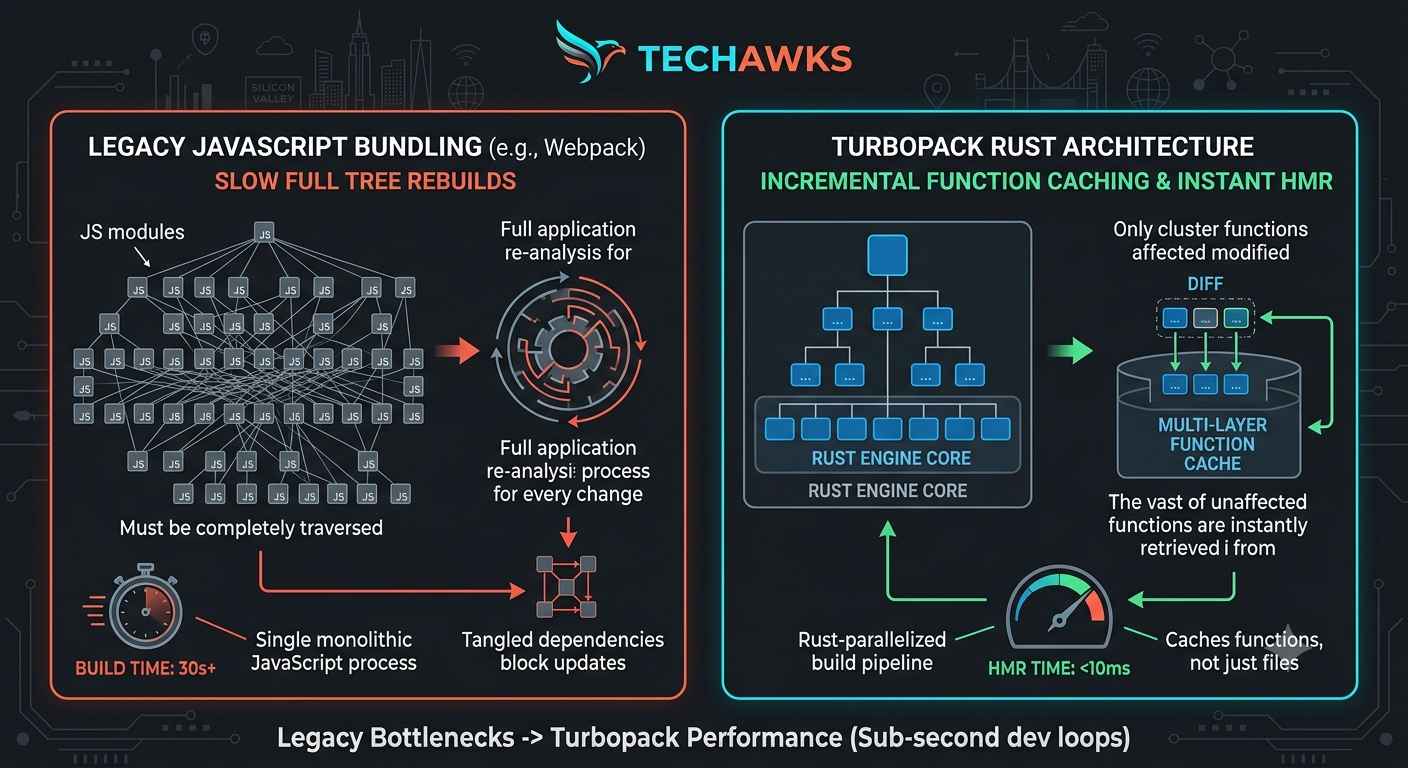
How it works: Turbopack never re-evaluates code it has already compiled. It uses a graph of function calls; when a file changes, it only re-executes the exact functions affected by the diff.
Why it matters: Instantaneous Hot Module Replacement ($<10\text{ ms}$) regardless of how large your application codebase grows.
2. Native Next.js Integration
How it works: Zero-config support for Server Components, CSS Modules, Tailwind CSS, TypeScript, and SWC transpilation out of the box.
Why it matters: No complex webpack.config.js setups to maintain or debug when upgrading frameworks.
3. Massive CI/CD & Dev Server Speedups
How it works: Lazy compilation delays building non-active routes until a browser actually requests them.
Why it matters: Developers land on local dev servers in milliseconds instead of waiting for the full app tree to bundle.
🛠️ Quick Setup Guide (Actionable Steps)
Enable in Next.js Development:
Update your package.json dev script to pass the --turbo flag:
{
"scripts": {
"dev": "next dev --turbo"
}
}
Verify Support: Run npm run dev and confirm that route compilation occurs on demand as you navigate your application.
Audit Custom Webpack Plugins: Check your next.config.js to ensure custom Webpack plugins are either replaced by native SWC/Turbopack features or moved to supported loaders.
Key Takeaways
Sub-Second HMR: Drastically reduces context switching and wait times for developers.
Smart Caching: Recomputes only modified dependencies instead of whole subtrees.
Zero Boilerplate: Built directly into modern Next.js toolchains with simple flag activation.
CTA
🇺🇸 Building high-performance web applications at scale in the US?
Get hands-on tool reviews, modern architecture frameworks, and engineering performance guides.
👉 Join Techawks USA to stay ahead with real-world developer tooling and enterprise best practices!
The Tool: Turbopack (Developed by Vercel)
Category: Rust-Based Web Application Bundler
Best For: Frontend Engineers, Full-Stack Developers, and Platform Teams
🔍 The Problem with Legacy Bundlers
For over a decade, Webpack has been the workhorse of web development. However, as modern React applications grow into thousands of modules, JavaScript-based compilation hits strict performance limits. Slow local feedback loops waste cumulative engineering hours across enterprise squads.
⚙️ Key Features That Make Turbopack a Game Changer
1. Rust-Engineered Core & Function-Level Caching
How it works: Turbopack never re-evaluates code it has already compiled. It uses a graph of function calls; when a file changes, it only re-executes the exact functions affected by the diff.
Why it matters: Instantaneous Hot Module Replacement ($<10\text{ ms}$) regardless of how large your application codebase grows.
2. Native Next.js Integration
How it works: Zero-config support for Server Components, CSS Modules, Tailwind CSS, TypeScript, and SWC transpilation out of the box.
Why it matters: No complex webpack.config.js setups to maintain or debug when upgrading frameworks.
3. Massive CI/CD & Dev Server Speedups
How it works: Lazy compilation delays building non-active routes until a browser actually requests them.
Why it matters: Developers land on local dev servers in milliseconds instead of waiting for the full app tree to bundle.
🛠️ Quick Setup Guide (Actionable Steps)
Enable in Next.js Development:
Update your package.json dev script to pass the --turbo flag:
{
"scripts": {
"dev": "next dev --turbo"
}
}
Verify Support: Run npm run dev and confirm that route compilation occurs on demand as you navigate your application.
Audit Custom Webpack Plugins: Check your next.config.js to ensure custom Webpack plugins are either replaced by native SWC/Turbopack features or moved to supported loaders.
Key Takeaways
Sub-Second HMR: Drastically reduces context switching and wait times for developers.
Smart Caching: Recomputes only modified dependencies instead of whole subtrees.
Zero Boilerplate: Built directly into modern Next.js toolchains with simple flag activation.
CTA
🇺🇸 Building high-performance web applications at scale in the US?
Get hands-on tool reviews, modern architecture frameworks, and engineering performance guides.
👉 Join Techawks USA to stay ahead with real-world developer tooling and enterprise best practices!
Tool Review: Why US Engineering Teams Are Replacing Webpack with Turbopack in Next.js
The Tool: Turbopack (Developed by Vercel)
Category: Rust-Based Web Application Bundler
Best For: Frontend Engineers, Full-Stack Developers, and Platform Teams
🔍 The Problem with Legacy Bundlers
For over a decade, Webpack has been the workhorse of web development. However, as modern React applications grow into thousands of modules, JavaScript-based compilation hits strict performance limits. Slow local feedback loops waste cumulative engineering hours across enterprise squads.
⚙️ Key Features That Make Turbopack a Game Changer
1. Rust-Engineered Core & Function-Level Caching
How it works: Turbopack never re-evaluates code it has already compiled. It uses a graph of function calls; when a file changes, it only re-executes the exact functions affected by the diff.
Why it matters: Instantaneous Hot Module Replacement ($<10\text{ ms}$) regardless of how large your application codebase grows.
2. Native Next.js Integration
How it works: Zero-config support for Server Components, CSS Modules, Tailwind CSS, TypeScript, and SWC transpilation out of the box.
Why it matters: No complex webpack.config.js setups to maintain or debug when upgrading frameworks.
3. Massive CI/CD & Dev Server Speedups
How it works: Lazy compilation delays building non-active routes until a browser actually requests them.
Why it matters: Developers land on local dev servers in milliseconds instead of waiting for the full app tree to bundle.
🛠️ Quick Setup Guide (Actionable Steps)
Enable in Next.js Development:
Update your package.json dev script to pass the --turbo flag:
{
"scripts": {
"dev": "next dev --turbo"
}
}
Verify Support: Run npm run dev and confirm that route compilation occurs on demand as you navigate your application.
Audit Custom Webpack Plugins: Check your next.config.js to ensure custom Webpack plugins are either replaced by native SWC/Turbopack features or moved to supported loaders.
Key Takeaways
Sub-Second HMR: Drastically reduces context switching and wait times for developers.
Smart Caching: Recomputes only modified dependencies instead of whole subtrees.
Zero Boilerplate: Built directly into modern Next.js toolchains with simple flag activation.
CTA
🇺🇸 Building high-performance web applications at scale in the US?
Get hands-on tool reviews, modern architecture frameworks, and engineering performance guides.
👉 Join Techawks USA to stay ahead with real-world developer tooling and enterprise best practices!

 Arabic
 French
 Spanish
 Portuguese
 Deutsch
 Turkish
 Dutch
Dutch
 Italiano
 Russian
 Romaian
 Portuguese (Brazil)
 Greek
Greek