


Taming Async Execution in Node.js: Why Promise.all() Might Be Killing Your Backend Performance
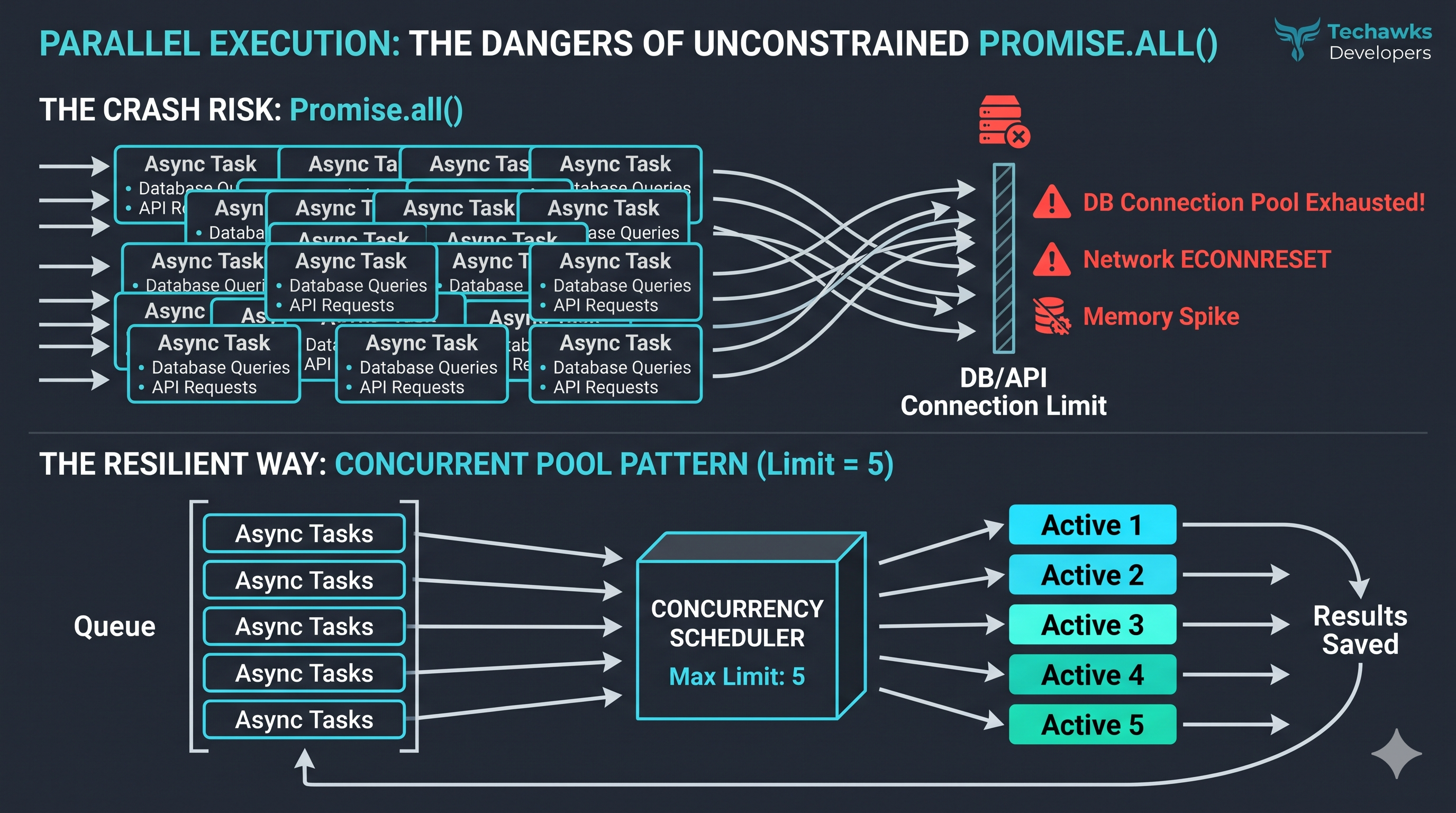
In the rush to optimize performance, it is easy to assume that launching all async tasks simultaneously is always faster. However, when you pass a large array of operations—such as scraping 150 URLs, querying APIs, or batching database writes—into Promise.all(), you create an instantaneous spike in concurrent connections.
Under heavy traffic, this brute-force approach leads to connection timeouts, severe memory bloat, and ECONNRESET errors.
To prevent concurrency cascading, backend developers must utilize Concurrent Pool Bottlenecking to constraint parallelism.
[ Array of 150 Async Tasks ]
│
▼
┌─────────────────────┐
│ Concurrency Limit │ (e.g., limit = 5)
└─────────────────────┘
│ │ │ │ │
▼ ▼ ▼ ▼ ▼ (Processing 5 at a time)
[ ][ ][ ][ ][ ]
│
(As task completes,
next is pulled in)
│
▼
[ Combined Results ]
💡 The Proactive Fix: Batching with a Concurrency Limit
Instead of firing 150 promises concurrently, use a controlled pipeline. Below is a lightweight, dependency-free pool implementation using native JS async/await:
JavaScript
async function asyncPool(limit, array, asyncFn) {
const results = [];
const executing = new Set(); // Track ongoing promises
for (const item of array) {
// Generate the promise and save its index
const p = Promise.resolve().then(() => asyncFn(item));
results.push(p);
executing.add(p);
// Clean up promise from executing pool when finished
const clean = () => executing.delete(p);
p.then(clean, clean);
// If limit is reached, wait for the fastest task to complete
if (executing.size >= limit) {
await Promise.race(executing);
}
}
return Promise.all(results);
}
// How to use it:
const urls = [...Array(150).keys()].map(i => `https://api.example.com/data/${i}`);
const fetchTask = async (url) => fetch(url).then(res => res.json());
// Max 5 concurrent fetches running at any given moment
const allData = await asyncPool(5, urls, fetchTask);
Why This Works Better:
Connection Congestion Relief: Avoids saturating your DB/HTTP client thread pools.
Controlled Failures: Prevents the whole process from immediately rejecting if a task fails midway (you can add try/catch bounds inside asyncFn).
Micro-Optimized Memory: Limits the simultaneous initialization of unresolved Promises waiting on I/O.
If you don't want to build a custom scheduler, production standard libraries like p-limit or chunk-based batches do the exact same job.
Architect your concurrency—don't hope for the best.
Discussion Question
How do you handle unconstrained async workflows in your stack? Do you rely on standard utility libraries like p-limit, use queue architectures (BullMQ), or handle throttle limits at the reverse proxy/network layer?
CTA
Ready to level up your asynchronous architecture and write highly performant, production-grade backend code? Join Developers & Coding at Techawks to trade optimization blueprints, tackle system bottlenecks, and build alongside a community of active engineers.
In the rush to optimize performance, it is easy to assume that launching all async tasks simultaneously is always faster. However, when you pass a large array of operations—such as scraping 150 URLs, querying APIs, or batching database writes—into Promise.all(), you create an instantaneous spike in concurrent connections.
Under heavy traffic, this brute-force approach leads to connection timeouts, severe memory bloat, and ECONNRESET errors.
To prevent concurrency cascading, backend developers must utilize Concurrent Pool Bottlenecking to constraint parallelism.
[ Array of 150 Async Tasks ]
│
▼
┌─────────────────────┐
│ Concurrency Limit │ (e.g., limit = 5)
└─────────────────────┘
│ │ │ │ │
▼ ▼ ▼ ▼ ▼ (Processing 5 at a time)
[ ][ ][ ][ ][ ]
│
(As task completes,
next is pulled in)
│
▼
[ Combined Results ]
💡 The Proactive Fix: Batching with a Concurrency Limit
Instead of firing 150 promises concurrently, use a controlled pipeline. Below is a lightweight, dependency-free pool implementation using native JS async/await:
JavaScript
async function asyncPool(limit, array, asyncFn) {
const results = [];
const executing = new Set(); // Track ongoing promises
for (const item of array) {
// Generate the promise and save its index
const p = Promise.resolve().then(() => asyncFn(item));
results.push(p);
executing.add(p);
// Clean up promise from executing pool when finished
const clean = () => executing.delete(p);
p.then(clean, clean);
// If limit is reached, wait for the fastest task to complete
if (executing.size >= limit) {
await Promise.race(executing);
}
}
return Promise.all(results);
}
// How to use it:
const urls = [...Array(150).keys()].map(i => `https://api.example.com/data/${i}`);
const fetchTask = async (url) => fetch(url).then(res => res.json());
// Max 5 concurrent fetches running at any given moment
const allData = await asyncPool(5, urls, fetchTask);
Why This Works Better:
Connection Congestion Relief: Avoids saturating your DB/HTTP client thread pools.
Controlled Failures: Prevents the whole process from immediately rejecting if a task fails midway (you can add try/catch bounds inside asyncFn).
Micro-Optimized Memory: Limits the simultaneous initialization of unresolved Promises waiting on I/O.
If you don't want to build a custom scheduler, production standard libraries like p-limit or chunk-based batches do the exact same job.
Architect your concurrency—don't hope for the best.
Discussion Question
How do you handle unconstrained async workflows in your stack? Do you rely on standard utility libraries like p-limit, use queue architectures (BullMQ), or handle throttle limits at the reverse proxy/network layer?
CTA
Ready to level up your asynchronous architecture and write highly performant, production-grade backend code? Join Developers & Coding at Techawks to trade optimization blueprints, tackle system bottlenecks, and build alongside a community of active engineers.
Taming Async Execution in Node.js: Why Promise.all() Might Be Killing Your Backend Performance
In the rush to optimize performance, it is easy to assume that launching all async tasks simultaneously is always faster. However, when you pass a large array of operations—such as scraping 150 URLs, querying APIs, or batching database writes—into Promise.all(), you create an instantaneous spike in concurrent connections.
Under heavy traffic, this brute-force approach leads to connection timeouts, severe memory bloat, and ECONNRESET errors.
To prevent concurrency cascading, backend developers must utilize Concurrent Pool Bottlenecking to constraint parallelism.
[ Array of 150 Async Tasks ]
│
▼
┌─────────────────────┐
│ Concurrency Limit │ (e.g., limit = 5)
└─────────────────────┘
│ │ │ │ │
▼ ▼ ▼ ▼ ▼ (Processing 5 at a time)
[ ][ ][ ][ ][ ]
│
(As task completes,
next is pulled in)
│
▼
[ Combined Results ]
💡 The Proactive Fix: Batching with a Concurrency Limit
Instead of firing 150 promises concurrently, use a controlled pipeline. Below is a lightweight, dependency-free pool implementation using native JS async/await:
JavaScript
async function asyncPool(limit, array, asyncFn) {
const results = [];
const executing = new Set(); // Track ongoing promises
for (const item of array) {
// Generate the promise and save its index
const p = Promise.resolve().then(() => asyncFn(item));
results.push(p);
executing.add(p);
// Clean up promise from executing pool when finished
const clean = () => executing.delete(p);
p.then(clean, clean);
// If limit is reached, wait for the fastest task to complete
if (executing.size >= limit) {
await Promise.race(executing);
}
}
return Promise.all(results);
}
// How to use it:
const urls = [...Array(150).keys()].map(i => `https://api.example.com/data/${i}`);
const fetchTask = async (url) => fetch(url).then(res => res.json());
// Max 5 concurrent fetches running at any given moment
const allData = await asyncPool(5, urls, fetchTask);
Why This Works Better:
Connection Congestion Relief: Avoids saturating your DB/HTTP client thread pools.
Controlled Failures: Prevents the whole process from immediately rejecting if a task fails midway (you can add try/catch bounds inside asyncFn).
Micro-Optimized Memory: Limits the simultaneous initialization of unresolved Promises waiting on I/O.
If you don't want to build a custom scheduler, production standard libraries like p-limit or chunk-based batches do the exact same job.
Architect your concurrency—don't hope for the best.
Discussion Question
How do you handle unconstrained async workflows in your stack? Do you rely on standard utility libraries like p-limit, use queue architectures (BullMQ), or handle throttle limits at the reverse proxy/network layer?
CTA
Ready to level up your asynchronous architecture and write highly performant, production-grade backend code? Join Developers & Coding at Techawks to trade optimization blueprints, tackle system bottlenecks, and build alongside a community of active engineers.

 Arabic
 French
 Spanish
 Portuguese
 Deutsch
 Turkish
 Dutch
 Italiano
 Russian
 Romaian
 Portuguese (Brazil)
 Greek