


Mastering Async Python: How to Handle 10x More Concurrent Traffic Without Upgrading Servers
Python gets a bad rap for speed, but when handling network-bound tasks—like fetching data from third-party APIs, querying databases, or handling user requests—the bottleneck isn't CPU compute; it's waiting for responses.
For developers in India scaling applications for high-volume traffic, understanding synchronous versus asynchronous execution is a game-changer.
Understand the Core Problem (Blocking I/O)
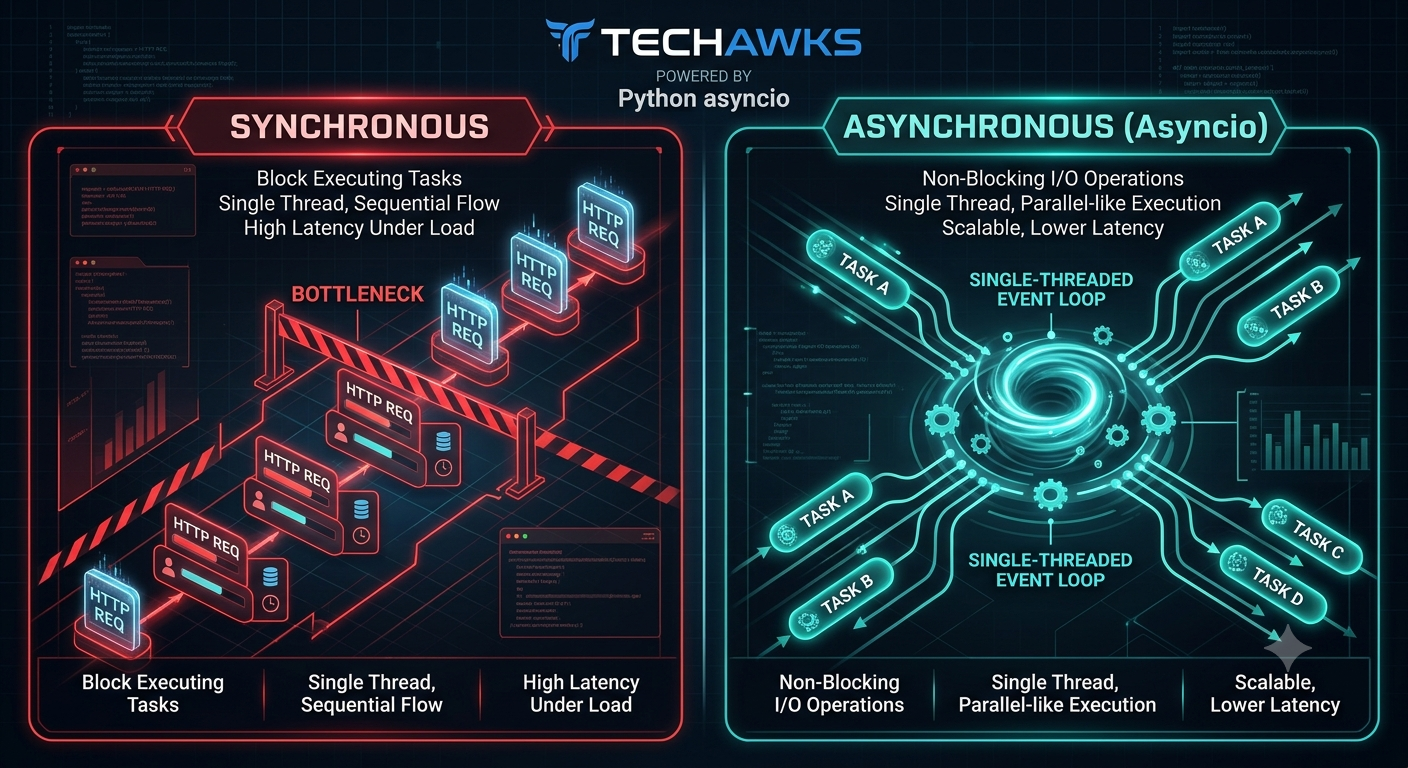
In traditional synchronous code (e.g., using requests), execution stops completely while waiting for a server response. If a request takes 500ms, your thread sits idle for 500ms. Multiply that by 1,000 concurrent users, and your server crashes.
Leverage the Event Loop
Python’s asyncio module uses a single-threaded event loop to pause execution of a task while it waits for I/O, allowing other tasks to run in the meantime.
Swap Your Libraries
Using async/await syntax with synchronous libraries does not make them non-blocking. You must use asynchronous equivalents:
Replace requests with httpx or aiohttp.
Replace standard database drivers with async ones like asyncpg (PostgreSQL) or motor (MongoDB).
Avoid the Golden Rule Traps
Never run heavy CPU computation inside an async function without offloading it to a ProcessPoolExecutor—otherwise, you block the entire event loop.
Don't use time.sleep(); use await asyncio.sleep().
Key Takeaways
I/O Bottlenecks vs CPU Limits: Most web services spend 90% of their time waiting, not computing.
Non-Blocking Execution: Async lets a single process serve thousands of open connections simultaneously.
Match Your Stack: Always use async-compatible drivers and HTTP clients alongside async/await.
Protect the Event Loop: Keep heavy mathematical operations out of the main thread.
CTA
Want to level up your engineering skills and share practical tech knowledge with top developers across India?
[Join Techawks India today] and grow with our thriving tech ecosystem.
Python gets a bad rap for speed, but when handling network-bound tasks—like fetching data from third-party APIs, querying databases, or handling user requests—the bottleneck isn't CPU compute; it's waiting for responses.
For developers in India scaling applications for high-volume traffic, understanding synchronous versus asynchronous execution is a game-changer.
Understand the Core Problem (Blocking I/O)
In traditional synchronous code (e.g., using requests), execution stops completely while waiting for a server response. If a request takes 500ms, your thread sits idle for 500ms. Multiply that by 1,000 concurrent users, and your server crashes.
Leverage the Event Loop
Python’s asyncio module uses a single-threaded event loop to pause execution of a task while it waits for I/O, allowing other tasks to run in the meantime.
Swap Your Libraries
Using async/await syntax with synchronous libraries does not make them non-blocking. You must use asynchronous equivalents:
Replace requests with httpx or aiohttp.
Replace standard database drivers with async ones like asyncpg (PostgreSQL) or motor (MongoDB).
Avoid the Golden Rule Traps
Never run heavy CPU computation inside an async function without offloading it to a ProcessPoolExecutor—otherwise, you block the entire event loop.
Don't use time.sleep(); use await asyncio.sleep().
Key Takeaways
I/O Bottlenecks vs CPU Limits: Most web services spend 90% of their time waiting, not computing.
Non-Blocking Execution: Async lets a single process serve thousands of open connections simultaneously.
Match Your Stack: Always use async-compatible drivers and HTTP clients alongside async/await.
Protect the Event Loop: Keep heavy mathematical operations out of the main thread.
CTA
Want to level up your engineering skills and share practical tech knowledge with top developers across India?
[Join Techawks India today] and grow with our thriving tech ecosystem.
Mastering Async Python: How to Handle 10x More Concurrent Traffic Without Upgrading Servers
Python gets a bad rap for speed, but when handling network-bound tasks—like fetching data from third-party APIs, querying databases, or handling user requests—the bottleneck isn't CPU compute; it's waiting for responses.
For developers in India scaling applications for high-volume traffic, understanding synchronous versus asynchronous execution is a game-changer.
Understand the Core Problem (Blocking I/O)
In traditional synchronous code (e.g., using requests), execution stops completely while waiting for a server response. If a request takes 500ms, your thread sits idle for 500ms. Multiply that by 1,000 concurrent users, and your server crashes.
Leverage the Event Loop
Python’s asyncio module uses a single-threaded event loop to pause execution of a task while it waits for I/O, allowing other tasks to run in the meantime.
Swap Your Libraries
Using async/await syntax with synchronous libraries does not make them non-blocking. You must use asynchronous equivalents:
Replace requests with httpx or aiohttp.
Replace standard database drivers with async ones like asyncpg (PostgreSQL) or motor (MongoDB).
Avoid the Golden Rule Traps
Never run heavy CPU computation inside an async function without offloading it to a ProcessPoolExecutor—otherwise, you block the entire event loop.
Don't use time.sleep(); use await asyncio.sleep().
Key Takeaways
I/O Bottlenecks vs CPU Limits: Most web services spend 90% of their time waiting, not computing.
Non-Blocking Execution: Async lets a single process serve thousands of open connections simultaneously.
Match Your Stack: Always use async-compatible drivers and HTTP clients alongside async/await.
Protect the Event Loop: Keep heavy mathematical operations out of the main thread.
CTA
Want to level up your engineering skills and share practical tech knowledge with top developers across India?
[Join Techawks India today] and grow with our thriving tech ecosystem.

 English
 Arabic
 Spanish
 Portuguese
 Deutsch
 Turkish
 Dutch
Dutch
 Italiano
 Russian
 Romaian
 Portuguese (Brazil)
 Greek
Greek