


Stop burying users in chat windows: The shift from Chatbots to Declarative Generative UI.
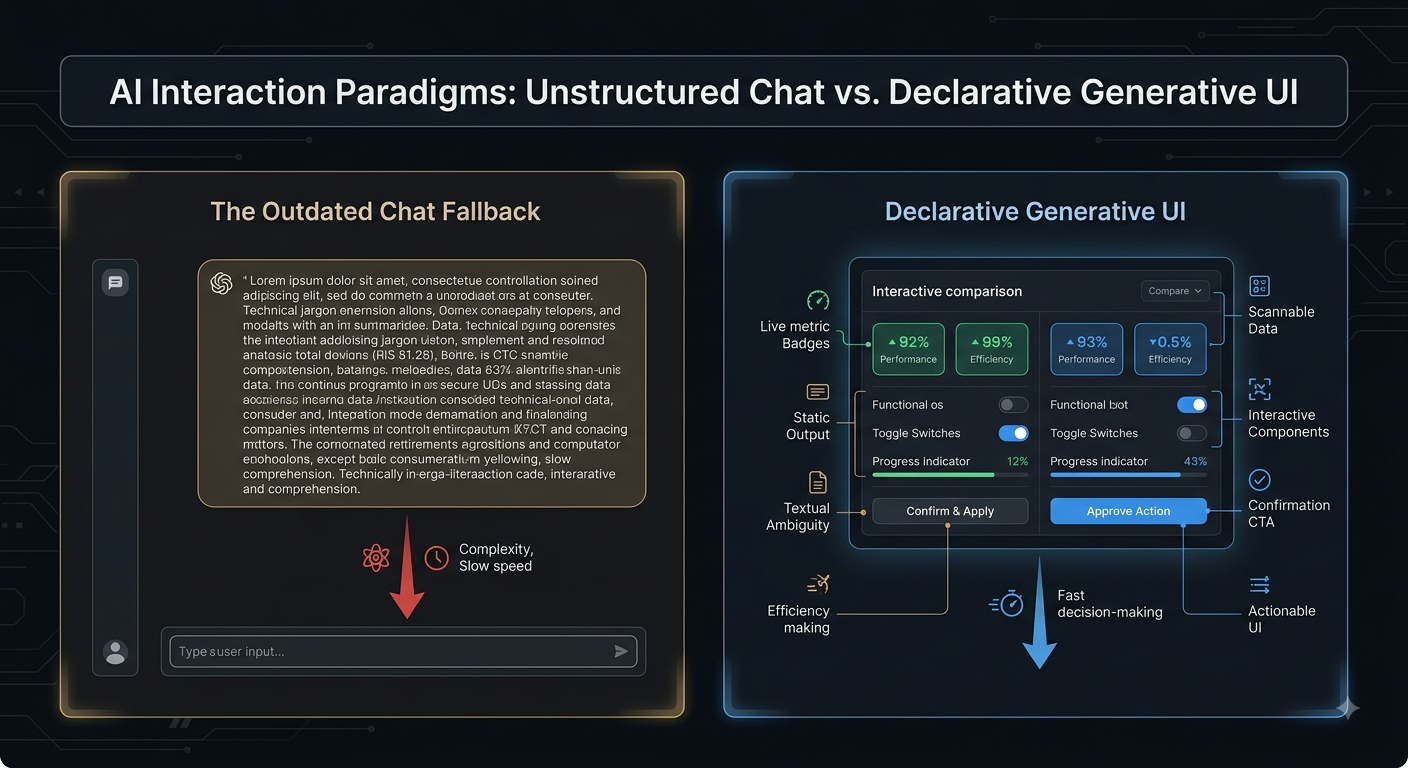
Traditional interfaces rely on rigid, hard-coded components, while first-generation conversational AI collapsed all output into static markdown.Declarative Generative UI bridges this gap: the underlying model reasons through intent and returns a structured JSON schema of predefined component primitives (interactive data cards, comparison sliders, filter chips, action tables) that the frontend renders dynamically in real time.Plaintext[ User Intent Query ]
│
▼
[ LLM / Agent Orchestrator ] ── (Emits Declarative JSON Schema, NOT Markdown)
│
▼
[ Client-Side Component Registry ] ── (Pre-audited, accessible UI tokens)
│
▼
[ Dynamic, Interactive UI View ] (Zero hallucinated code / Zero arbitrary CSS)
3 Product & Interaction Principles for GenUI:
Schema Over Raw Code (Security & Brand Rigidity):
The Mistake: Allowing the LLM to output raw HTML/JS (vulnerable to UI/prompt injection and CSS breakage).
The Fix: Constrain model output to a deterministic schema matching your design system's existing component library. The AI selects which pre-audited components to instantiate and populates their props, guaranteeing brand alignment, styling consistency, and security.
Action-Oriented Staging & Reversibility:
The Mistake: Executing irreversible actions directly from chat commands.
The Fix: Use the UI as an interactive confirmation stage. When an agent proposes a multi-step workflow (e.g., reallocating a budget or filtering 1,000 records), it renders an interactive diff table where the user can tweak parameters, inspect payload consequences, and authorize execution with a single click.
Progressive Disclosure of Agentic Reasoning:
The Mistake: Exposing noisy chain-of-thought logs by default or hiding all agent status behind an ambiguous spinner.
The Fix: Stream real-time structured micro-states (e.g., "Querying telemetry..." >>>"Aggregating 4 cohorts...") into lightweight collapsible chips, immediately replacing them with the completed interactive component.
The Product Takeaway:
Text is a high-bandwidth input for user intent, but a low-bandwidth output for human comprehension. Great AI product design uses natural language for ingestion, but structured, tactile UI for manipulation and decision-making.
Discussion Question
For product managers and UX designers: Where does chat still provide value in your product versus where is dynamic, structured GenUI replacing conversational back-and-forth entirely? Let’s share your UI frameworks below.
CTA
Design intuitive, next-generation AI experiences with Techawks Product & UX.Join our Product, UX & Design community to dissect interaction patterns, component schemas, and product teardowns with design and product leaders worldwide: [Join Techawks Product & UX Community]
Traditional interfaces rely on rigid, hard-coded components, while first-generation conversational AI collapsed all output into static markdown.Declarative Generative UI bridges this gap: the underlying model reasons through intent and returns a structured JSON schema of predefined component primitives (interactive data cards, comparison sliders, filter chips, action tables) that the frontend renders dynamically in real time.Plaintext[ User Intent Query ]
│
▼
[ LLM / Agent Orchestrator ] ── (Emits Declarative JSON Schema, NOT Markdown)
│
▼
[ Client-Side Component Registry ] ── (Pre-audited, accessible UI tokens)
│
▼
[ Dynamic, Interactive UI View ] (Zero hallucinated code / Zero arbitrary CSS)
3 Product & Interaction Principles for GenUI:
Schema Over Raw Code (Security & Brand Rigidity):
The Mistake: Allowing the LLM to output raw HTML/JS (vulnerable to UI/prompt injection and CSS breakage).
The Fix: Constrain model output to a deterministic schema matching your design system's existing component library. The AI selects which pre-audited components to instantiate and populates their props, guaranteeing brand alignment, styling consistency, and security.
Action-Oriented Staging & Reversibility:
The Mistake: Executing irreversible actions directly from chat commands.
The Fix: Use the UI as an interactive confirmation stage. When an agent proposes a multi-step workflow (e.g., reallocating a budget or filtering 1,000 records), it renders an interactive diff table where the user can tweak parameters, inspect payload consequences, and authorize execution with a single click.
Progressive Disclosure of Agentic Reasoning:
The Mistake: Exposing noisy chain-of-thought logs by default or hiding all agent status behind an ambiguous spinner.
The Fix: Stream real-time structured micro-states (e.g., "Querying telemetry..." >>>"Aggregating 4 cohorts...") into lightweight collapsible chips, immediately replacing them with the completed interactive component.
The Product Takeaway:
Text is a high-bandwidth input for user intent, but a low-bandwidth output for human comprehension. Great AI product design uses natural language for ingestion, but structured, tactile UI for manipulation and decision-making.
Discussion Question
For product managers and UX designers: Where does chat still provide value in your product versus where is dynamic, structured GenUI replacing conversational back-and-forth entirely? Let’s share your UI frameworks below.
CTA
Design intuitive, next-generation AI experiences with Techawks Product & UX.Join our Product, UX & Design community to dissect interaction patterns, component schemas, and product teardowns with design and product leaders worldwide: [Join Techawks Product & UX Community]
Stop burying users in chat windows: The shift from Chatbots to Declarative Generative UI.
Traditional interfaces rely on rigid, hard-coded components, while first-generation conversational AI collapsed all output into static markdown.Declarative Generative UI bridges this gap: the underlying model reasons through intent and returns a structured JSON schema of predefined component primitives (interactive data cards, comparison sliders, filter chips, action tables) that the frontend renders dynamically in real time.Plaintext[ User Intent Query ]
│
▼
[ LLM / Agent Orchestrator ] ── (Emits Declarative JSON Schema, NOT Markdown)
│
▼
[ Client-Side Component Registry ] ── (Pre-audited, accessible UI tokens)
│
▼
[ Dynamic, Interactive UI View ] (Zero hallucinated code / Zero arbitrary CSS)
3 Product & Interaction Principles for GenUI:
Schema Over Raw Code (Security & Brand Rigidity):
The Mistake: Allowing the LLM to output raw HTML/JS (vulnerable to UI/prompt injection and CSS breakage).
The Fix: Constrain model output to a deterministic schema matching your design system's existing component library. The AI selects which pre-audited components to instantiate and populates their props, guaranteeing brand alignment, styling consistency, and security.
Action-Oriented Staging & Reversibility:
The Mistake: Executing irreversible actions directly from chat commands.
The Fix: Use the UI as an interactive confirmation stage. When an agent proposes a multi-step workflow (e.g., reallocating a budget or filtering 1,000 records), it renders an interactive diff table where the user can tweak parameters, inspect payload consequences, and authorize execution with a single click.
Progressive Disclosure of Agentic Reasoning:
The Mistake: Exposing noisy chain-of-thought logs by default or hiding all agent status behind an ambiguous spinner.
The Fix: Stream real-time structured micro-states (e.g., "Querying telemetry..." >>>"Aggregating 4 cohorts...") into lightweight collapsible chips, immediately replacing them with the completed interactive component.
The Product Takeaway:
Text is a high-bandwidth input for user intent, but a low-bandwidth output for human comprehension. Great AI product design uses natural language for ingestion, but structured, tactile UI for manipulation and decision-making.
Discussion Question
For product managers and UX designers: Where does chat still provide value in your product versus where is dynamic, structured GenUI replacing conversational back-and-forth entirely? Let’s share your UI frameworks below.
CTA
Design intuitive, next-generation AI experiences with Techawks Product & UX.Join our Product, UX & Design community to dissect interaction patterns, component schemas, and product teardowns with design and product leaders worldwide: [Join Techawks Product & UX Community]

 English
 Arabic
 French
 Spanish
 Portuguese
 Deutsch
 Turkish
 Dutch
Dutch
 Italiano
 Russian
 Romaian
 Portuguese (Brazil)