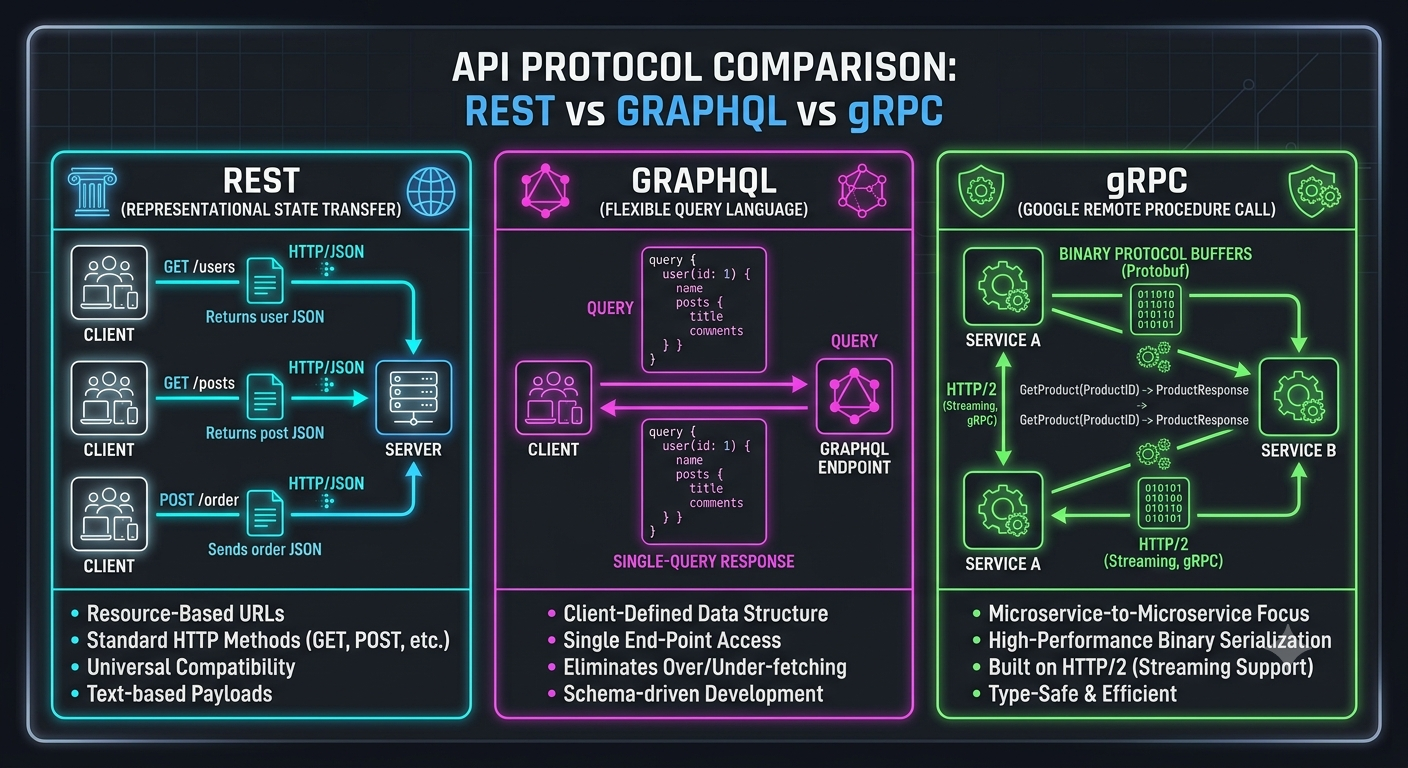
• Demystifying API Protocols: REST, GraphQL, and gRPC Explained
    As modern applications grow increasingly modular, how your services communicate with each other becomes a critical design choice. While REST remains the default for web APIs, specialized alternatives like GraphQL and gRPC have become essential tools for solving specific scale challenges.
    Here is how the three major protocols stack up and when to deploy each:


    1 REST (Representational State Transfer)
    How it works: Relies on standard HTTP verbs (GET, POST, PUT, DELETE) and resources identified by URLs.
    Best for: Public-facing web APIs, standard CRUD applications, and scenarios where HTTP caching is heavily leveraged.
    Trade-off: Vulnerable to over-fetching (getting data you don't need) or under-fetching (requiring multiple round trips for complex UI screens).


    2 GraphQL
    How it works: Uses a single endpoint where clients declare the exact structure of the data they require using a flexible query language.
    Best for: Mobile applications, rich front-end interfaces, and multi-device platforms where bandwidth efficiency and minimizing network round-trips are crucial.
    Trade-off: Adds complexity to backend caching and can expose your server to expensive, deeply nested queries if not properly rate-limited.


    3 gRPC (Google Remote Procedure Call)
    How it works: Runs over HTTP/2 using Protocol Buffers (Protobuf) to serialize data into binary payloads instead of text-based JSON.
    Best for: Microservice-to-microservice internal communication, real-time streaming, and high-performance networks requiring ultra-low latency.
    Trade-off: Lacks native web browser support (requires proxy translation) and human-readable payload debugging without dedicated tooling.


    Key Takeaways
    REST for simple, universally compatible, public-facing services.
    GraphQL for frontend-driven apps needing granular data control and minimal network calls.
    gRPC for high-throughput, low-latency microservice architectures.


    CTA
    Want to sharpen your software architecture skills and stay ahead of modern backend practices?


    [Join the Techawks General Community] to connect with developers worldwide, share real-world code patterns, and learn together.
    Demystifying API Protocols: REST, GraphQL, and gRPC Explained As modern applications grow increasingly modular, how your services communicate with each other becomes a critical design choice. While REST remains the default for web APIs, specialized alternatives like GraphQL and gRPC have become essential tools for solving specific scale challenges. Here is how the three major protocols stack up and when to deploy each: 1 REST (Representational State Transfer) How it works: Relies on standard HTTP verbs (GET, POST, PUT, DELETE) and resources identified by URLs. Best for: Public-facing web APIs, standard CRUD applications, and scenarios where HTTP caching is heavily leveraged. Trade-off: Vulnerable to over-fetching (getting data you don't need) or under-fetching (requiring multiple round trips for complex UI screens). 2 GraphQL How it works: Uses a single endpoint where clients declare the exact structure of the data they require using a flexible query language. Best for: Mobile applications, rich front-end interfaces, and multi-device platforms where bandwidth efficiency and minimizing network round-trips are crucial. Trade-off: Adds complexity to backend caching and can expose your server to expensive, deeply nested queries if not properly rate-limited. 3 gRPC (Google Remote Procedure Call) How it works: Runs over HTTP/2 using Protocol Buffers (Protobuf) to serialize data into binary payloads instead of text-based JSON. Best for: Microservice-to-microservice internal communication, real-time streaming, and high-performance networks requiring ultra-low latency. Trade-off: Lacks native web browser support (requires proxy translation) and human-readable payload debugging without dedicated tooling. Key Takeaways REST for simple, universally compatible, public-facing services. GraphQL for frontend-driven apps needing granular data control and minimal network calls. gRPC for high-throughput, low-latency microservice architectures. CTA Want to sharpen your software architecture skills and stay ahead of modern backend practices? [Join the Techawks General Community] to connect with developers worldwide, share real-world code patterns, and learn together.
    0 Comments 0 Shares 580 Views 0 Reviews
  • Monolith vs. Microservices: How Do You Know When It’s Time to Split?


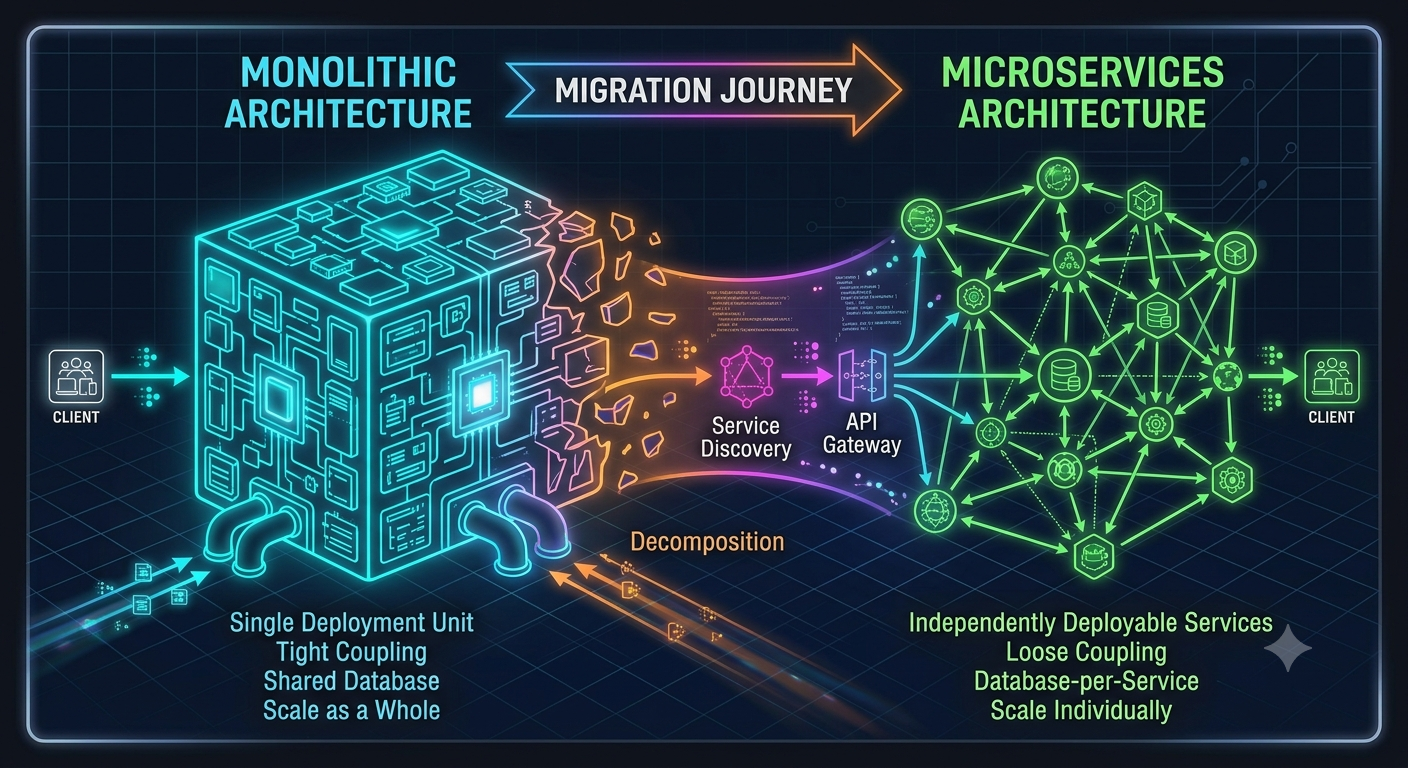
    "Start with a monolith, then break it down into microservices." It’s standard industry advice—until you realize your team is spending more time managing Kubernetes clusters and network hops than shipping actual features. Where is the line?
    The debate between monolithic architectures and microservices isn't about which design is superior; it's about matching your software architecture to your organizational maturity and scale requirements.
    While microservices promise independent deployments, isolated scaling, and tech-stack flexibility, they introduce distributed systems complexity: eventual consistency, network latency, distributed tracing headaches, and operational overhead.


    Before you make the leap to split your application, evaluate these three foundational questions:


    1 Domain Isolation: Are your business domain boundaries clear enough that splitting them won't lead to distributed monoliths and constant cross-service database joins?
    2.Team Autonomy: Is developer throughput actually blocked by shared codebases and deployment queues, or are organizational bottlenecks the real issue?
    3 Operational Readiness: Does your team have the observability, automated CI/CD pipelines, and infrastructure monitoring required to operate tens (or hundreds) of independent services?


    Modular monoliths are often the sweet spot—offering clean domain separation in code without the distributed system tax.


    Key Takeaways
    Premature microservices create operational burden without solving architectural bottlenecks.
    Domain boundaries matter most: If your domain model is fuzzy, splitting it will only create network-bound complexity.
    Scale the team, then the architecture: Microservices solve organizational scaling problems as much as technical ones.


    CTA
    Where does your team currently stand on the architecture spectrum? Are you team Monolith, team Microservices, or somewhere in between?


    Drop your experiences in the comments below, and [Join the Techawks General Community] to jump into deeper architectural debates with engineers around the globe.
    Monolith vs. Microservices: How Do You Know When It’s Time to Split? "Start with a monolith, then break it down into microservices." It’s standard industry advice—until you realize your team is spending more time managing Kubernetes clusters and network hops than shipping actual features. Where is the line? The debate between monolithic architectures and microservices isn't about which design is superior; it's about matching your software architecture to your organizational maturity and scale requirements. While microservices promise independent deployments, isolated scaling, and tech-stack flexibility, they introduce distributed systems complexity: eventual consistency, network latency, distributed tracing headaches, and operational overhead. Before you make the leap to split your application, evaluate these three foundational questions: 1 Domain Isolation: Are your business domain boundaries clear enough that splitting them won't lead to distributed monoliths and constant cross-service database joins? 2.Team Autonomy: Is developer throughput actually blocked by shared codebases and deployment queues, or are organizational bottlenecks the real issue? 3 Operational Readiness: Does your team have the observability, automated CI/CD pipelines, and infrastructure monitoring required to operate tens (or hundreds) of independent services? Modular monoliths are often the sweet spot—offering clean domain separation in code without the distributed system tax. Key Takeaways Premature microservices create operational burden without solving architectural bottlenecks. Domain boundaries matter most: If your domain model is fuzzy, splitting it will only create network-bound complexity. Scale the team, then the architecture: Microservices solve organizational scaling problems as much as technical ones. CTA Where does your team currently stand on the architecture spectrum? Are you team Monolith, team Microservices, or somewhere in between? Drop your experiences in the comments below, and [Join the Techawks General Community] to jump into deeper architectural debates with engineers around the globe.
    0 Comments 0 Shares 503 Views 0 Reviews
  • The 5-Step RAG Optimization Guide: Stop Hallucinations in Production


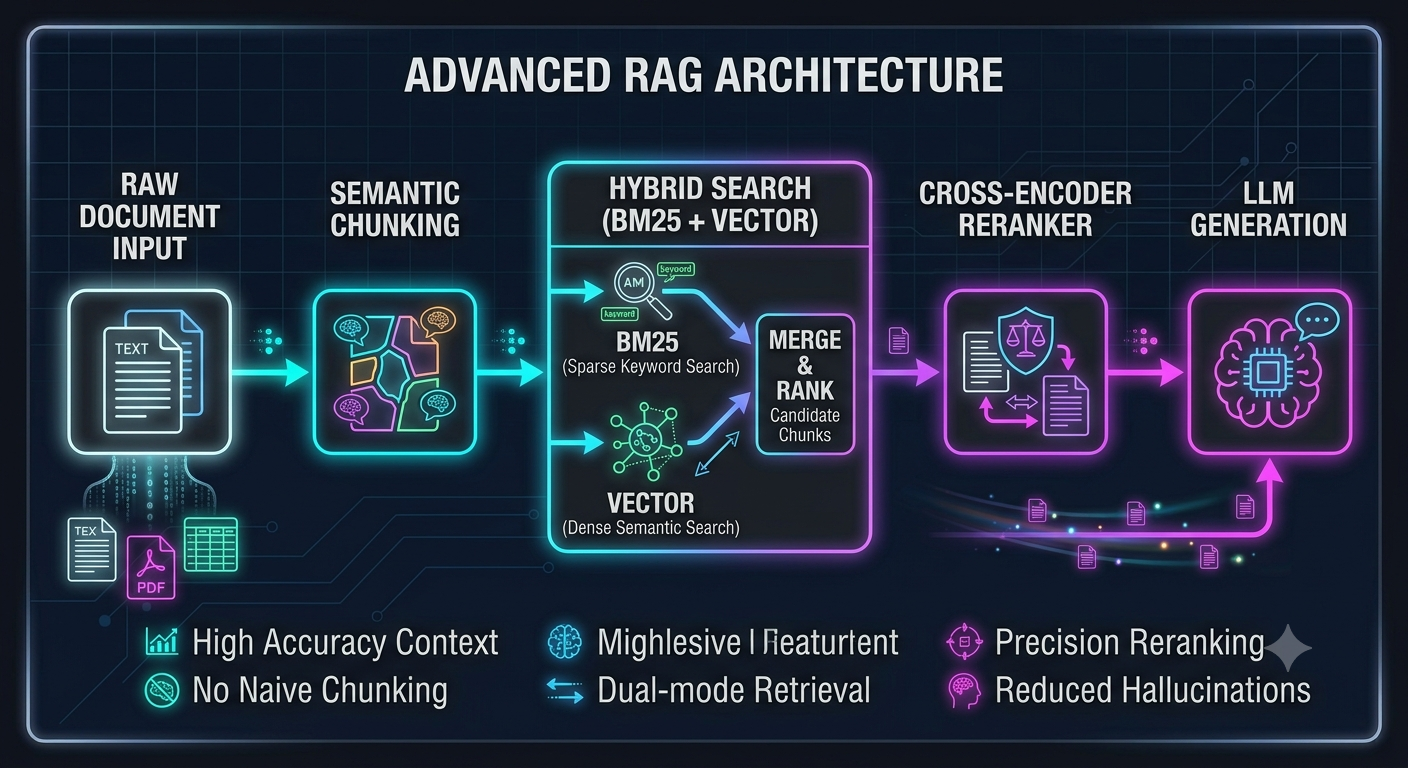
    Building a robust RAG pipeline requires moving beyond simple naive retrieval (splitting text every 500 characters and querying a vector store). To build production-grade AI systems that deliver accurate, contextual responses, implement these five advanced RAG optimizations:


    Semantic Chunking Over Fixed-Size Chunking
    The Problem: Fixed token lengths slice through coherent paragraphs and split critical context mid-sentence.
    The Fix: Group text by semantic similarity using embedding distances between sentences or leverage document structure (headers, markdown, code blocks) to preserve complete thoughts.


    Hybrid Search (Dense + Sparse Retrieval)
    The Problem: Dense vector embeddings excel at semantic intent but often fail with exact matches (part numbers, specific proper nouns, or code snippets).
    The Fix: Combine dense vector search with sparse keyword search (BM25) using Reciprocal Rank Fusion (RRF) to get the best of both worlds.


    Reranking with Cross-Encoders
    The Problem: Top-$K$ vector retrieval brings back similar documents, but not necessarily the most relevant answers.
    The Fix: Pass your top 20–50 retrieved chunks through a dedicated cross-encoder reranking model (like Cohere Rerank or BGE-Reranker) to score precision before sending context to your LLM.


    Query Transformation & Rewriting
    The Problem: Raw user queries are often ambiguous, vague, or conversational, making direct vector search inefficient.
    The Fix: Use a fast, lightweight LLM step to rewrite queries, break complex multi-part questions into sub-queries, or generate hypothetical answers (HyDE) to embed instead of the question.


    Context Compression & Pruning
    The Problem: Stuffing irrelevant retrieved chunks into the prompt window increases latency, elevates API costs, and causes the LLM to miss key details due to "lost in the middle" phenomena.
    The Fix: Filter out low-confidence chunks post-reranking and summarize or extract only the essential sentences required to answer the query.


    Key Takeaways
    Naive RAG isn't enough: Production systems require multi-stage pipelines.
    Hybrid Search + Reranking yields the highest accuracy bump for the lowest engineering lift.
    Filter context early: Less irrelevant context leads to fewer LLM hallucinations and lower token costs.


    CTA
    Ready to build reliable, production-ready AI applications alongside fellow engineers?
    The 5-Step RAG Optimization Guide: Stop Hallucinations in Production Building a robust RAG pipeline requires moving beyond simple naive retrieval (splitting text every 500 characters and querying a vector store). To build production-grade AI systems that deliver accurate, contextual responses, implement these five advanced RAG optimizations: Semantic Chunking Over Fixed-Size Chunking The Problem: Fixed token lengths slice through coherent paragraphs and split critical context mid-sentence. The Fix: Group text by semantic similarity using embedding distances between sentences or leverage document structure (headers, markdown, code blocks) to preserve complete thoughts. Hybrid Search (Dense + Sparse Retrieval) The Problem: Dense vector embeddings excel at semantic intent but often fail with exact matches (part numbers, specific proper nouns, or code snippets). The Fix: Combine dense vector search with sparse keyword search (BM25) using Reciprocal Rank Fusion (RRF) to get the best of both worlds. Reranking with Cross-Encoders The Problem: Top-$K$ vector retrieval brings back similar documents, but not necessarily the most relevant answers. The Fix: Pass your top 20–50 retrieved chunks through a dedicated cross-encoder reranking model (like Cohere Rerank or BGE-Reranker) to score precision before sending context to your LLM. Query Transformation & Rewriting The Problem: Raw user queries are often ambiguous, vague, or conversational, making direct vector search inefficient. The Fix: Use a fast, lightweight LLM step to rewrite queries, break complex multi-part questions into sub-queries, or generate hypothetical answers (HyDE) to embed instead of the question. Context Compression & Pruning The Problem: Stuffing irrelevant retrieved chunks into the prompt window increases latency, elevates API costs, and causes the LLM to miss key details due to "lost in the middle" phenomena. The Fix: Filter out low-confidence chunks post-reranking and summarize or extract only the essential sentences required to answer the query. Key Takeaways Naive RAG isn't enough: Production systems require multi-stage pipelines. Hybrid Search + Reranking yields the highest accuracy bump for the lowest engineering lift. Filter context early: Less irrelevant context leads to fewer LLM hallucinations and lower token costs. CTA Ready to build reliable, production-ready AI applications alongside fellow engineers?
    0 Comments 0 Shares 452 Views 0 Reviews
  • Prompt Engineering vs. Fine-Tuning vs. RAG: Choosing the Right Strategy for Your LLM App
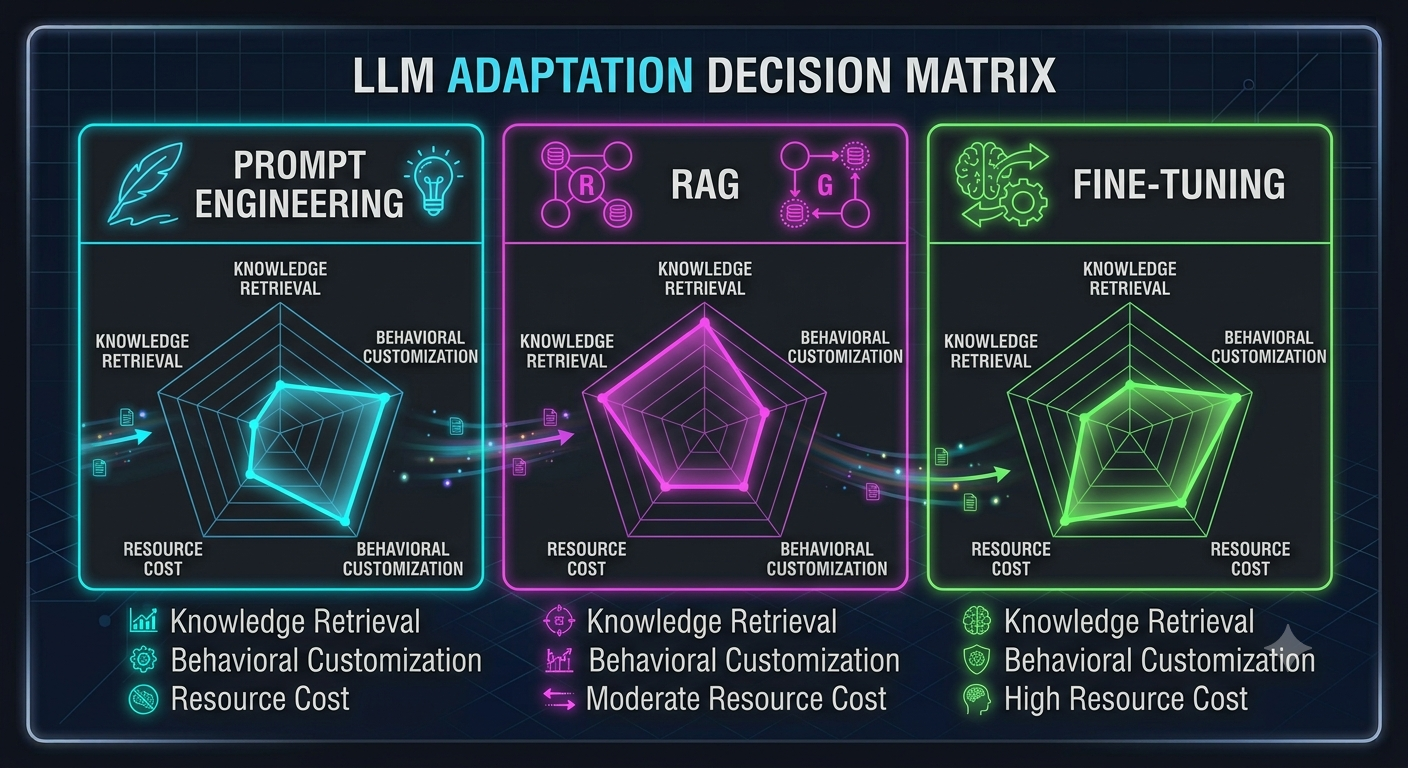
    To pick the optimal path, you need to understand the trade-offs between speed to deploy, implementation complexity, and ongoing maintenance costs. Here is a clear decision framework for the three primary LLM adaptation strategies:


    Prompt Engineering & In-Context Learning
    What it is: Optimizing system instructions, formats, and few-shot examples directly within the context window.
    When to use: Rapid prototyping, simple tasks, formatting output (e.g., JSON), or setting tone and style.
    Pros: Zero training cost, instant iteration, no infrastructure management.
    Cons: High latency and token costs for large prompts; limited by the context window size.


    Retrieval-Augmented Generation (RAG)
    What it is: Connecting your LLM to an external dynamic knowledge base via vector embeddings or search engines to fetch relevant documents dynamically.
    When to use: Accessing proprietary, frequently updated, or factual enterprise data (e.g., company wiki, customer support docs, live APIs).
    Pros: Highly accurate, verifiable source attribution, easy to update data without retraining.
    Cons: Adds architectural complexity (vector databases, embedding pipelines, chunking strategies).


    Fine-Tuning (e.g., LoRA / QLoRA)
    What it is: Updating a pretrained model's internal weights on a specialized dataset using Parameter-Efficient Fine-Tuning.
    When to use: Teaching the model a niche style/syntax, optimizing for specific structured outputs, or running smaller, specialized models on-premise at high throughput.
    Pros: Reduces context window size (lowers per-query token cost), fast inference speed, high consistency.
    Cons: Expensive to train and maintain; bad for rapidly changing knowledge (weights become stale quickly).


    Key Takeaways
    Start with Prompting: Always build a baseline with prompt engineering before adding architectural complexity.
    Use RAG for Knowledge: If your model needs accurate, up-to-date, or private dynamic data, build a RAG pipeline.
    Use Fine-Tuning for Behavior: If your model needs to master a specialized skill, syntax, or tone at high efficiency, fine-tune.


    CTA
    Stuck deciding on the best AI architecture for your project?
    Prompt Engineering vs. Fine-Tuning vs. RAG: Choosing the Right Strategy for Your LLM App To pick the optimal path, you need to understand the trade-offs between speed to deploy, implementation complexity, and ongoing maintenance costs. Here is a clear decision framework for the three primary LLM adaptation strategies: Prompt Engineering & In-Context Learning What it is: Optimizing system instructions, formats, and few-shot examples directly within the context window. When to use: Rapid prototyping, simple tasks, formatting output (e.g., JSON), or setting tone and style. Pros: Zero training cost, instant iteration, no infrastructure management. Cons: High latency and token costs for large prompts; limited by the context window size. Retrieval-Augmented Generation (RAG) What it is: Connecting your LLM to an external dynamic knowledge base via vector embeddings or search engines to fetch relevant documents dynamically. When to use: Accessing proprietary, frequently updated, or factual enterprise data (e.g., company wiki, customer support docs, live APIs). Pros: Highly accurate, verifiable source attribution, easy to update data without retraining. Cons: Adds architectural complexity (vector databases, embedding pipelines, chunking strategies). Fine-Tuning (e.g., LoRA / QLoRA) What it is: Updating a pretrained model's internal weights on a specialized dataset using Parameter-Efficient Fine-Tuning. When to use: Teaching the model a niche style/syntax, optimizing for specific structured outputs, or running smaller, specialized models on-premise at high throughput. Pros: Reduces context window size (lowers per-query token cost), fast inference speed, high consistency. Cons: Expensive to train and maintain; bad for rapidly changing knowledge (weights become stale quickly). Key Takeaways Start with Prompting: Always build a baseline with prompt engineering before adding architectural complexity. Use RAG for Knowledge: If your model needs accurate, up-to-date, or private dynamic data, build a RAG pipeline. Use Fine-Tuning for Behavior: If your model needs to master a specialized skill, syntax, or tone at high efficiency, fine-tune. CTA Stuck deciding on the best AI architecture for your project?
    0 Comments 0 Shares 557 Views 0 Reviews
  • Autonomous AI Agents vs. Deterministic Workflows: When Should You Trust the Loop?


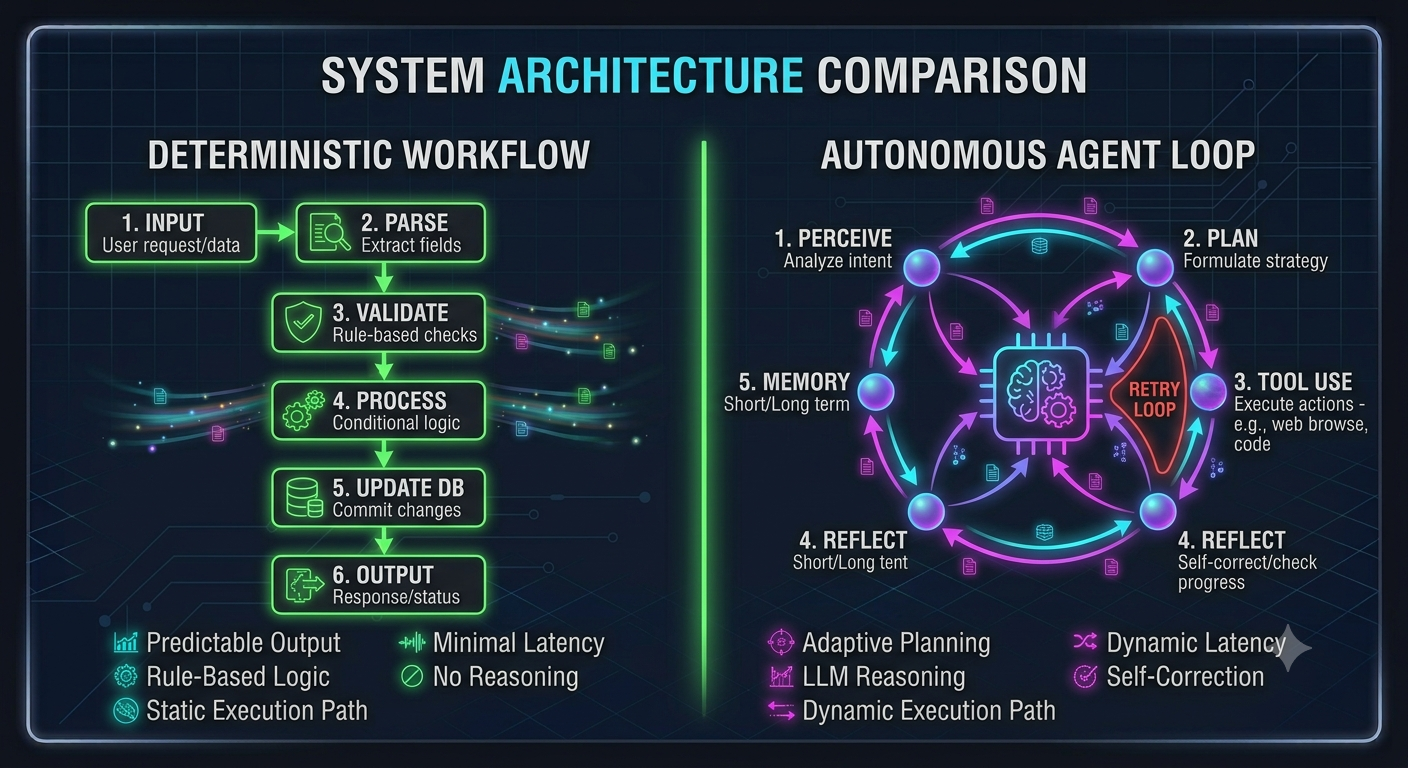
    Building production AI features isn't just about giving an LLM tool-calling abilities; it’s about choosing the right balance between dynamic orchestration and hardcoded reliability.
    When architecture choices lean too far toward fully autonomous loops, systems become non-deterministic, hard to evaluate, and prone to unpredictable failures. Lean too far toward rigid, step-by-step logic, and you lose the power of LLM reasoning.
    To build resilient AI systems, evaluate your workflows against these three operational boundaries:


    Task Ambiguity vs. Latency Tolerance
    Deterministic Workflows: Ideal for highly structured tasks with clear paths (e.g., extracting fields from a standard invoice or running a structured RAG pipeline). Output quality is predictable, and latency is minimized.
    Agentic Loops: Necessary when the solution path is dynamic or unknown beforehand (e.g., exploratory data analysis, complex debugging, or dynamic multi-step search).


    Human-in-the-Loop (HITL) Gatekeeping
    Don't let autonomous agents execute side-effects (like modifying production databases, sending emails, or making financial transactions) without explicit confirmation bounds.
    Use agents to generate state proposals or action plans, then use deterministic checks or human approval before execution.


    Deterministic Guardrails & State Machines
    Wrap agent loops inside strict finite state machines (FSMs).
    Define hard caps on tool invocations, maximum token consumption, and clear fallback pathways when an agent fails to make progress after $N$ iterations.


    Key Takeaways
    Don't use autonomous agents for linear problems: If the steps can be written in code, write them in code.
    Bound your loops: Every agentic feature must have strict token caps, recursion limits, and state fallbacks.
    Decouple planning from execution: Let the LLM plan the actions, but use deterministic code to execute side-effects.


    CTA
    How are you structuring AI applications in your stack? Are you deploying fully autonomous agents, or relying on structured workflow DAGs?
    Autonomous AI Agents vs. Deterministic Workflows: When Should You Trust the Loop? Building production AI features isn't just about giving an LLM tool-calling abilities; it’s about choosing the right balance between dynamic orchestration and hardcoded reliability. When architecture choices lean too far toward fully autonomous loops, systems become non-deterministic, hard to evaluate, and prone to unpredictable failures. Lean too far toward rigid, step-by-step logic, and you lose the power of LLM reasoning. To build resilient AI systems, evaluate your workflows against these three operational boundaries: Task Ambiguity vs. Latency Tolerance Deterministic Workflows: Ideal for highly structured tasks with clear paths (e.g., extracting fields from a standard invoice or running a structured RAG pipeline). Output quality is predictable, and latency is minimized. Agentic Loops: Necessary when the solution path is dynamic or unknown beforehand (e.g., exploratory data analysis, complex debugging, or dynamic multi-step search). Human-in-the-Loop (HITL) Gatekeeping Don't let autonomous agents execute side-effects (like modifying production databases, sending emails, or making financial transactions) without explicit confirmation bounds. Use agents to generate state proposals or action plans, then use deterministic checks or human approval before execution. Deterministic Guardrails & State Machines Wrap agent loops inside strict finite state machines (FSMs). Define hard caps on tool invocations, maximum token consumption, and clear fallback pathways when an agent fails to make progress after $N$ iterations. Key Takeaways Don't use autonomous agents for linear problems: If the steps can be written in code, write them in code. Bound your loops: Every agentic feature must have strict token caps, recursion limits, and state fallbacks. Decouple planning from execution: Let the LLM plan the actions, but use deterministic code to execute side-effects. CTA How are you structuring AI applications in your stack? Are you deploying fully autonomous agents, or relying on structured workflow DAGs?
    0 Comments 0 Shares 542 Views 0 Reviews
  • The Clean Code Checklist: 5 Refactoring Patterns to Level Up Your Codebase


    Tech debt compounds quietly. It usually starts with a quick patch here, a nested if statement there, and suddenly you're staring at a 500-line function no one dares to touch.
    Here are five practical, language-agnostic code refactoring patterns you can apply immediately to clean up your codebase:


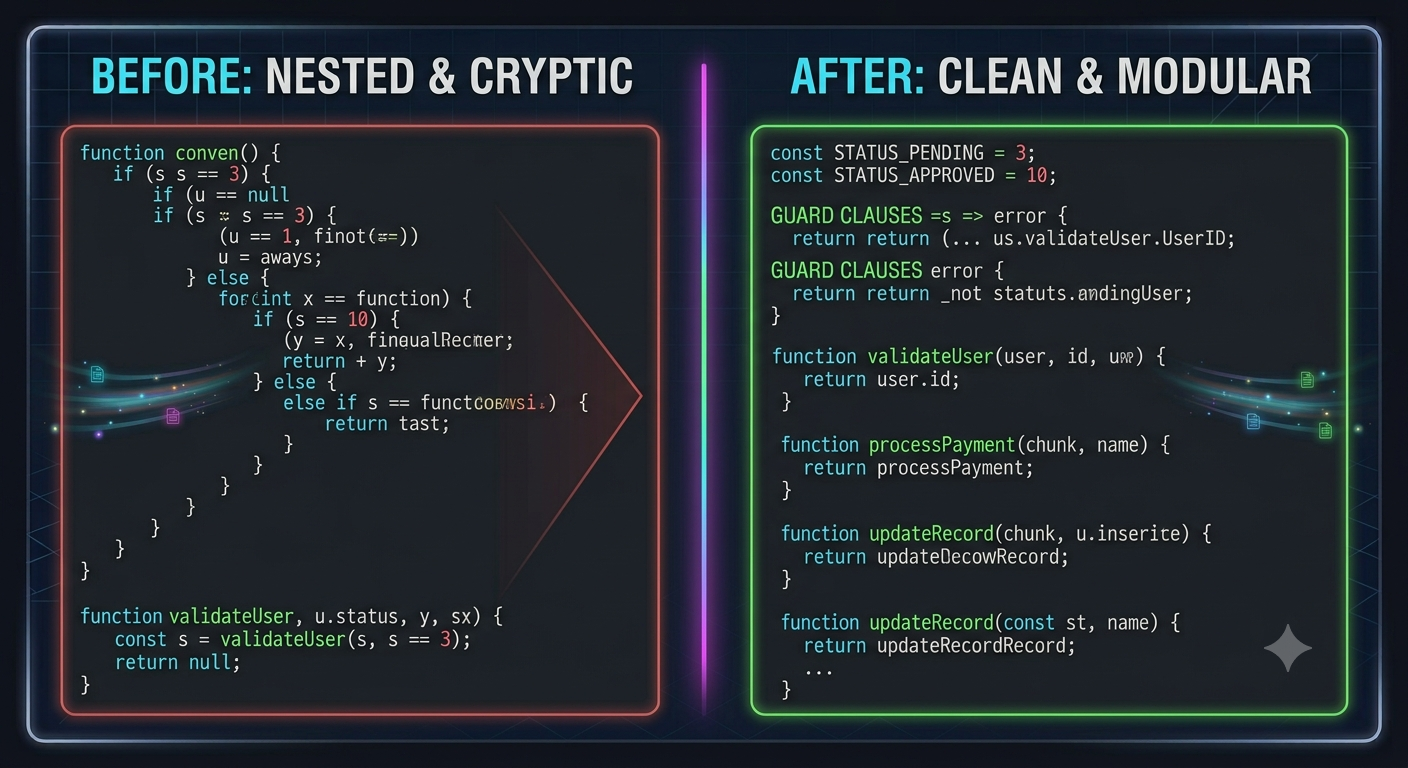
    Replace Magic Numbers with Named Constants
    The Bad: if (user.status === 3) { retry(4); }
    The Fix: Assign clear, descriptive names to raw values (e.g., USER_STATUS_PENDING = 3, MAX_RETRY_ATTEMPTS = 4). It instantly makes the code self-documenting and prevents typos across your codebase.


    Flatten Deeply Nested Logic with Guard Clauses
    The Bad: Arrow-shaped code filled with 4–5 levels of nested if-else blocks checking for valid states.
    The Fix: Return early. Validate preconditions at the very top of your function (e.g., if (!user) return;) to handle error cases first. This keeps the primary execution path clean and flush against the left margin.


    Break Up "God Functions" (Single Responsibility Principle)
    The Bad: A single function that parses incoming request payloads, validates input fields, writes to a database, and emails a receipt.
    The Fix: Extract discrete logical operations into small, single-purpose helper functions. A good rule of thumb: if a function's behavior needs an "and" to explain what it does, it's doing too much.


    Prefer Pure Functions Where Possible
    The Bad: Functions that rely heavily on hidden global variables or mutate state outside their immediate scope, making them unpredictable to test.
    The Fix: Write pure functions—where the same inputs always return the exact same output without side effects. Pure functions are vastly easier to unit test, debug, and reason about.


    Replace Boolean Flags with Enum or Explicit Function Strategy
    The Bad: Calling renderUI(true, false, true) where no one knows what those positional parameters control without checking the function definition.
    The Fix: Pass named configuration objects or split the behavior into distinct, explicitly named functions (e.g., renderAdminDashboard() vs. renderUserDashboard()).


    Key Takeaways
    Return early: Guard clauses eliminate cognitive overload caused by deeply nested conditionals.
    Keep functions tiny: Aim for functions that do one thing and do it predictably.
    Name with intent: Code is read far more often than it is written—make every variable name earn its place.


    CTA
    Ready to refine your syntax, adopt better design patterns, and write production-ready code with fellow developers?


    [Join Developers & Coding] to share code snippets, get PR feedback, and sharpen your software engineering skills every single day.
    The Clean Code Checklist: 5 Refactoring Patterns to Level Up Your Codebase Tech debt compounds quietly. It usually starts with a quick patch here, a nested if statement there, and suddenly you're staring at a 500-line function no one dares to touch. Here are five practical, language-agnostic code refactoring patterns you can apply immediately to clean up your codebase: Replace Magic Numbers with Named Constants The Bad: if (user.status === 3) { retry(4); } The Fix: Assign clear, descriptive names to raw values (e.g., USER_STATUS_PENDING = 3, MAX_RETRY_ATTEMPTS = 4). It instantly makes the code self-documenting and prevents typos across your codebase. Flatten Deeply Nested Logic with Guard Clauses The Bad: Arrow-shaped code filled with 4–5 levels of nested if-else blocks checking for valid states. The Fix: Return early. Validate preconditions at the very top of your function (e.g., if (!user) return;) to handle error cases first. This keeps the primary execution path clean and flush against the left margin. Break Up "God Functions" (Single Responsibility Principle) The Bad: A single function that parses incoming request payloads, validates input fields, writes to a database, and emails a receipt. The Fix: Extract discrete logical operations into small, single-purpose helper functions. A good rule of thumb: if a function's behavior needs an "and" to explain what it does, it's doing too much. Prefer Pure Functions Where Possible The Bad: Functions that rely heavily on hidden global variables or mutate state outside their immediate scope, making them unpredictable to test. The Fix: Write pure functions—where the same inputs always return the exact same output without side effects. Pure functions are vastly easier to unit test, debug, and reason about. Replace Boolean Flags with Enum or Explicit Function Strategy The Bad: Calling renderUI(true, false, true) where no one knows what those positional parameters control without checking the function definition. The Fix: Pass named configuration objects or split the behavior into distinct, explicitly named functions (e.g., renderAdminDashboard() vs. renderUserDashboard()). Key Takeaways Return early: Guard clauses eliminate cognitive overload caused by deeply nested conditionals. Keep functions tiny: Aim for functions that do one thing and do it predictably. Name with intent: Code is read far more often than it is written—make every variable name earn its place. CTA Ready to refine your syntax, adopt better design patterns, and write production-ready code with fellow developers? [Join Developers & Coding] to share code snippets, get PR feedback, and sharpen your software engineering skills every single day.
    0 Comments 0 Shares 871 Views 0 Reviews
  • Mastering Async Control Flow: Callbacks, Promises, and Async/Await


    Whether you are fetching API data, reading from a file system, or querying a database, non-blocking asynchronous operations are essential for application performance. However, as your code scales, managing async execution flow requires choosing the right mechanism for the task.
    Here is an actionable breakdown of the evolution of async patterns and when to use each:


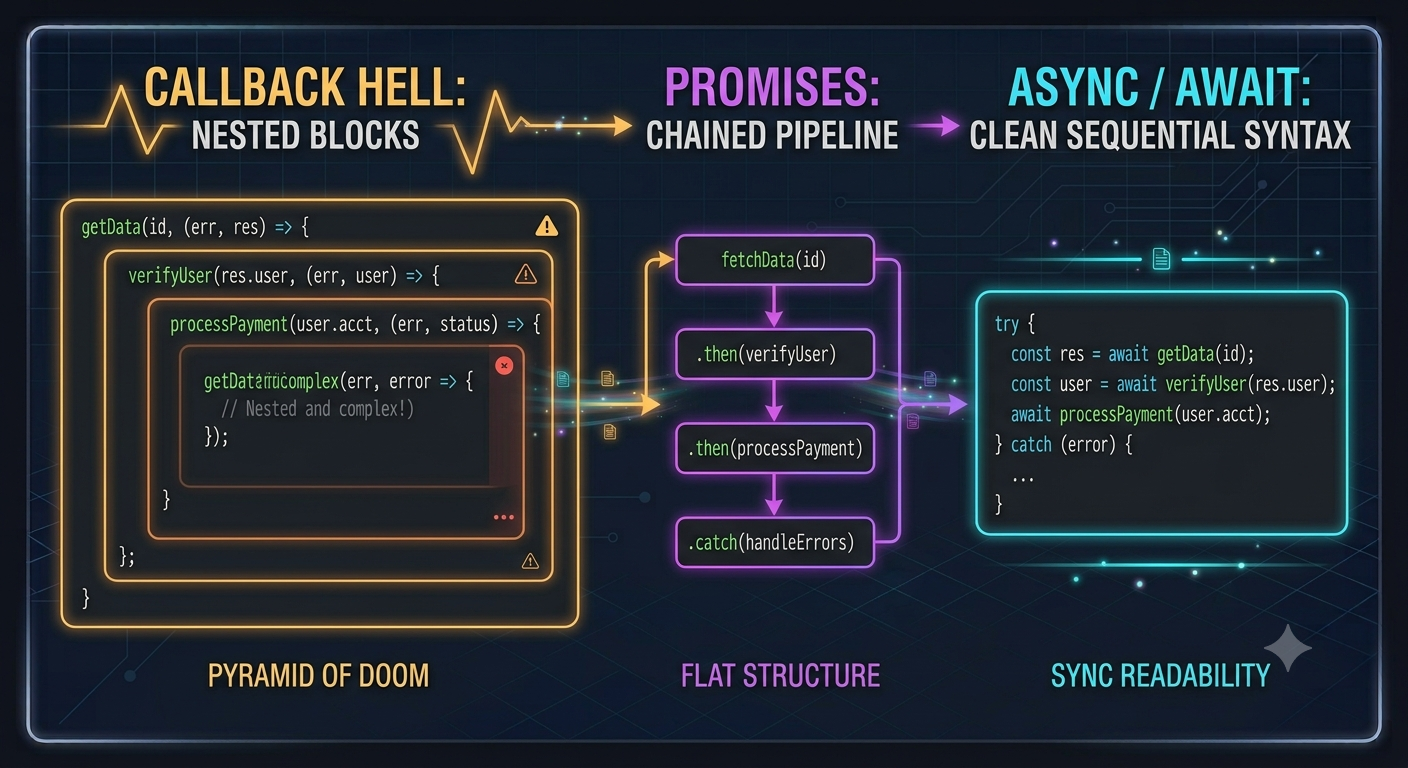
    Callbacks: The Foundational Mechanism
    How it works: You pass a function as an argument to another function, which executes once the async operation finishes.
    The Trap: Nesting multiple dependent callbacks creates "Callback Hell" (Pyramid of Doom), making error handling extremely cumbersome.
    Best Practice: Limit callbacks to simple single-event listeners or low-level library interfaces.


    Promises: Flat, Chainable Async Flow
    How it works: Represents a value that may be available now, in the future, or never (Pending, Fulfilled, Rejected state machine).
    The Superpower: Flattens nested logic using .then() chains and centralizes error handling via .catch().
    Best Practice: Use Promise.all() to execute independent async operations concurrently (e.g., fetching 3 distinct APIs at once) rather than awaiting them sequentially.


    Async / Await: Syntactic Sugar with Synchronous Readability
    How it works: Built on top of Promises, async/await allows asynchronous code to be written and read like standard sequential code.
    The Trap: Accidental sequential blocking. Awaiting independent promises one after another inside a for loop slows execution significantly.
    Best Practice: Combine async/await with Promise.all() for concurrent operations, and always wrap execution blocks in try/catch statements for reliable error handling.


    Key Takeaways
    Callbacks are foundational but quickly create hard-to-read nested code.
    Promises introduce predictable state management and concurrent helpers like Promise.all().
    Async/Await delivers clean readability, but always ensure independent operations run concurrently instead of blocking sequentially.


    CTA
    Want to sharpen your understanding of execution stacks, event loops, and clean coding patterns?


    [Join Developers & Coding] to share code snippets, participate in technical breakdown sessions, and elevate your engineering capabilities with developers worldwide.
    Mastering Async Control Flow: Callbacks, Promises, and Async/Await Whether you are fetching API data, reading from a file system, or querying a database, non-blocking asynchronous operations are essential for application performance. However, as your code scales, managing async execution flow requires choosing the right mechanism for the task. Here is an actionable breakdown of the evolution of async patterns and when to use each: Callbacks: The Foundational Mechanism How it works: You pass a function as an argument to another function, which executes once the async operation finishes. The Trap: Nesting multiple dependent callbacks creates "Callback Hell" (Pyramid of Doom), making error handling extremely cumbersome. Best Practice: Limit callbacks to simple single-event listeners or low-level library interfaces. Promises: Flat, Chainable Async Flow How it works: Represents a value that may be available now, in the future, or never (Pending, Fulfilled, Rejected state machine). The Superpower: Flattens nested logic using .then() chains and centralizes error handling via .catch(). Best Practice: Use Promise.all() to execute independent async operations concurrently (e.g., fetching 3 distinct APIs at once) rather than awaiting them sequentially. Async / Await: Syntactic Sugar with Synchronous Readability How it works: Built on top of Promises, async/await allows asynchronous code to be written and read like standard sequential code. The Trap: Accidental sequential blocking. Awaiting independent promises one after another inside a for loop slows execution significantly. Best Practice: Combine async/await with Promise.all() for concurrent operations, and always wrap execution blocks in try/catch statements for reliable error handling. Key Takeaways Callbacks are foundational but quickly create hard-to-read nested code. Promises introduce predictable state management and concurrent helpers like Promise.all(). Async/Await delivers clean readability, but always ensure independent operations run concurrently instead of blocking sequentially. CTA Want to sharpen your understanding of execution stacks, event loops, and clean coding patterns? [Join Developers & Coding] to share code snippets, participate in technical breakdown sessions, and elevate your engineering capabilities with developers worldwide.
    0 Comments 0 Shares 604 Views 0 Reviews
  • TDD vs. Integration-First: What’s Your Actual Testing Strategy?


    Testing strategy is often treated like dogmatic theology in software engineering. Test-Driven Development (TDD) purists advocate for strict Red-Green-Refactor cycles at the unit level, while pragmatists argue that heavy unit mocking slows down refactoring and misses critical boundary bugs.
    To build a sustainable automated testing suite without suffocating developer velocity, evaluate your approach across these three operational dimensions:


    The Cost of Mocks vs. Real Implementations
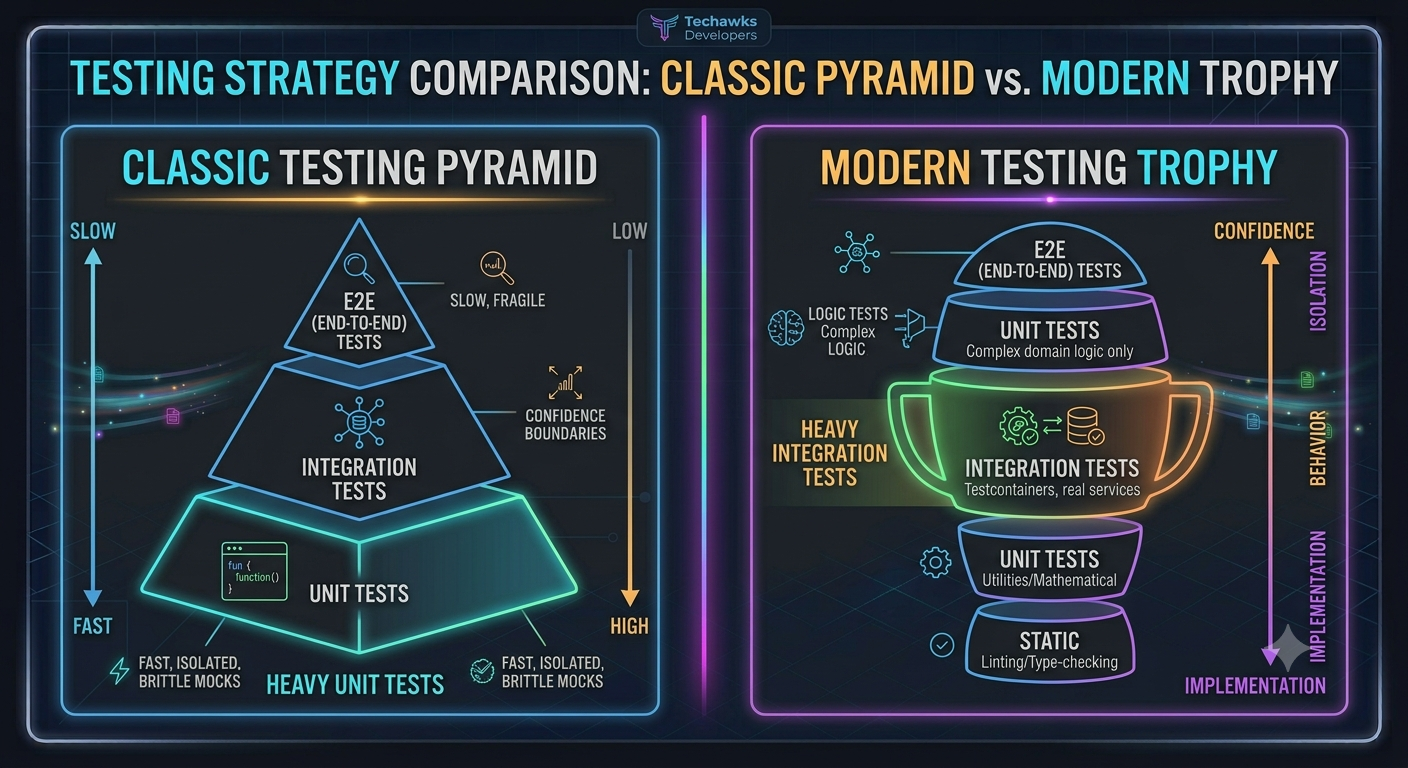
    Unit Tests (TDD): Fast and deterministic, but over-mocking external dependencies (databases, payment gateways, microservices) can lead to tests that pass green while production completely breaks.
    Integration Tests: Slower to run, but test actual system boundaries. Using lightweight containers (like Testcontainers) to spin up real databases gives far higher confidence than mocking the ORM.


    The "Refactoring Tax"
    Strict unit testing often binds your test suite to implementation details. When you change internal class structures, dozens of tests break—even if the overall feature input/output remains identical.
    Actionable Rule: Test behavior, not implementation details. If a refactor doesn't change public API outputs, your tests shouldn't break.


    Applying the Testing Trophy over the Pyramid
    Shift primary focus from hundreds of isolated unit tests (the base of the classic pyramid) toward a robust suite of integration tests (the meat of the testing trophy).
    Reserve pure unit tests for complex domain logic, mathematical computations, and algorithmic utilities where edge cases are plentiful.


    Key Takeaways
    Test behavior, not implementation: Avoid tying unit tests to private methods or exact internal call chains.
    Mocks are a double-edged sword: Over-reliance on mock objects creates false confidence and brittle test suites.
    Prioritize integration confidence: A suite of solid integration tests catching boundary failures often yields a higher ROI than 100% unit code coverage.


    CTA
    Where do you and your engineering team land on the testing spectrum? Do you strictly adhere to TDD, rely heavily on integration tests, or test manually in staging?


    Share your real-world testing setups in the comments below, and [Join Developers & Coding] to debate software patterns and code architecture with developers worldwide.
    TDD vs. Integration-First: What’s Your Actual Testing Strategy? Testing strategy is often treated like dogmatic theology in software engineering. Test-Driven Development (TDD) purists advocate for strict Red-Green-Refactor cycles at the unit level, while pragmatists argue that heavy unit mocking slows down refactoring and misses critical boundary bugs. To build a sustainable automated testing suite without suffocating developer velocity, evaluate your approach across these three operational dimensions: The Cost of Mocks vs. Real Implementations Unit Tests (TDD): Fast and deterministic, but over-mocking external dependencies (databases, payment gateways, microservices) can lead to tests that pass green while production completely breaks. Integration Tests: Slower to run, but test actual system boundaries. Using lightweight containers (like Testcontainers) to spin up real databases gives far higher confidence than mocking the ORM. The "Refactoring Tax" Strict unit testing often binds your test suite to implementation details. When you change internal class structures, dozens of tests break—even if the overall feature input/output remains identical. Actionable Rule: Test behavior, not implementation details. If a refactor doesn't change public API outputs, your tests shouldn't break. Applying the Testing Trophy over the Pyramid Shift primary focus from hundreds of isolated unit tests (the base of the classic pyramid) toward a robust suite of integration tests (the meat of the testing trophy). Reserve pure unit tests for complex domain logic, mathematical computations, and algorithmic utilities where edge cases are plentiful. Key Takeaways Test behavior, not implementation: Avoid tying unit tests to private methods or exact internal call chains. Mocks are a double-edged sword: Over-reliance on mock objects creates false confidence and brittle test suites. Prioritize integration confidence: A suite of solid integration tests catching boundary failures often yields a higher ROI than 100% unit code coverage. CTA Where do you and your engineering team land on the testing spectrum? Do you strictly adhere to TDD, rely heavily on integration tests, or test manually in staging? Share your real-world testing setups in the comments below, and [Join Developers & Coding] to debate software patterns and code architecture with developers worldwide.
    0 Comments 0 Shares 600 Views 0 Reviews
  • The Software Engineer’s Resume Blueprint: How to Pass the 6-Second Recruiter Screen


    Standing out in today’s hiring environment isn't about padding your tech stack list with buzzwords. It’s about clearly communicating business impact, technical ownership, and problem-solving capability.
    Whether you are applying for your first developer role or a senior engineering position, use this actionable blueprint to structure high-converting resume bullet points:


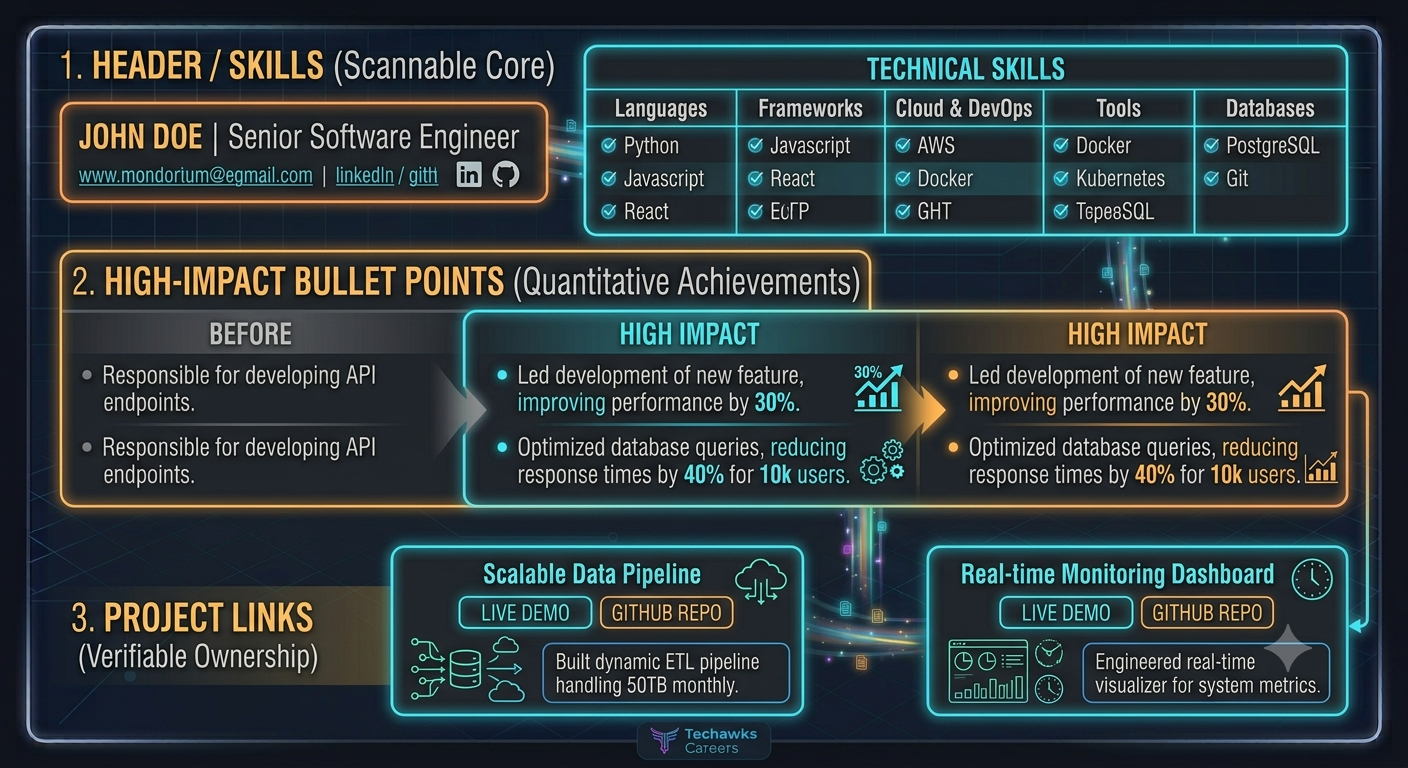
    Adopt the Action + Context + Outcome Formula
    The Bad: "Responsible for building REST APIs in Node.js."
    The Fix: Frame every project accomplishment using the Google XYZ framework ("Accomplished [X], as measured by [Y], by doing [Z]").
    Example: "Reduced API response latency by 42% by implementing a Redis caching layer for high-volume database queries."


    Categorize Your Skills Strategy
    Don't dump 30 programming languages and frameworks into an unsorted block at the top.
    Group skills logically into categories: Languages, Frameworks & Libraries, Databases & Storage, and Cloud & DevOps. Place the tools you are most proficient with first.


    Showcase System Scale & Problem Complexity
    Metrics matter. Whenever possible, include numbers that quantify scale: throughput, active users, data volume, deployment frequency, or test coverage improvements.
    If working on a side project, quantify performance metrics (e.g., "Engineered a RAG pipeline handling 10k+ vector lookups under 200ms").


    Highlight Engineering Trade-offs & Ownership
    In project descriptions, briefly note why you chose a specific technology over an alternative.
    Highlight cross-functional collaboration, such as leading architecture reviews, mentoring junior devs, or establishing testing standards.


    Keep Formatting Aggressively Scannable
    Stick to a single-page format (two pages only if you have 8+ years of experience).
    Use clean line spacing, bold key metrics, and link directly to active GitHub repositories or live production demos.


    Key Takeaways
    Focus on impact over duties: Quantify results with specific numbers, metrics, and business outcomes.
    Format for scannability: Group your technical skills logically so recruiters can evaluate fit instantly.
    Showcase trade-offs: Prove that you understand why you chose certain tools, not just how to use them.


    CTA
    Looking to land your next technical role, polish your resume, or prepare for tough technical interviews?


    [Join Tech Jobs & Opportunities] to access curated job listings, resume teardowns, and career growth strategies from experienced tech recruiters and engineering leaders.


    Suggested Image
    The Software Engineer’s Resume Blueprint: How to Pass the 6-Second Recruiter Screen Standing out in today’s hiring environment isn't about padding your tech stack list with buzzwords. It’s about clearly communicating business impact, technical ownership, and problem-solving capability. Whether you are applying for your first developer role or a senior engineering position, use this actionable blueprint to structure high-converting resume bullet points: Adopt the Action + Context + Outcome Formula The Bad: "Responsible for building REST APIs in Node.js." The Fix: Frame every project accomplishment using the Google XYZ framework ("Accomplished [X], as measured by [Y], by doing [Z]"). Example: "Reduced API response latency by 42% by implementing a Redis caching layer for high-volume database queries." Categorize Your Skills Strategy Don't dump 30 programming languages and frameworks into an unsorted block at the top. Group skills logically into categories: Languages, Frameworks & Libraries, Databases & Storage, and Cloud & DevOps. Place the tools you are most proficient with first. Showcase System Scale & Problem Complexity Metrics matter. Whenever possible, include numbers that quantify scale: throughput, active users, data volume, deployment frequency, or test coverage improvements. If working on a side project, quantify performance metrics (e.g., "Engineered a RAG pipeline handling 10k+ vector lookups under 200ms"). Highlight Engineering Trade-offs & Ownership In project descriptions, briefly note why you chose a specific technology over an alternative. Highlight cross-functional collaboration, such as leading architecture reviews, mentoring junior devs, or establishing testing standards. Keep Formatting Aggressively Scannable Stick to a single-page format (two pages only if you have 8+ years of experience). Use clean line spacing, bold key metrics, and link directly to active GitHub repositories or live production demos. Key Takeaways Focus on impact over duties: Quantify results with specific numbers, metrics, and business outcomes. Format for scannability: Group your technical skills logically so recruiters can evaluate fit instantly. Showcase trade-offs: Prove that you understand why you chose certain tools, not just how to use them. CTA Looking to land your next technical role, polish your resume, or prepare for tough technical interviews? [Join Tech Jobs & Opportunities] to access curated job listings, resume teardowns, and career growth strategies from experienced tech recruiters and engineering leaders. Suggested Image
    0 Comments 0 Shares 903 Views 0 Reviews
  • Cracking the System Design Interview: A Framework for Mid-to-Senior Engineers


    Whether you are tasked with designing a URL shortener or a global messaging system, every successful system design interview follows a structured, repeatable framework.
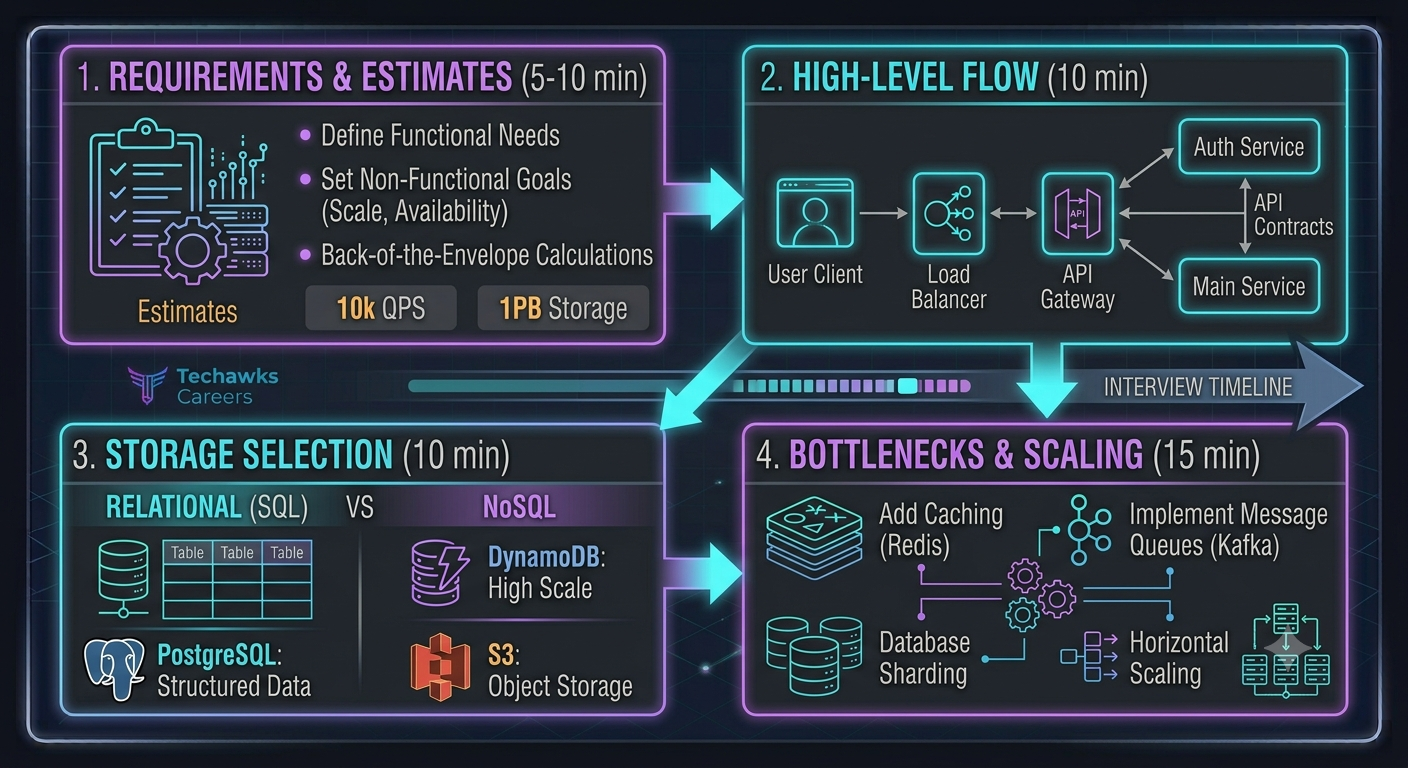
    Use this 4-step framework to lead the conversation and demonstrate senior-level engineering thinking:


    Clarify Requirements & Scope (First 5–10 Minutes)
    Functional Requirements: Define exactly what the system must do (e.g., "Users can upload videos and view their feed").
    Non-Functional Requirements: Establish scale expectations, availability targets (99.99%), latency limits (<200ms), and data consistency models (eventual vs. strong consistency).
    Back-of-the-Envelope Estimates: Calculate estimated read/write QPS (Queries Per Second), bandwidth requirements, and storage capacity needed over 5 years.


    Define High-Level Architecture & API Boundaries (Next 10 Minutes)
    Sketch the basic data flow before diving into microservices or complex caching layers.
    Draw the core components: Client → Load Balancer → API Gateway → Core Service → Database.
    Define major API contracts (e.g., POST /v1/videos/upload and GET /v1/feed?user_id=123).


    Choose Data Storage & Database Paradigm (Next 10 Minutes)
    Relational (SQL): Choose PostgreSQL/MySQL when transaction ACID compliance and structured complex queries are required.
    NoSQL (Document/Key-Value): Choose DynamoDB/Cassandra for massive horizontal scale, high throughput, and simple key-value lookups.
    Blob Storage: Direct raw file uploads (images/videos) to S3/GCS rather than database blobs.


    Identify Bottlenecks & Scale Components (Final 15 Minutes)
    Read-Heavy System? Add Redis/Memcached caching layers or a Content Delivery Network (CDN) at the edge.
    Write-Heavy System? Introduce message queues (Kafka/RabbitMQ) to decouple processing and absorb traffic spikes.
    Database Bottleneck? Discuss read replicas, database sharding strategies, or indexing optimizations.


    Key Takeaways
    Never skip requirements gathering: Spending 5 minutes clarifying scope prevents building the wrong architecture.
    Lead with trade-offs: Explicitly state why you chose NoSQL over SQL or why caching is required for your specific QPS.
    Focus on bottlenecks: Identify single points of failure, network latency issues, and database read/write limits proactively.


    CTA
    Preparing for technical interviews, system design rounds, or negotiating your next offer?


    [Join Tech Jobs & Opportunities] to access real interview case studies, mock system design practice, and direct career guidance from senior engineers and tech hiring managers.
    Cracking the System Design Interview: A Framework for Mid-to-Senior Engineers Whether you are tasked with designing a URL shortener or a global messaging system, every successful system design interview follows a structured, repeatable framework. Use this 4-step framework to lead the conversation and demonstrate senior-level engineering thinking: Clarify Requirements & Scope (First 5–10 Minutes) Functional Requirements: Define exactly what the system must do (e.g., "Users can upload videos and view their feed"). Non-Functional Requirements: Establish scale expectations, availability targets (99.99%), latency limits (<200ms), and data consistency models (eventual vs. strong consistency). Back-of-the-Envelope Estimates: Calculate estimated read/write QPS (Queries Per Second), bandwidth requirements, and storage capacity needed over 5 years. Define High-Level Architecture & API Boundaries (Next 10 Minutes) Sketch the basic data flow before diving into microservices or complex caching layers. Draw the core components: Client → Load Balancer → API Gateway → Core Service → Database. Define major API contracts (e.g., POST /v1/videos/upload and GET /v1/feed?user_id=123). Choose Data Storage & Database Paradigm (Next 10 Minutes) Relational (SQL): Choose PostgreSQL/MySQL when transaction ACID compliance and structured complex queries are required. NoSQL (Document/Key-Value): Choose DynamoDB/Cassandra for massive horizontal scale, high throughput, and simple key-value lookups. Blob Storage: Direct raw file uploads (images/videos) to S3/GCS rather than database blobs. Identify Bottlenecks & Scale Components (Final 15 Minutes) Read-Heavy System? Add Redis/Memcached caching layers or a Content Delivery Network (CDN) at the edge. Write-Heavy System? Introduce message queues (Kafka/RabbitMQ) to decouple processing and absorb traffic spikes. Database Bottleneck? Discuss read replicas, database sharding strategies, or indexing optimizations. Key Takeaways Never skip requirements gathering: Spending 5 minutes clarifying scope prevents building the wrong architecture. Lead with trade-offs: Explicitly state why you chose NoSQL over SQL or why caching is required for your specific QPS. Focus on bottlenecks: Identify single points of failure, network latency issues, and database read/write limits proactively. CTA Preparing for technical interviews, system design rounds, or negotiating your next offer? [Join Tech Jobs & Opportunities] to access real interview case studies, mock system design practice, and direct career guidance from senior engineers and tech hiring managers.
    0 Comments 0 Shares 646 Views 0 Reviews