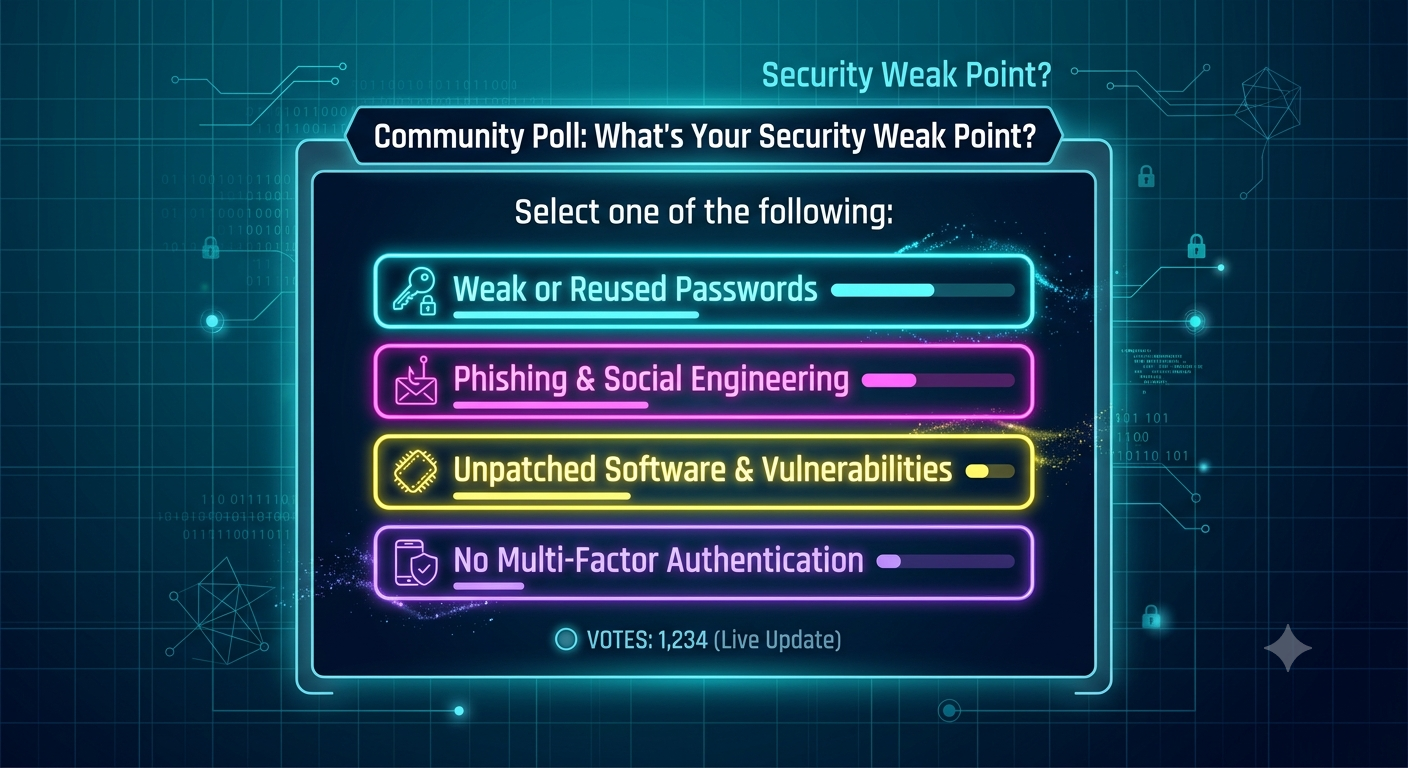
• Which Security Practice Is Your Weakest Link? (Vote & Test Your Defense)
    Good security hygiene isn't about complex hacks; it's about the daily habits that prevent 90% of opportunistic attacks. Cast your vote below, then check out the actionable tips to fix each vulnerability:


    📊 Poll Question:
    Which of these foundational security practices do you find hardest to keep up with?
    Option A: Multi-Factor Authentication (MFA) on all accounts
    Option B: Timely OS & Software Patching
    Option C: Using a Password Manager for Unique Credentials
    Option D: Regular, Isolated Data Backups


    💡 How to Fix Your Weak Spot Right Now:
    If you chose A (MFA): Switch from SMS-based MFA to an authenticator app (like Google Authenticator or Authy) or a hardware key (YubiKey). SMS interception is a common vector; app-based TOTP is vastly more secure.
    If you chose B (Patching): Enable automatic updates for operating systems and key software. Most exploit kits target known vulnerabilities that already have patches available.
    If you chose C (Password Management): Audit your accounts. Never reuse passwords across services. A password manager lets you generate 16+ character complex strings without the headache of memorization.
    If you chose D (Backups): Follow the 3-2-1 Rule: 3 total copies of your data, 2 different storage media types, and 1 off-site or offline copy (to protect against ransomware).


    Key Takeaways
    Basics win games: The vast majority of breaches exploit basic lapses like reused passwords or delayed patches.
    MFA is essential: Adding a second factor stops automated brute-force attacks in their tracks.
    Air-gap your backups: Backups connected to your primary network can be encrypted by ransomware along with your live files.


    CTA
    Want to benchmark your security knowledge and learn how to audit defenses like a pro?
    👉 Join our Cybersecurity & Ethical Hacking community today to participate in daily quizzes, discussion polls, and hands-on labs!
    Which Security Practice Is Your Weakest Link? (Vote & Test Your Defense) Good security hygiene isn't about complex hacks; it's about the daily habits that prevent 90% of opportunistic attacks. Cast your vote below, then check out the actionable tips to fix each vulnerability: 📊 Poll Question: Which of these foundational security practices do you find hardest to keep up with? Option A: Multi-Factor Authentication (MFA) on all accounts Option B: Timely OS & Software Patching Option C: Using a Password Manager for Unique Credentials Option D: Regular, Isolated Data Backups 💡 How to Fix Your Weak Spot Right Now: If you chose A (MFA): Switch from SMS-based MFA to an authenticator app (like Google Authenticator or Authy) or a hardware key (YubiKey). SMS interception is a common vector; app-based TOTP is vastly more secure. If you chose B (Patching): Enable automatic updates for operating systems and key software. Most exploit kits target known vulnerabilities that already have patches available. If you chose C (Password Management): Audit your accounts. Never reuse passwords across services. A password manager lets you generate 16+ character complex strings without the headache of memorization. If you chose D (Backups): Follow the 3-2-1 Rule: 3 total copies of your data, 2 different storage media types, and 1 off-site or offline copy (to protect against ransomware). Key Takeaways Basics win games: The vast majority of breaches exploit basic lapses like reused passwords or delayed patches. MFA is essential: Adding a second factor stops automated brute-force attacks in their tracks. Air-gap your backups: Backups connected to your primary network can be encrypted by ransomware along with your live files. CTA Want to benchmark your security knowledge and learn how to audit defenses like a pro? 👉 Join our Cybersecurity & Ethical Hacking community today to participate in daily quizzes, discussion polls, and hands-on labs!
    0 Yorumlar 0 hisse senetleri 1K Views 0 önizleme
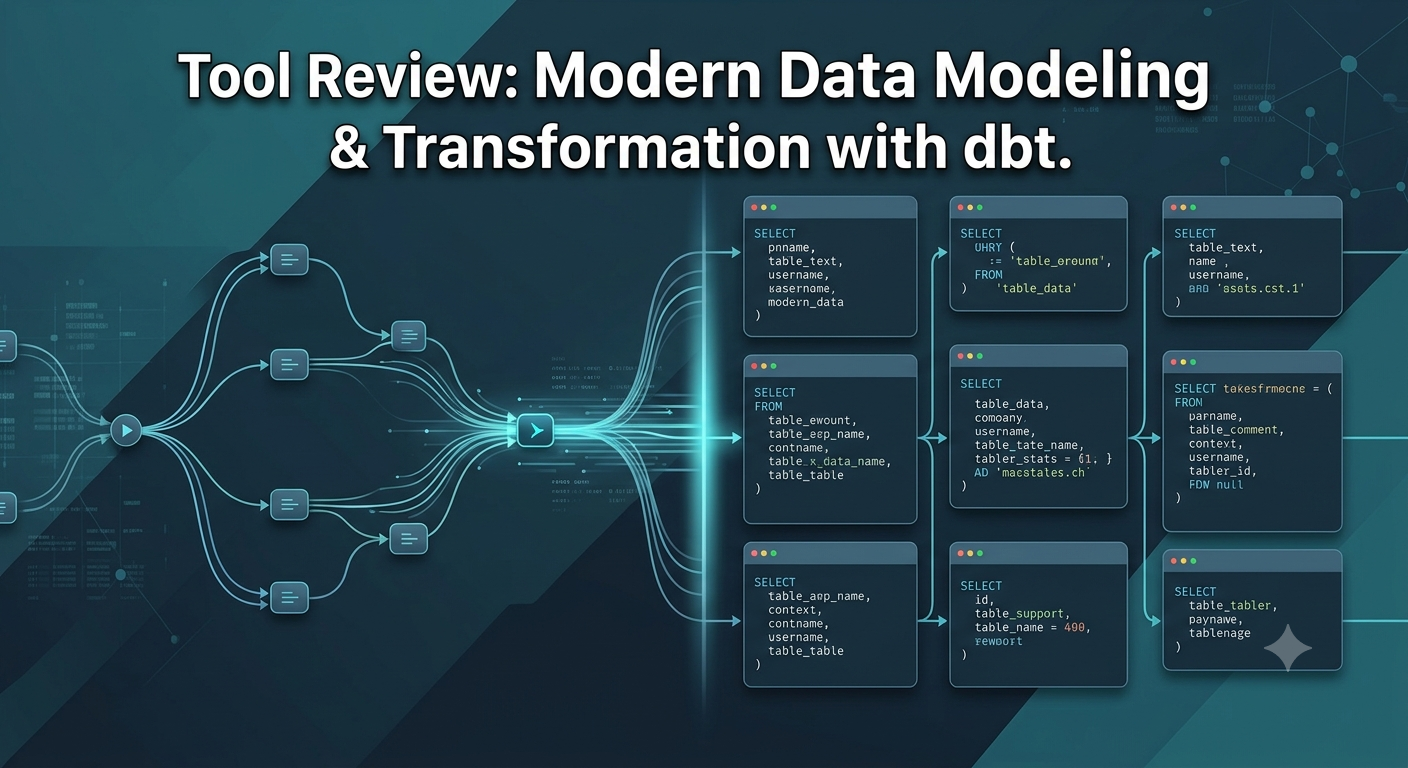
  • dbt (Data Build Tool) Reviewed: Transform Your Raw Data inside the Warehouse Like a Software Engineer
    In the modern data stack, raw data is loaded directly into modern cloud platforms (like Snowflake, BigQuery, or Databricks) before transformation. This shift created the need for a dedicated tool to model, test, and document data efficiently. dbt sits on top of your warehouse, allowing analysts and engineers to write modular SQL SELECT statements while dbt handles the execution, dependency management, and boilerplate code.
    Here is how dbt elevates your analytics pipeline:


    1. Modular Data Modeling (ref function)
    Instead of writing massive, monolithic SQL scripts, dbt lets you break transformations into modular, reusable models.
    How it works: You reference upstream tables using the {{ ref('model_name') }} function.
    Why it matters: dbt automatically infers your DAG (Directed Acyclic Graph) and builds dependencies in the correct execution order.


    2. Built-in Testing and Quality Control
    Data quality issues are caught before dashboards break for stakeholders.
    How it works: Define data tests directly in YAML files (e.g., unique, not_null, accepted_values, and foreign key constraints).
    Why it matters: Running dbt test validates your models instantly, catching duplicate records or unexpected missing values before deployment.


    3. Automated Documentation & Lineage
    Forget manually updating data dictionaries that become outdated in a week.
    How it works: dbt generates a self-hosted documentation site complete with visual lineage graphs straight from your codebase using dbt docs generate.
    Why it matters: Engineers and business analysts can visually trace how raw source data transforms into final reporting tables.


    4. Git-Based Version Control
    Treat your SQL as code. Track changes, conduct code reviews, and roll back breaking changes effortlessly using Git workflows.


    Key Takeaways
    T in ELT: dbt focuses exclusively on the Transformation layer inside your warehouse, using native compute power.
    Software practices for data: Version control, modular code, automated testing, and CI/CD come built-in.
    Instant documentation: Keeps data dictionaries synchronized with your live data models effortlessly.
    SQL-first workflow: Anyone who knows standard SQL can learn dbt and build production-ready data pipelines.


    CTA
    Want to level up your data pipelines and master analytics engineering?
    👉 Join our Data Science & Analytics community today to get practical tutorials, template projects, and peer guidance!
    dbt (Data Build Tool) Reviewed: Transform Your Raw Data inside the Warehouse Like a Software Engineer In the modern data stack, raw data is loaded directly into modern cloud platforms (like Snowflake, BigQuery, or Databricks) before transformation. This shift created the need for a dedicated tool to model, test, and document data efficiently. dbt sits on top of your warehouse, allowing analysts and engineers to write modular SQL SELECT statements while dbt handles the execution, dependency management, and boilerplate code. Here is how dbt elevates your analytics pipeline: 1. Modular Data Modeling (ref function) Instead of writing massive, monolithic SQL scripts, dbt lets you break transformations into modular, reusable models. How it works: You reference upstream tables using the {{ ref('model_name') }} function. Why it matters: dbt automatically infers your DAG (Directed Acyclic Graph) and builds dependencies in the correct execution order. 2. Built-in Testing and Quality Control Data quality issues are caught before dashboards break for stakeholders. How it works: Define data tests directly in YAML files (e.g., unique, not_null, accepted_values, and foreign key constraints). Why it matters: Running dbt test validates your models instantly, catching duplicate records or unexpected missing values before deployment. 3. Automated Documentation & Lineage Forget manually updating data dictionaries that become outdated in a week. How it works: dbt generates a self-hosted documentation site complete with visual lineage graphs straight from your codebase using dbt docs generate. Why it matters: Engineers and business analysts can visually trace how raw source data transforms into final reporting tables. 4. Git-Based Version Control Treat your SQL as code. Track changes, conduct code reviews, and roll back breaking changes effortlessly using Git workflows. Key Takeaways T in ELT: dbt focuses exclusively on the Transformation layer inside your warehouse, using native compute power. Software practices for data: Version control, modular code, automated testing, and CI/CD come built-in. Instant documentation: Keeps data dictionaries synchronized with your live data models effortlessly. SQL-first workflow: Anyone who knows standard SQL can learn dbt and build production-ready data pipelines. CTA Want to level up your data pipelines and master analytics engineering? 👉 Join our Data Science & Analytics community today to get practical tutorials, template projects, and peer guidance!
    0 Yorumlar 0 hisse senetleri 849 Views 0 önizleme
  • From Data Analyst to Senior Analytics Engineer: 4 Critical Mindset Shifts
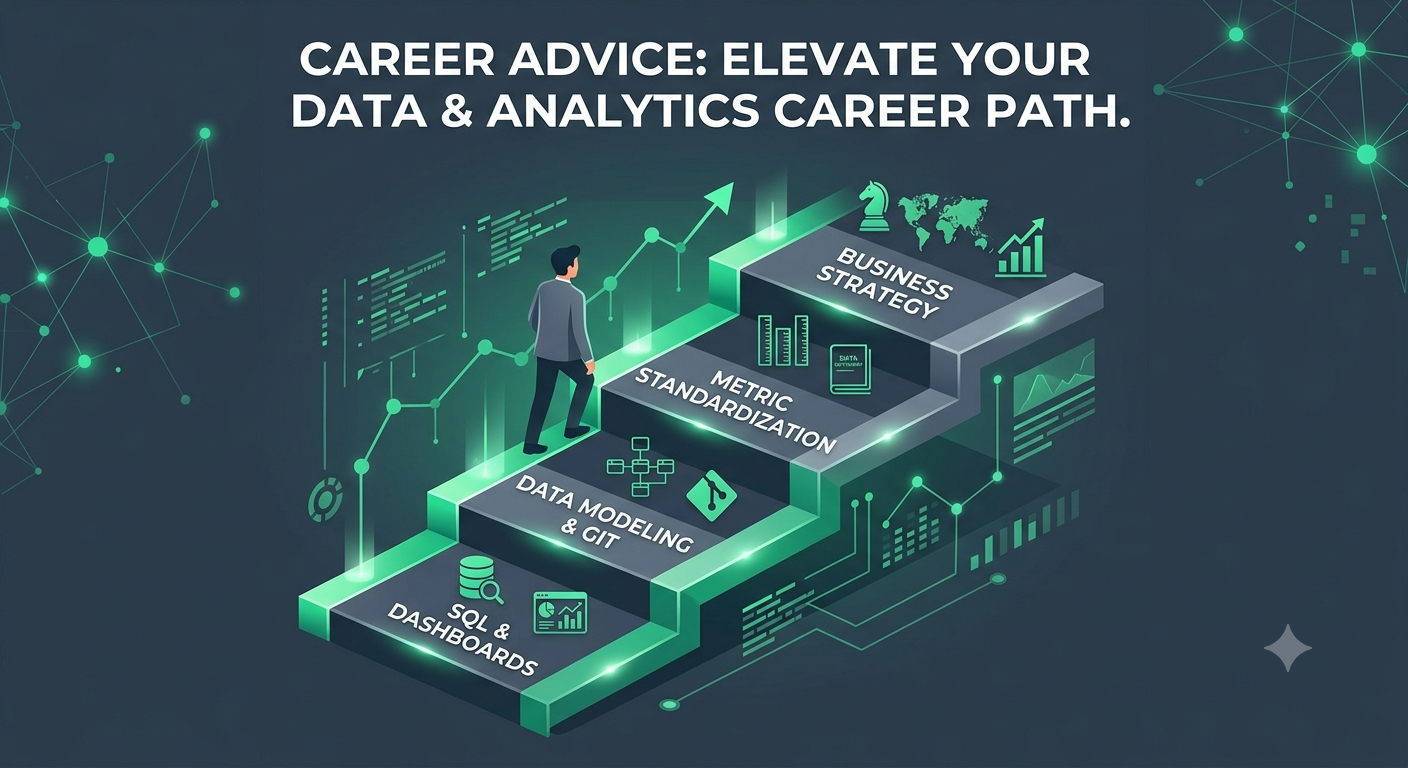
    Many data professionals plateau early because they focus exclusively on technical syntax—learning yet another BI tool or mastering obscure Python libraries. While technical proficiency is necessary, career progression hinges on how you apply those tools to create sustainable value.


    Here are 4 practical shifts to transition from an entry-level analyst to a high-impact data leader:


    1. Shift from "Answering Questions" to "Defining Metrics"
    Junior Mindset: Executing SQL queries strictly based on tickets assigned to you by stakeholders.
    Senior Mindset: Interrogating the request. Ask why the metric matters, how it drives revenue or efficiency, and build standardized metric definitions across the entire organization so everyone speaks the same language.


    2. Treat Data Models as Software Products
    Junior Mindset: Writing one-off, 500-line SQL scripts with nested subqueries to solve an immediate question.
    Senior Mindset: Building modular, reusable, and documented data models (using tools like dbt). Implement version control via Git, write data quality tests, and design schema that scale gracefully as company data grows.


    3. Master the Art of Data Storytelling
    Junior Mindset: Sending stakeholders a dense dashboard full of 15 charts and leaving them to draw their own conclusions.
    Senior Mindset: Curating a clear narrative. Focus on 2–3 key performance indicators (KPIs), highlight actionable anomalies, and explicitly answer: "So what? What action should we take based on this data?"


    4. Build Business Domain Knowledge
    Junior Mindset: Treating all datasets the same regardless of industry.
    Senior Mindset: Immersing yourself in the core business model. Understand unit economics, customer acquisition costs (CAC), lifetime value (LTV), or operational bottlenecks. The best data professionals understand the business just as well as the executives they advise.


    Key Takeaways
    Value over volume: Producing fewer, higher-quality, standardized data models creates more impact than delivering dozens of ad-hoc dashboards.
    Adopt software engineering practices: Version control, automated testing, and modular architecture turn fragile scripts into robust data products.
    Focus on business context: Technical skills are only as valuable as the business decisions they inform.


    CTA
    Ready to elevate your analytics career and master modern data stack architecture?
    👉 Join our Data Science & Analytics community today to connect with industry peers, access hands-on learning paths, and accelerate your career!
    From Data Analyst to Senior Analytics Engineer: 4 Critical Mindset Shifts Many data professionals plateau early because they focus exclusively on technical syntax—learning yet another BI tool or mastering obscure Python libraries. While technical proficiency is necessary, career progression hinges on how you apply those tools to create sustainable value. Here are 4 practical shifts to transition from an entry-level analyst to a high-impact data leader: 1. Shift from "Answering Questions" to "Defining Metrics" Junior Mindset: Executing SQL queries strictly based on tickets assigned to you by stakeholders. Senior Mindset: Interrogating the request. Ask why the metric matters, how it drives revenue or efficiency, and build standardized metric definitions across the entire organization so everyone speaks the same language. 2. Treat Data Models as Software Products Junior Mindset: Writing one-off, 500-line SQL scripts with nested subqueries to solve an immediate question. Senior Mindset: Building modular, reusable, and documented data models (using tools like dbt). Implement version control via Git, write data quality tests, and design schema that scale gracefully as company data grows. 3. Master the Art of Data Storytelling Junior Mindset: Sending stakeholders a dense dashboard full of 15 charts and leaving them to draw their own conclusions. Senior Mindset: Curating a clear narrative. Focus on 2–3 key performance indicators (KPIs), highlight actionable anomalies, and explicitly answer: "So what? What action should we take based on this data?" 4. Build Business Domain Knowledge Junior Mindset: Treating all datasets the same regardless of industry. Senior Mindset: Immersing yourself in the core business model. Understand unit economics, customer acquisition costs (CAC), lifetime value (LTV), or operational bottlenecks. The best data professionals understand the business just as well as the executives they advise. Key Takeaways Value over volume: Producing fewer, higher-quality, standardized data models creates more impact than delivering dozens of ad-hoc dashboards. Adopt software engineering practices: Version control, automated testing, and modular architecture turn fragile scripts into robust data products. Focus on business context: Technical skills are only as valuable as the business decisions they inform. CTA Ready to elevate your analytics career and master modern data stack architecture? 👉 Join our Data Science & Analytics community today to connect with industry peers, access hands-on learning paths, and accelerate your career!
    0 Yorumlar 0 hisse senetleri 855 Views 0 önizleme
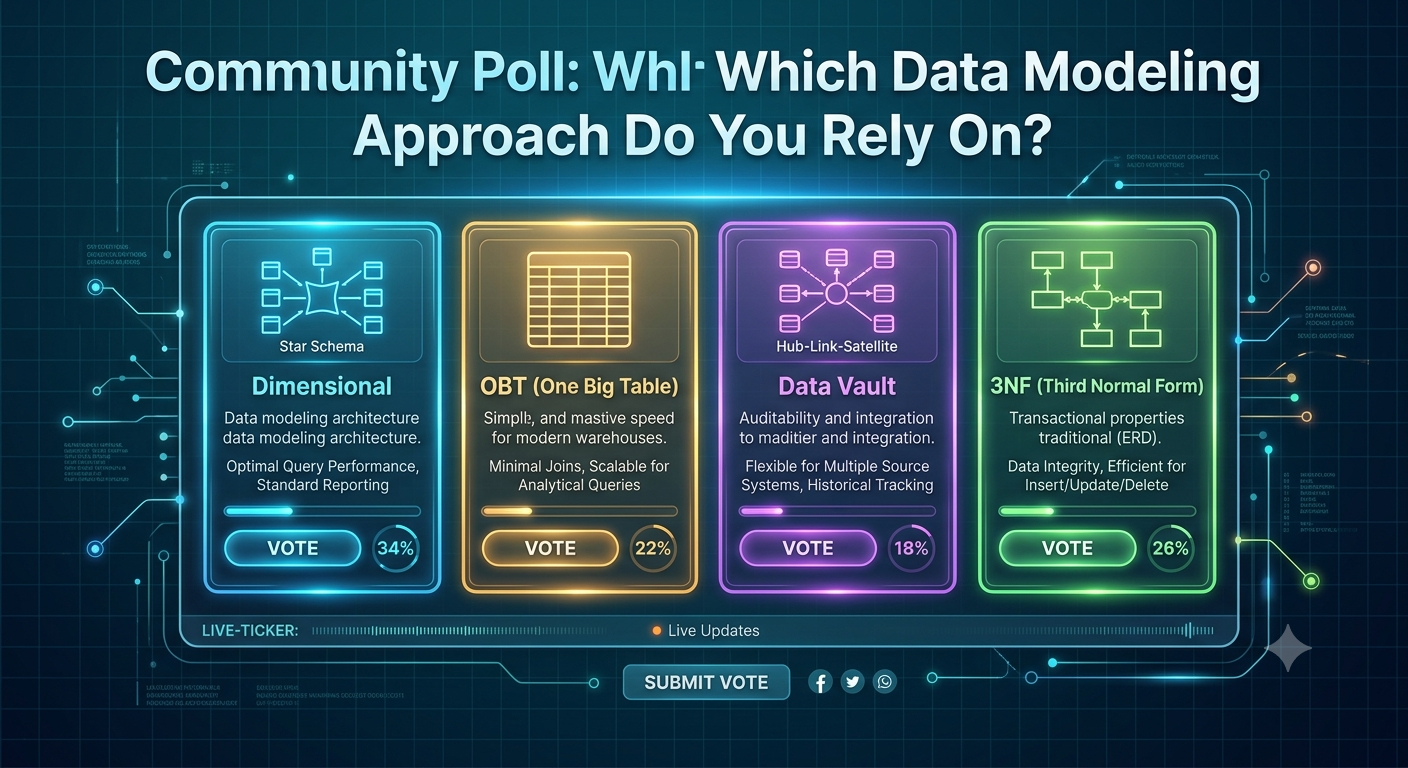
  • Which Data Modeling Approach Powers Your Analytics Stack? (Vote & Compare)
    Data architectures evolve, but foundational modeling patterns remain critical for organizing analytical data efficiently. Cast your vote below, then check out the practical breakdown for when to leverage each strategy:


    📊 Poll Question:
    What is your team's primary approach for structuring analytical data models?
    Option A: Dimensional Modeling (Star / Snowflake Schema)
    Option B: One Big Table (OBT / Wide Tables)
    Option C: Data Vault (Hubs, Links, and Satellites)
    Option D: Normalized / Relational (3NF)


    💡 When to Use Each Approach:
    If you chose A (Dimensional Modeling): The gold standard for business intelligence. By separating facts (quantitative measurements) from dimensions (contextual attributes), you ensure intuitive querying for tools like Tableau or PowerBI while keeping query joins fast and readable.
    If you chose B (OBT): Gaining massive popularity with modern cloud data warehouses (Snowflake, BigQuery, ClickHouse). Denormalizing data into a single wide table eliminates join overhead, making nested analytical queries lightning-fast at scale.
    If you chose C (Data Vault): Best for enterprise-scale environments with constantly shifting source systems. Data Vault isolates changes by decoupling business keys (Hubs), relationships (Links), and descriptive context (Satellites), offering auditability and long-term scalability.
    If you chose D (3NF): Great for transactional systems (OLTP), but usually a bottleneck for analytics (OLAP). If your reporting tables are heavily normalized, consider transforming them into Star Schema or OBT layers to avoid expensive multi-table joins.


    Key Takeaways
    No one-size-fits-all: Choose OBT for raw query speed, Dimensional for self-serve BI usability, and Data Vault for complex enterprise auditability.
    Decouple OLTP and OLAP: Never expose raw 3NF operational schemas directly to reporting tools; transform them into analytical structures first.
    Prioritize stakeholder clarity: A model is only effective if business analysts can easily query and understand the underlying data relationships.


    CTA
    Want to dive deeper into data modeling frameworks and modern warehouse architectures?
    👉 Join our Data Science & Analytics community today to participate in architectural discussions, vote in weekly polls, and level up your data engineering skills!
    Which Data Modeling Approach Powers Your Analytics Stack? (Vote & Compare) Data architectures evolve, but foundational modeling patterns remain critical for organizing analytical data efficiently. Cast your vote below, then check out the practical breakdown for when to leverage each strategy: 📊 Poll Question: What is your team's primary approach for structuring analytical data models? Option A: Dimensional Modeling (Star / Snowflake Schema) Option B: One Big Table (OBT / Wide Tables) Option C: Data Vault (Hubs, Links, and Satellites) Option D: Normalized / Relational (3NF) 💡 When to Use Each Approach: If you chose A (Dimensional Modeling): The gold standard for business intelligence. By separating facts (quantitative measurements) from dimensions (contextual attributes), you ensure intuitive querying for tools like Tableau or PowerBI while keeping query joins fast and readable. If you chose B (OBT): Gaining massive popularity with modern cloud data warehouses (Snowflake, BigQuery, ClickHouse). Denormalizing data into a single wide table eliminates join overhead, making nested analytical queries lightning-fast at scale. If you chose C (Data Vault): Best for enterprise-scale environments with constantly shifting source systems. Data Vault isolates changes by decoupling business keys (Hubs), relationships (Links), and descriptive context (Satellites), offering auditability and long-term scalability. If you chose D (3NF): Great for transactional systems (OLTP), but usually a bottleneck for analytics (OLAP). If your reporting tables are heavily normalized, consider transforming them into Star Schema or OBT layers to avoid expensive multi-table joins. Key Takeaways No one-size-fits-all: Choose OBT for raw query speed, Dimensional for self-serve BI usability, and Data Vault for complex enterprise auditability. Decouple OLTP and OLAP: Never expose raw 3NF operational schemas directly to reporting tools; transform them into analytical structures first. Prioritize stakeholder clarity: A model is only effective if business analysts can easily query and understand the underlying data relationships. CTA Want to dive deeper into data modeling frameworks and modern warehouse architectures? 👉 Join our Data Science & Analytics community today to participate in architectural discussions, vote in weekly polls, and level up your data engineering skills!
    0 Yorumlar 0 hisse senetleri 871 Views 0 önizleme
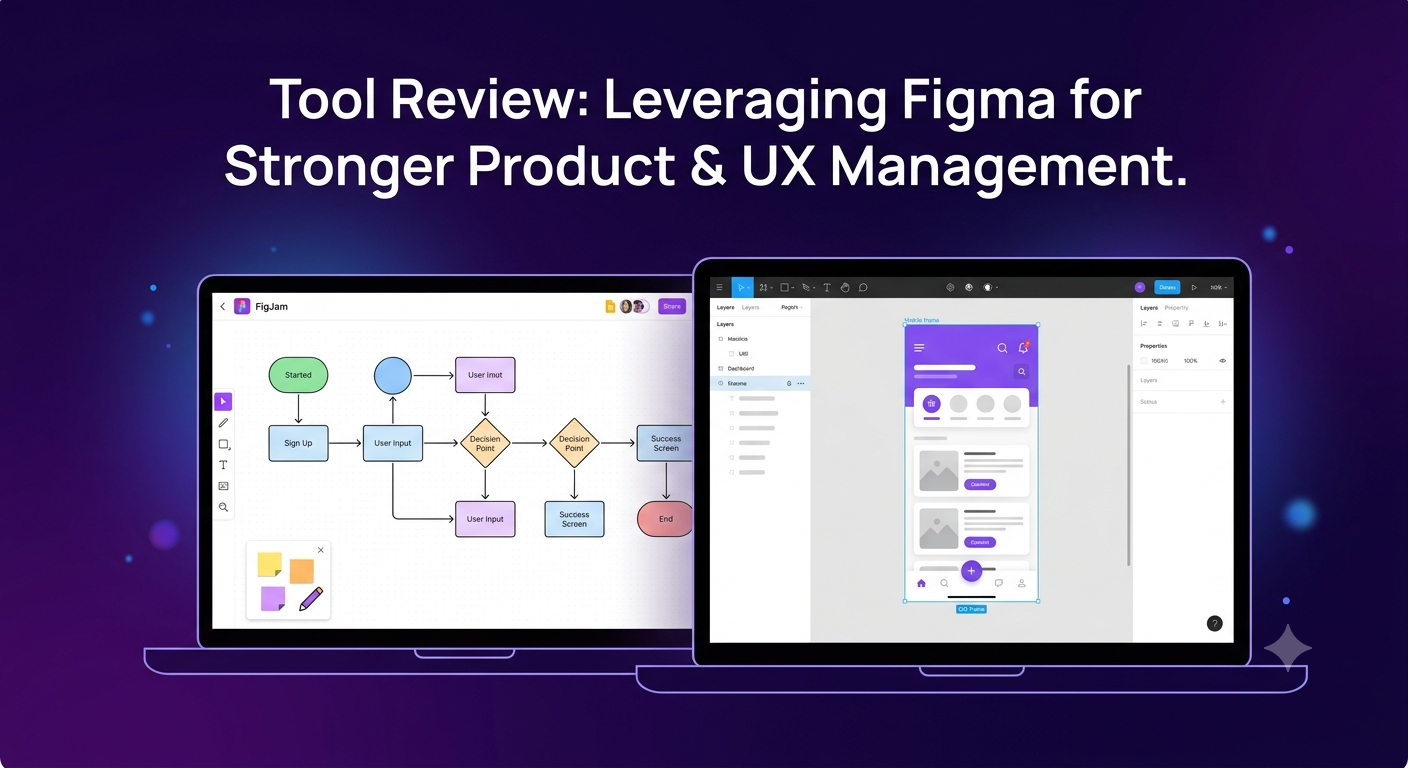
  • Figma for Product Managers: The Essential Feature Set for Clearer Requirements
    Product managers don't need to craft custom iconography or balance typography hierarchies. However, relying solely on static text documents or outdated slide decks to explain user flows creates friction and misunderstandings between product, design, and engineering teams.


    Here is a practical breakdown of how PMs can leverage Figma to communicate user intent, map feature requirements, and streamline product discovery:


    1. FigJam for Early Discovery & User Flows
    Before jumping into UI fidelity, map out system logic collaboratively.
    How to use it: Use FigJam boards for user journey mapping, feature prioritization matrices (Impact vs. Effort), and low-fidelity flowcharting.
    Why it matters: It aligns engineering and design on edge cases and system logic before anyone wastes time pixel-pushing.


    2. Interactive Component Variants for Prototyping Scenarios
    You don't need to build full prototypes to test a feature hypothesis.
    How to use it: Leverage existing design system components to swap states (e.g., Hover, Active, Disabled, or Error) directly on the canvas.
    Why it matters: Demonstrating error states and edge cases visually in a PRD prevents last-minute scope creep during sprint planning.


    3. Canvas Comments & Audio Spotlights for Async Reviews
    Stop scheduling 30-minute alignment meetings for minor feature clarification.
    How to use it: Drop pinned comments directly on specific UI frames or use Figma's built-in audio calls and "Spotlight" features to guide asynchronous walkthroughs.
    Why it matters: Keeps feedback contextual, documented, and actionable right next to the design artifacts.


    4. Dev Mode Inspection for Realistic Scoping
    Understanding how design tokens and layouts translate to code helps you write better user stories.
    How to use it: Toggle Dev Mode to inspect padding, auto-layout rules, and asset specs.
    Why it matters: Gives PMs visibility into design complexity so you can estimate engineering effort more accurately during backlog grooming.


    Key Takeaways
    Visual specs beat walls of text: Embedding interactive Figma frames into PRDs drastically increases team comprehension.
    Focus on edge cases: Use component variants to visually highlight error states, empty states, and loading behavior early.
    Streamline async communication: Contextual canvas commenting reduces meeting overhead and preserves decisions in one central hub.


    CTA
    Want to sharpen your product thinking and build seamless collaboration between product and design?
    👉 Join our Product, UX & Design community today to access actionable frameworks, teardowns, and peer feedback!
    Figma for Product Managers: The Essential Feature Set for Clearer Requirements Product managers don't need to craft custom iconography or balance typography hierarchies. However, relying solely on static text documents or outdated slide decks to explain user flows creates friction and misunderstandings between product, design, and engineering teams. Here is a practical breakdown of how PMs can leverage Figma to communicate user intent, map feature requirements, and streamline product discovery: 1. FigJam for Early Discovery & User Flows Before jumping into UI fidelity, map out system logic collaboratively. How to use it: Use FigJam boards for user journey mapping, feature prioritization matrices (Impact vs. Effort), and low-fidelity flowcharting. Why it matters: It aligns engineering and design on edge cases and system logic before anyone wastes time pixel-pushing. 2. Interactive Component Variants for Prototyping Scenarios You don't need to build full prototypes to test a feature hypothesis. How to use it: Leverage existing design system components to swap states (e.g., Hover, Active, Disabled, or Error) directly on the canvas. Why it matters: Demonstrating error states and edge cases visually in a PRD prevents last-minute scope creep during sprint planning. 3. Canvas Comments & Audio Spotlights for Async Reviews Stop scheduling 30-minute alignment meetings for minor feature clarification. How to use it: Drop pinned comments directly on specific UI frames or use Figma's built-in audio calls and "Spotlight" features to guide asynchronous walkthroughs. Why it matters: Keeps feedback contextual, documented, and actionable right next to the design artifacts. 4. Dev Mode Inspection for Realistic Scoping Understanding how design tokens and layouts translate to code helps you write better user stories. How to use it: Toggle Dev Mode to inspect padding, auto-layout rules, and asset specs. Why it matters: Gives PMs visibility into design complexity so you can estimate engineering effort more accurately during backlog grooming. Key Takeaways Visual specs beat walls of text: Embedding interactive Figma frames into PRDs drastically increases team comprehension. Focus on edge cases: Use component variants to visually highlight error states, empty states, and loading behavior early. Streamline async communication: Contextual canvas commenting reduces meeting overhead and preserves decisions in one central hub. CTA Want to sharpen your product thinking and build seamless collaboration between product and design? 👉 Join our Product, UX & Design community today to access actionable frameworks, teardowns, and peer feedback!
    0 Yorumlar 0 hisse senetleri 1K Views 0 önizleme
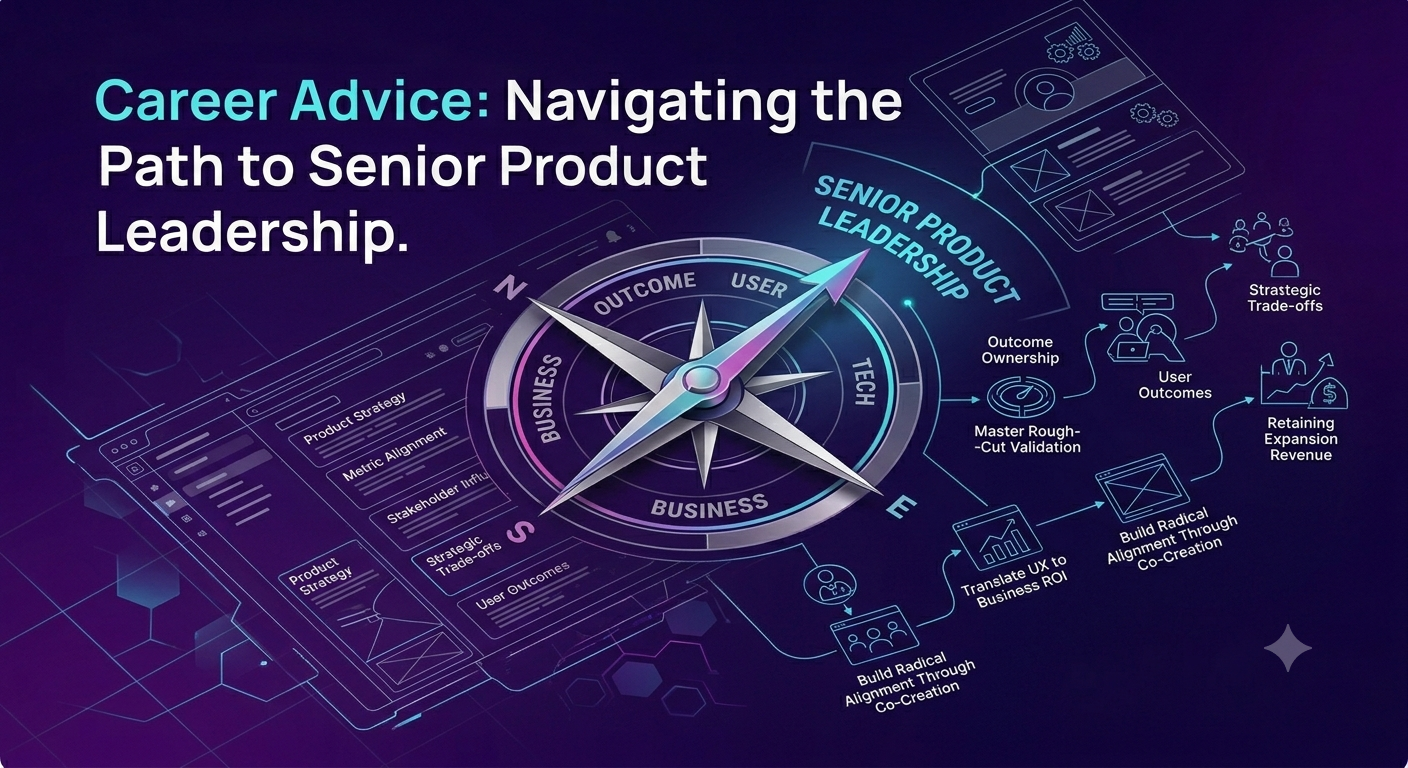
  • From Feature Factory to Product Leader: 4 Skills That Standard PM & UX Frameworks Don't Teach
    In many tech organizations, product managers and UX designers fall into the "feature factory" trap: shipping output after output without measuring actual business impact. Breaking out of this cycle is the single most effective way to accelerate your career trajectory.


    Here is actionable advice on how to transition from managing deliverables to driving product strategy:


    1. Own Outcomes, Not Output
    The Shift: Stop measuring success by features shipped or sprint velocity. Measure success by shifts in user behavior and core business metrics (e.g., activation rate, retention, expansion revenue).
    Action Item: Before starting any new initiative, define the single primary metric that success will be evaluated against, and establish a baseline before design work begins.


    2. Master "Rough-Cut" Validation
    The Shift: Don't wait for polished prototypes or full build-outs to test core hypotheses.
    Action Item: Use low-fidelity wireframes, interactive paper sketches, or fake-door tests to validate demand and user intent within days rather than weeks. The faster you kill bad ideas, the more time you save for high-impact features.


    3. Translate UX Decisions into Business ROI
    The Shift: Senior leaders rarely push back on design decisions because of aesthetics; they push back because of resource constraints and business priorities.
    Action Item: Frame design changes in terms of business trade-offs. Instead of saying, "This checkout flow offers a cleaner user experience," say, "Reducing this flow from 4 steps to 2 addresses our 35% drop-off rate, directly impacting conversion revenue."


    4. Build Radical Alignment Through Co-Creation
    The Shift: Handing off completed PRDs or Figma files over the fence to engineering creates friction and rework.
    Action Item: Invite lead engineers and key stakeholders into early discovery sessions. When developers help uncover user problems, technical constraints are identified upfront, and team buy-in increases dramatically.


    Key Takeaways
    Business acumen matters: High-performing product professionals bridge the gap between user needs and business metrics.
    Fail fast in discovery: Validate assumptions with low-fidelity prototypes before committing engineering resources.
    Co-create with engineering: Involve technical partners early in problem framing to prevent friction during execution.


    CTA
    Looking to level up your product thinking and build products that drive real business impact?
    👉 Join our Product, UX & Design community today to connect with industry leaders, access practical frameworks, and elevate your career!
    From Feature Factory to Product Leader: 4 Skills That Standard PM & UX Frameworks Don't Teach In many tech organizations, product managers and UX designers fall into the "feature factory" trap: shipping output after output without measuring actual business impact. Breaking out of this cycle is the single most effective way to accelerate your career trajectory. Here is actionable advice on how to transition from managing deliverables to driving product strategy: 1. Own Outcomes, Not Output The Shift: Stop measuring success by features shipped or sprint velocity. Measure success by shifts in user behavior and core business metrics (e.g., activation rate, retention, expansion revenue). Action Item: Before starting any new initiative, define the single primary metric that success will be evaluated against, and establish a baseline before design work begins. 2. Master "Rough-Cut" Validation The Shift: Don't wait for polished prototypes or full build-outs to test core hypotheses. Action Item: Use low-fidelity wireframes, interactive paper sketches, or fake-door tests to validate demand and user intent within days rather than weeks. The faster you kill bad ideas, the more time you save for high-impact features. 3. Translate UX Decisions into Business ROI The Shift: Senior leaders rarely push back on design decisions because of aesthetics; they push back because of resource constraints and business priorities. Action Item: Frame design changes in terms of business trade-offs. Instead of saying, "This checkout flow offers a cleaner user experience," say, "Reducing this flow from 4 steps to 2 addresses our 35% drop-off rate, directly impacting conversion revenue." 4. Build Radical Alignment Through Co-Creation The Shift: Handing off completed PRDs or Figma files over the fence to engineering creates friction and rework. Action Item: Invite lead engineers and key stakeholders into early discovery sessions. When developers help uncover user problems, technical constraints are identified upfront, and team buy-in increases dramatically. Key Takeaways Business acumen matters: High-performing product professionals bridge the gap between user needs and business metrics. Fail fast in discovery: Validate assumptions with low-fidelity prototypes before committing engineering resources. Co-create with engineering: Involve technical partners early in problem framing to prevent friction during execution. CTA Looking to level up your product thinking and build products that drive real business impact? 👉 Join our Product, UX & Design community today to connect with industry leaders, access practical frameworks, and elevate your career!
    0 Yorumlar 0 hisse senetleri 976 Views 0 önizleme
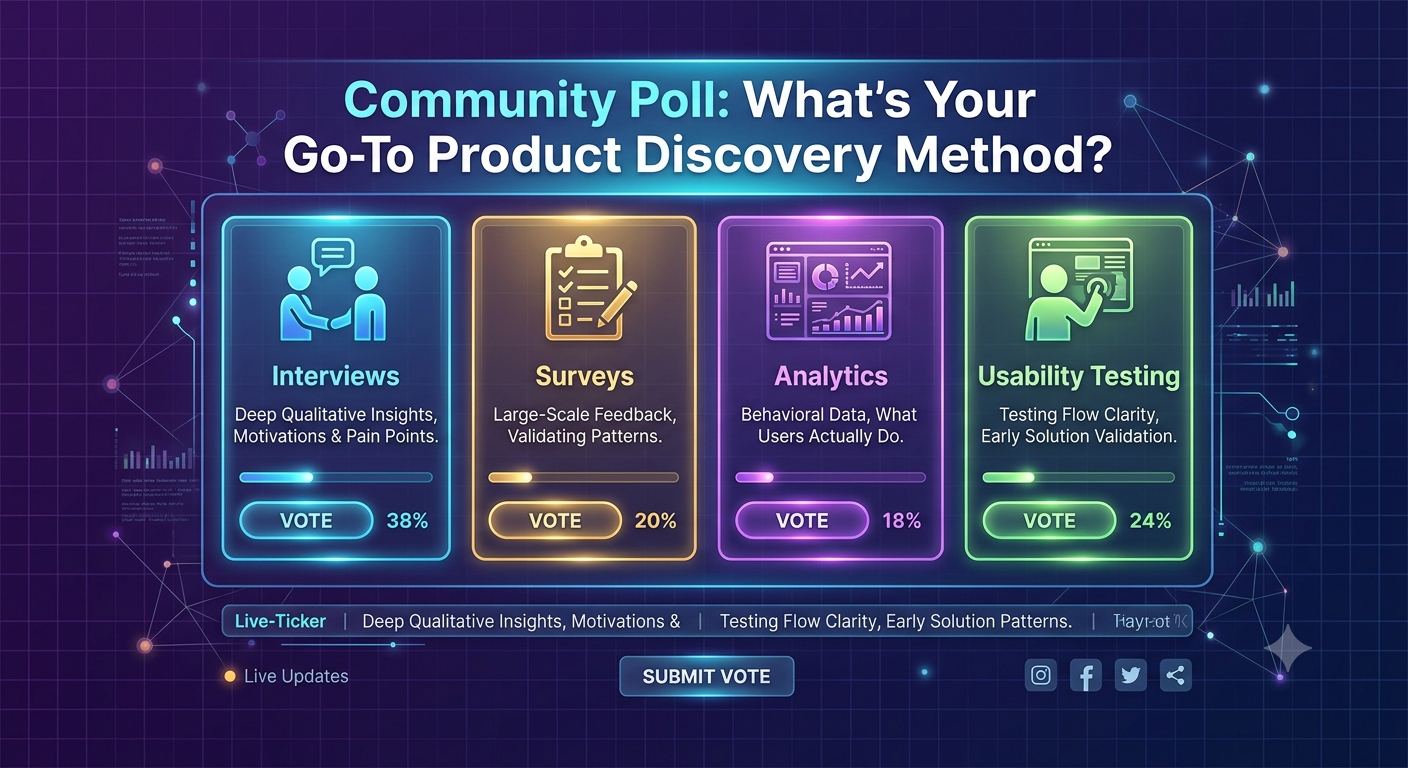
  • Which Product Discovery Method Yields Your Best User Insights? (Vote & Discuss)


    Great product strategy relies on balancing qualitative understanding (why users act) with quantitative validation (what users do). Cast your vote below, then check out the practical guidance on when to deploy each discovery technique:


    📊 Poll Question:
    When starting a new feature discovery phase, what is your team's primary go-to method for gathering user insights?
    Option A: 1-on-1 User Interviews (Qualitative)
    Option B: Quantitative Surveys & In-App Polls
    Option C: Product Analytics & Behavioral Data (e.g., Mixpanel, Amplitude)
    Option D: Rapid Usability Testing with Low-Fi Prototypes


    💡 When to Use Each Discovery Method:
    If you chose A (1-on-1 Interviews): Best for understanding underlying motivations, emotional friction, and mental models during early problem exploration. Tip: Focus on past behavior rather than hypothetical future actions—ask "Tell me about the last time you..." instead of "Would you use..."
    If you chose B (Surveys & In-App Polls): Great for validating patterns at scale after qualitative research has identified the key hypotheses. Tip: Keep in-app micro-surveys under 3 questions to maximize response rates without interrupting key user workflows.
    If you chose C (Behavioral Analytics): Unbeatable for revealing what users actually do vs. what they say they do. Tip: Look for drop-off points in key conversion funnels or unexpected navigation patterns to generate new research questions.
    If you chose D (Rapid Usability Testing): Ideal for testing execution logic and UI clarity before committing engineering sprint cycles. Tip: Test with 5–6 users per iteration; research shows this catches up to 85% of usability issues.


    Key Takeaways
    Triangulate your data: Combine qualitative insights (interviews) with quantitative data (analytics) to validate both the problem and the solution.
    Beware of hypothetical feedback: Users are notoriously poor at predicting their future behavior; focus on real past experiences.
    Iterate before code: Use low-fidelity prototypes early to catch usability friction while changes are still fast and cheap to make.


    CTA
    Want to sharpen your product discovery framework and collaborate with top UX strategists?
    👉 Join our Product, UX & Design community today to participate in weekly teardowns, share discovery frameworks, and elevate your product craft!
    Which Product Discovery Method Yields Your Best User Insights? (Vote & Discuss) Great product strategy relies on balancing qualitative understanding (why users act) with quantitative validation (what users do). Cast your vote below, then check out the practical guidance on when to deploy each discovery technique: 📊 Poll Question: When starting a new feature discovery phase, what is your team's primary go-to method for gathering user insights? Option A: 1-on-1 User Interviews (Qualitative) Option B: Quantitative Surveys & In-App Polls Option C: Product Analytics & Behavioral Data (e.g., Mixpanel, Amplitude) Option D: Rapid Usability Testing with Low-Fi Prototypes 💡 When to Use Each Discovery Method: If you chose A (1-on-1 Interviews): Best for understanding underlying motivations, emotional friction, and mental models during early problem exploration. Tip: Focus on past behavior rather than hypothetical future actions—ask "Tell me about the last time you..." instead of "Would you use..." If you chose B (Surveys & In-App Polls): Great for validating patterns at scale after qualitative research has identified the key hypotheses. Tip: Keep in-app micro-surveys under 3 questions to maximize response rates without interrupting key user workflows. If you chose C (Behavioral Analytics): Unbeatable for revealing what users actually do vs. what they say they do. Tip: Look for drop-off points in key conversion funnels or unexpected navigation patterns to generate new research questions. If you chose D (Rapid Usability Testing): Ideal for testing execution logic and UI clarity before committing engineering sprint cycles. Tip: Test with 5–6 users per iteration; research shows this catches up to 85% of usability issues. Key Takeaways Triangulate your data: Combine qualitative insights (interviews) with quantitative data (analytics) to validate both the problem and the solution. Beware of hypothetical feedback: Users are notoriously poor at predicting their future behavior; focus on real past experiences. Iterate before code: Use low-fidelity prototypes early to catch usability friction while changes are still fast and cheap to make. CTA Want to sharpen your product discovery framework and collaborate with top UX strategists? 👉 Join our Product, UX & Design community today to participate in weekly teardowns, share discovery frameworks, and elevate your product craft!
    0 Yorumlar 0 hisse senetleri 1K Views 0 önizleme
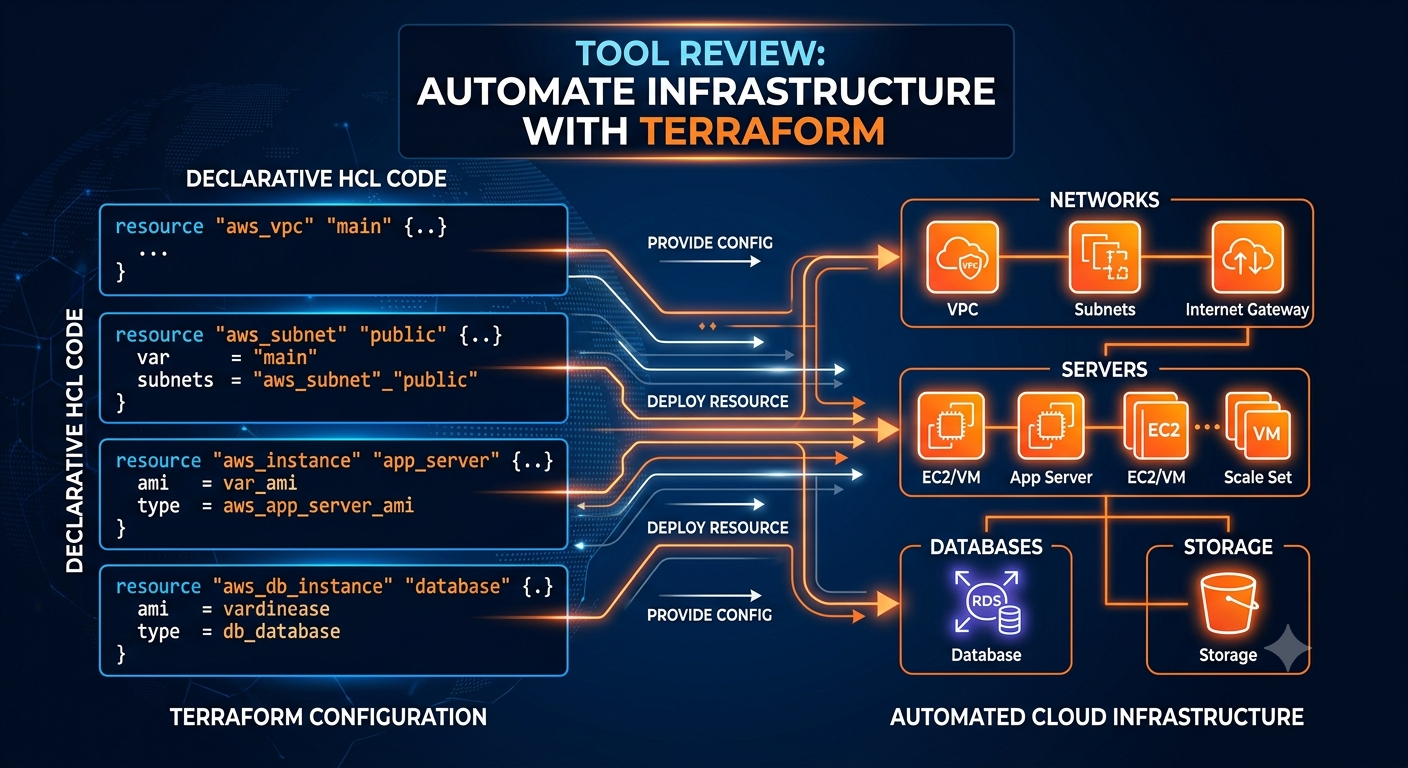
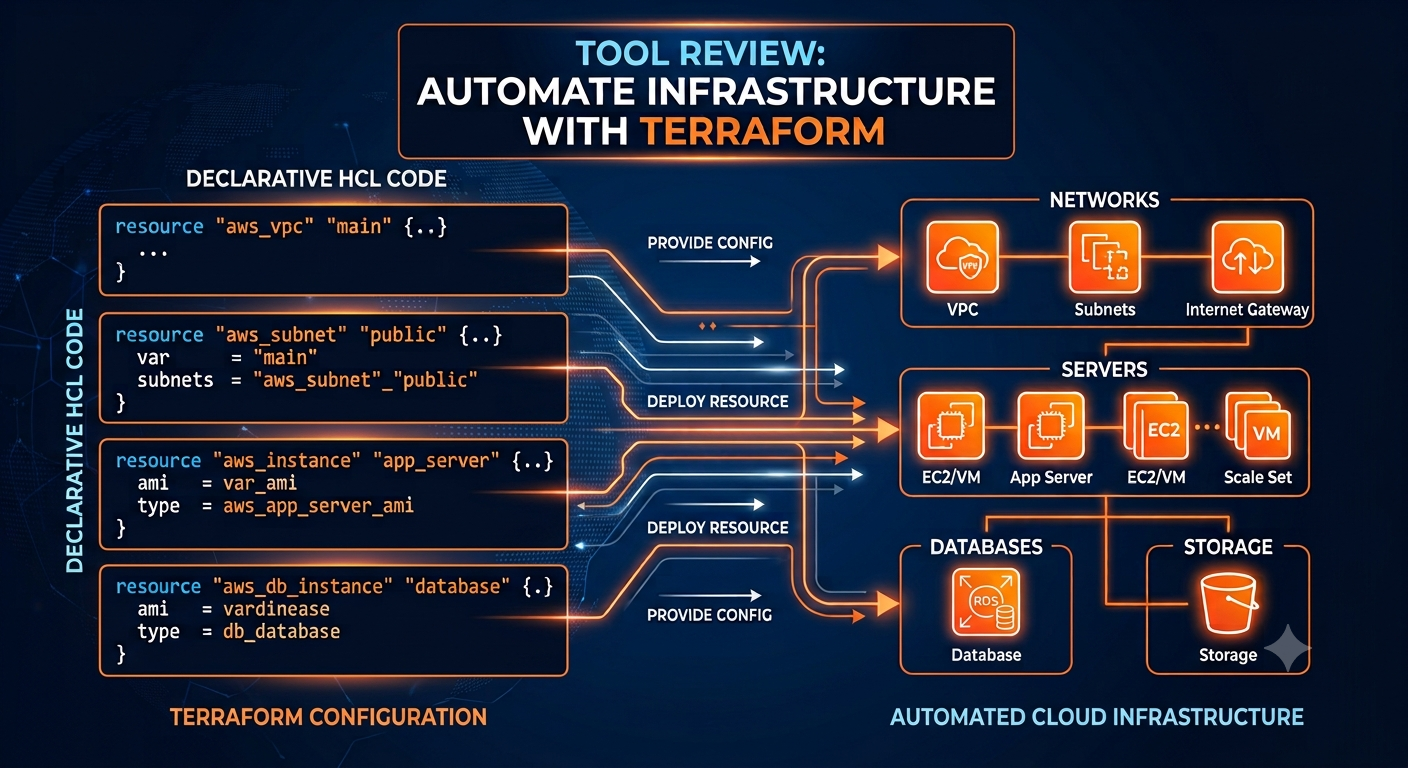
  • Terraform Reviewed: Master Infrastructure as Code for Multi-Cloud Reliability
    As cloud environments grow, maintaining consistency across development, staging, and production becomes a massive challenge. Terraform addresses this by allowing engineers to define, provision, and manage cloud infrastructure using declarative configuration files (HashiCorp Configuration Language / HCL).
    Here is a practical breakdown of how Terraform empowers modern DevOps workflows:


    1. Declarative Infrastructure Definition
    Instead of writing step-by-step scripts detailing how to build a server, you define the desired end state.
    How it works: You describe the required resources (e.g., VPCs, EC2 instances, S3 buckets) in .tf files.
    Why it matters: Terraform automatically calculates dependencies, creates resource graphs, and figures out the optimal execution plan.


    2. Predictable Execution with terraform plan
    Never deploy changes blindly into production again.
    How it works: Running terraform plan compares your local HCL code against the real-world deployed resources stored in the Terraform State file.
    Why it matters: It displays an exact dry-run output of what will be added, modified, or destroyed before any actual infrastructure change occurs.


    3. Reusable Architecture with Modules
    Avoid repeating code across multiple environments.
    How it works: Package frequently used infrastructure configurations (like a hardened Kubernetes cluster setup) into self-contained modules.
    Why it matters: Promotes code reuse, enforces organizational security standards, and reduces configuration drift across dev/prod environments.


    4. Vendor-Agnostic Multi-Cloud Support
    Terraform uses modular plugins called Providers to interact with hundreds of cloud services, SaaS platforms, and Kubernetes APIs.
    Pro Tip: Keep your state file (terraform.tfstate) in a secure, remote backend (like AWS S3 with DynamoDB locking) to enable safe team collaboration and prevent concurrent runs.


    Key Takeaways
    Declarative power: Focus on defining the desired end state rather than writing fragile imperative automation scripts.
    Always run plan first: Dry runs prevent accidental deletions and help catch configuration drift early.
    Modularize early: Structure infrastructure as reusable modules to enforce consistency across environments.
    Secure state files: Treat state files as sensitive assets—always store them remotely with encryption and lock management enabled.


    CTA
    Ready to automate your infrastructure and build production-grade cloud environments?
    👉 Join our Cloud, DevOps & Open Source community today to access hands-on IaC labs, architecture guides, and peer support!
    Terraform Reviewed: Master Infrastructure as Code for Multi-Cloud Reliability As cloud environments grow, maintaining consistency across development, staging, and production becomes a massive challenge. Terraform addresses this by allowing engineers to define, provision, and manage cloud infrastructure using declarative configuration files (HashiCorp Configuration Language / HCL). Here is a practical breakdown of how Terraform empowers modern DevOps workflows: 1. Declarative Infrastructure Definition Instead of writing step-by-step scripts detailing how to build a server, you define the desired end state. How it works: You describe the required resources (e.g., VPCs, EC2 instances, S3 buckets) in .tf files. Why it matters: Terraform automatically calculates dependencies, creates resource graphs, and figures out the optimal execution plan. 2. Predictable Execution with terraform plan Never deploy changes blindly into production again. How it works: Running terraform plan compares your local HCL code against the real-world deployed resources stored in the Terraform State file. Why it matters: It displays an exact dry-run output of what will be added, modified, or destroyed before any actual infrastructure change occurs. 3. Reusable Architecture with Modules Avoid repeating code across multiple environments. How it works: Package frequently used infrastructure configurations (like a hardened Kubernetes cluster setup) into self-contained modules. Why it matters: Promotes code reuse, enforces organizational security standards, and reduces configuration drift across dev/prod environments. 4. Vendor-Agnostic Multi-Cloud Support Terraform uses modular plugins called Providers to interact with hundreds of cloud services, SaaS platforms, and Kubernetes APIs. Pro Tip: Keep your state file (terraform.tfstate) in a secure, remote backend (like AWS S3 with DynamoDB locking) to enable safe team collaboration and prevent concurrent runs. Key Takeaways Declarative power: Focus on defining the desired end state rather than writing fragile imperative automation scripts. Always run plan first: Dry runs prevent accidental deletions and help catch configuration drift early. Modularize early: Structure infrastructure as reusable modules to enforce consistency across environments. Secure state files: Treat state files as sensitive assets—always store them remotely with encryption and lock management enabled. CTA Ready to automate your infrastructure and build production-grade cloud environments? 👉 Join our Cloud, DevOps & Open Source community today to access hands-on IaC labs, architecture guides, and peer support!
    0 Yorumlar 0 hisse senetleri 791 Views 0 önizleme
  • 5 High-Impact Habits That Will Fast-Track Your Cloud & DevOps Career


    Navigating a career in Cloud & DevOps can feel overwhelming with the constant influx of new tools and framework updates. However, the foundational strategies that distinguish high-performing senior engineers from junior practitioners remain surprisingly consistent.
    Here are five practical habits to adopt if you want to accelerate your growth:


    1. Shift from "Tool Collector" to "Problem Solver"
    It’s easy to get caught up learning every hot new tool on the market. Instead, master the core underlying concepts: networking fundamentals, Linux administration, storage models, and system architecture. Tools like Terraform, Kubernetes, and Ansible are just implementations of these principles. When you understand why an architecture pattern exists, picking up a new tool takes days instead of months.


    2. Treat Everything as Code
    If you find yourself executing a manual configuration in a web console more than twice, stop and write a script or infrastructure-as-code (IaC) declaration. Adopting an Infrastructure as Code (IaC) and Configuration as Code mindset not only prevents human error and configuration drift, but it also creates a visible portfolio of your work in version control.


    3. Learn to Read Code, Not Just Write YAML
    While YAML and HCL form the backbone of modern DevOps tooling, true senior-level impact happens when you can debug application code. Familiarize yourself with at least one major application language (such as Go, Python, or Java). Understanding how developers write, compile, and execute their software allows you to build better CI/CD pipelines, troubleshoot deployment failures faster, and earn the respect of development teams.


    4. Build with "Day 2 Operations" in Mind
    Anyone can deploy a basic container cluster; top-tier engineers design systems that survive real-world production. Always ask yourself:
    How will we monitor and log this service?
    What happens when a node fails?
    How do we handle disaster recovery, backups, and security patching?
    Designing for observability, resilience, and security from day one sets you apart from engineers who only focus on getting initial deployments live.


    5. Document Your Architecture and Impact
    Your technical achievements lose value if no one else can understand or build upon them. Get comfortable writing clear architectural design docs, post-mortems, and runbooks. More importantly, measure the impact of your work in business terms—such as reducing deployment times by 40%, cutting cloud costs, or eliminating downtime.


    Key Takeaways
    Focus on Fundamentals: Prioritize networking, OS internals, and architecture over chasing every new tool syntax.
    Automate Aggressively: If it’s repeatable, convert it into version-controlled code.
    Bridge the Dev/Ops Gap: Learn application debugging to build smoother pipelines and collaborate better with developers.
    Design for Resilience: Always account for monitoring, security, and failure modes before going live.
    Quantify Your Value: Document your solutions and measure their business impact to showcase senior leadership potential.


    CTA
    Looking to level up your cloud journey with hands-on guides, real-world architecture breakdowns, and a supportive engineering community?
    👉 [Join Cloud, DevOps & Open Source with Techawks] to connect with fellow engineers and accelerate your career!
    5 High-Impact Habits That Will Fast-Track Your Cloud & DevOps Career Navigating a career in Cloud & DevOps can feel overwhelming with the constant influx of new tools and framework updates. However, the foundational strategies that distinguish high-performing senior engineers from junior practitioners remain surprisingly consistent. Here are five practical habits to adopt if you want to accelerate your growth: 1. Shift from "Tool Collector" to "Problem Solver" It’s easy to get caught up learning every hot new tool on the market. Instead, master the core underlying concepts: networking fundamentals, Linux administration, storage models, and system architecture. Tools like Terraform, Kubernetes, and Ansible are just implementations of these principles. When you understand why an architecture pattern exists, picking up a new tool takes days instead of months. 2. Treat Everything as Code If you find yourself executing a manual configuration in a web console more than twice, stop and write a script or infrastructure-as-code (IaC) declaration. Adopting an Infrastructure as Code (IaC) and Configuration as Code mindset not only prevents human error and configuration drift, but it also creates a visible portfolio of your work in version control. 3. Learn to Read Code, Not Just Write YAML While YAML and HCL form the backbone of modern DevOps tooling, true senior-level impact happens when you can debug application code. Familiarize yourself with at least one major application language (such as Go, Python, or Java). Understanding how developers write, compile, and execute their software allows you to build better CI/CD pipelines, troubleshoot deployment failures faster, and earn the respect of development teams. 4. Build with "Day 2 Operations" in Mind Anyone can deploy a basic container cluster; top-tier engineers design systems that survive real-world production. Always ask yourself: How will we monitor and log this service? What happens when a node fails? How do we handle disaster recovery, backups, and security patching? Designing for observability, resilience, and security from day one sets you apart from engineers who only focus on getting initial deployments live. 5. Document Your Architecture and Impact Your technical achievements lose value if no one else can understand or build upon them. Get comfortable writing clear architectural design docs, post-mortems, and runbooks. More importantly, measure the impact of your work in business terms—such as reducing deployment times by 40%, cutting cloud costs, or eliminating downtime. Key Takeaways Focus on Fundamentals: Prioritize networking, OS internals, and architecture over chasing every new tool syntax. Automate Aggressively: If it’s repeatable, convert it into version-controlled code. Bridge the Dev/Ops Gap: Learn application debugging to build smoother pipelines and collaborate better with developers. Design for Resilience: Always account for monitoring, security, and failure modes before going live. Quantify Your Value: Document your solutions and measure their business impact to showcase senior leadership potential. CTA Looking to level up your cloud journey with hands-on guides, real-world architecture breakdowns, and a supportive engineering community? 👉 [Join Cloud, DevOps & Open Source with Techawks] to connect with fellow engineers and accelerate your career!
    0 Yorumlar 0 hisse senetleri 953 Views 0 önizleme
  • Kubernetes Deployment vs. StatefulSet: Which Do You Use for Databases?


    The Big Question:
    When running a stateful application—like PostgreSQL, MySQL, or MongoDB—on Kubernetes, which controller should you use to manage your pods?


    🗳️ POLL:
    How do you deploy databases in your Kubernetes cluster?
    🔴 A) StatefulSet (Proper identity & persistent storage mapping)
    🔵 B) Deployment with PVC attached (Quick & risky)
    🟡 C) Managed Database Service outside K8s (RDS, Cloud SQL, etc.)
    🟢 D) Custom Operator (e.g., CloudNativePG, Zalando)


    💡 The Practical Breakdown
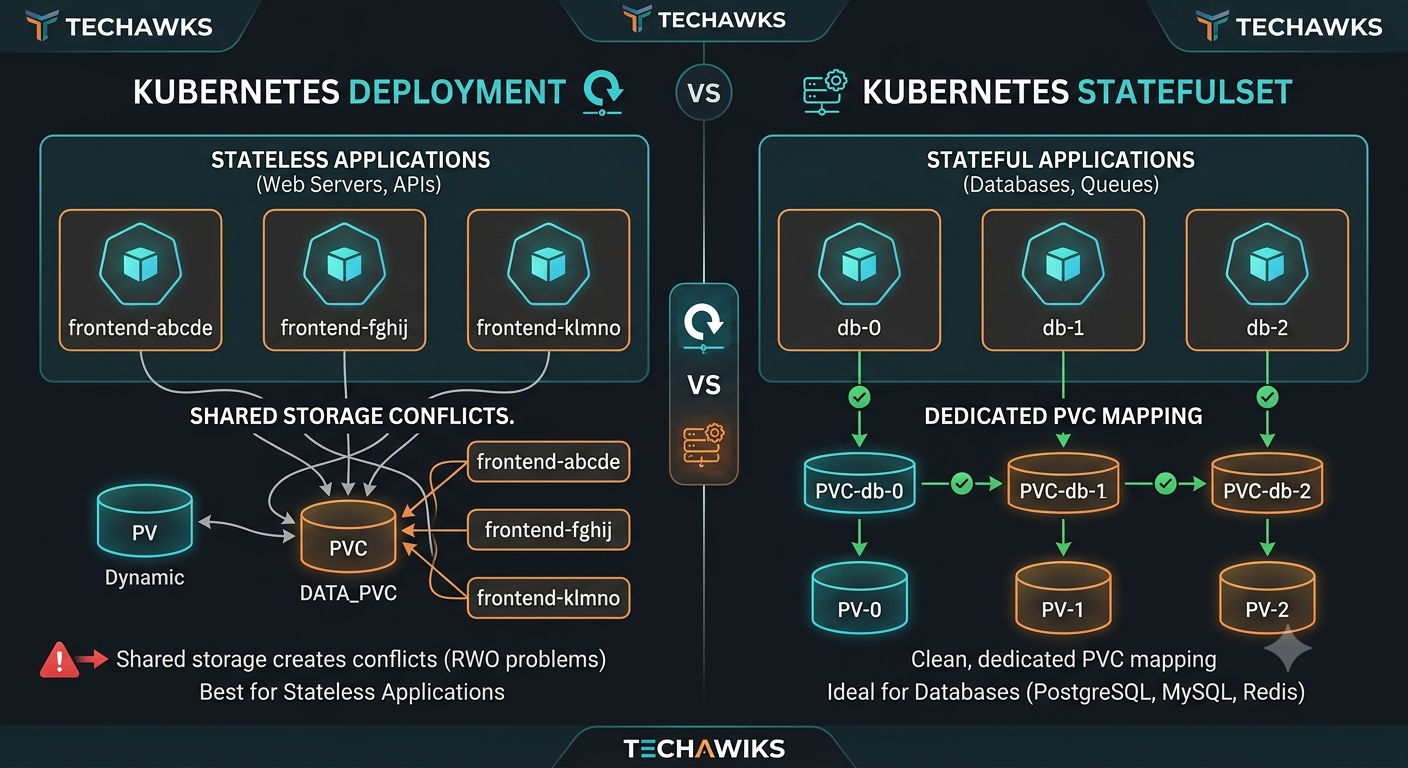
    Why Deployment Fails for Databases:
    Pods are stateless and interchangeable: A Deployment treats pods like cattle. If a pod crashes, K8s replaces it with a completely random host name and dynamic identity.
    Storage conflicts: Attaching a ReadWriteOnce Persistent Volume (PV) to a standard Deployment can lead to locking issues during rolling updates, as two pods attempt to mount the same volume simultaneously.


    Why StatefulSet is Built for State:
    Stable Network IDs: Pods get deterministic names (e.g., db-0, db-1), which is crucial for master-replica clustering.
    Ordered Deployment & Scaling: Pods are created, updated, and deleted sequentially ($0 \to 1 \to 2$).
    Dedicated Persistent Volume Claim (PVC) per Pod: Each replica maintains its own persistent storage binding, preserving data even if the pod restarts


    Key Takeaways
    Stateless = Deployments: Web servers, APIs, microservices.
    Stateful = StatefulSets or Operators: Databases, Redis clusters, Kafka nodes.
    Best Practice: For production databases, leverage a dedicated Kubernetes Operator (Option D) on top of StatefulSets to handle automated failover, backups, and point-in-time recovery seamlessly.


    CTA
    🚀 Want to master production-grade Kubernetes architecture, CI/CD pipelines, and cloud-native practices?
    👉 Join Cloud, DevOps & Open Source to level up your engineering skills with hands-on labs and expert-led discussions!.
    Kubernetes Deployment vs. StatefulSet: Which Do You Use for Databases? The Big Question: When running a stateful application—like PostgreSQL, MySQL, or MongoDB—on Kubernetes, which controller should you use to manage your pods? 🗳️ POLL: How do you deploy databases in your Kubernetes cluster? 🔴 A) StatefulSet (Proper identity & persistent storage mapping) 🔵 B) Deployment with PVC attached (Quick & risky) 🟡 C) Managed Database Service outside K8s (RDS, Cloud SQL, etc.) 🟢 D) Custom Operator (e.g., CloudNativePG, Zalando) 💡 The Practical Breakdown Why Deployment Fails for Databases: Pods are stateless and interchangeable: A Deployment treats pods like cattle. If a pod crashes, K8s replaces it with a completely random host name and dynamic identity. Storage conflicts: Attaching a ReadWriteOnce Persistent Volume (PV) to a standard Deployment can lead to locking issues during rolling updates, as two pods attempt to mount the same volume simultaneously. Why StatefulSet is Built for State: Stable Network IDs: Pods get deterministic names (e.g., db-0, db-1), which is crucial for master-replica clustering. Ordered Deployment & Scaling: Pods are created, updated, and deleted sequentially ($0 \to 1 \to 2$). Dedicated Persistent Volume Claim (PVC) per Pod: Each replica maintains its own persistent storage binding, preserving data even if the pod restarts Key Takeaways Stateless = Deployments: Web servers, APIs, microservices. Stateful = StatefulSets or Operators: Databases, Redis clusters, Kafka nodes. Best Practice: For production databases, leverage a dedicated Kubernetes Operator (Option D) on top of StatefulSets to handle automated failover, backups, and point-in-time recovery seamlessly. CTA 🚀 Want to master production-grade Kubernetes architecture, CI/CD pipelines, and cloud-native practices? 👉 Join Cloud, DevOps & Open Source to level up your engineering skills with hands-on labs and expert-led discussions!.
    0 Yorumlar 0 hisse senetleri 698 Views 0 önizleme